
A booking confirmation email is the message that proves a reservation exists, tells the customer exactly what they booked, and gives them a way to change or cancel it if something comes up. It works because it does one job well instead of ten jobs poorly. Send it the moment the booking happens, not an hour later.
Three things matter more than anything else:
- Send it instantly. The confirmation should hit the inbox within seconds of the booking, not at the end of a batch job.
- Include the core fields. Reference number, date, time, location, and payment status, every time, in the same order.
- Give a clear way to make changes. A reschedule or cancel link removes almost all the "did this actually go through?" messages.
Here's the bare minimum a confirmation needs:
- Booking reference number
- Date and time (with time zone if it's not obvious)
- Location or access link
- Payment status (paid, deposit held, balance due)
- A contact or reschedule option
Two subject lines that work better than "Thank you for your booking":
- "Booking confirmed: Tuesday, March 17 at 2:00 PM"
- "Your appointment is confirmed — ref #4821"
Hi Sarah, your appointment with Riverside Plumbing is confirmed for Tuesday, March 17 at 2:00 PM at 14 Oak Street. Reference #4821. A €50 deposit has been received; the balance of €120 is due on completion. Need to change anything? [Reschedule here].
Key Takeaways
The most effective booking confirmation email sends instantly, states the core booking details plainly, and gives the customer a clear way to make changes.
| Point | Details |
|---|---|
| Send immediately | Trigger the confirmation the moment a booking or payment completes, not in a batch later. |
| Include the core fields | Reference number, date, time, location, and payment status belong in every confirmation. |
| Add a calendar file | An .ics attachment or add-to-calendar link cuts no-shows by blocking the time automatically. |
| Automate reminders | Layer 48 hour and 24 hour reminders on top of the confirmation for time-sensitive bookings. |
| Automate with QueryTrade | Trades businesses can trigger confirmations and collect deposits via Stripe automatically once a job is scheduled. |
Table of Contents
- What Is a Booking Confirmation Email, and Why Does It Matter?
- What Should a Booking Confirmation Email Include?
- Booking Confirmation Email Templates for Every Type of Booking
- When Should You Send a Booking Confirmation and Reminders?
- How Do You Format a Confirmation So It Actually Gets Read?
- What Payment and Cancellation Details Belong in a Confirmation?
- How Do You Write a Booking Confirmation Email From Scratch?
- How Does a Trades Business Automate Booking Confirmations?
- What Do Real Bookings Teach You About Confirmations?
- Automate Your Booking Confirmations With QueryTrade
- Sources
What Is a Booking Confirmation Email, and Why Does It Matter?
A booking confirmation email is a transactional message, not a marketing one. That distinction shapes everything about how it should be written, formatted, and sent. Transactional emails exist to complete a task the customer already started (booking a table, paying a deposit, reserving a slot). Marketing emails exist to start a new action (buy this, sign up for that). Mixing the two confuses the customer and can even change how your email provider and spam filters treat the message.
| Transactional | Marketing | |
|---|---|---|
| Purpose | Confirms an action already taken | Prompts a new action |
| Content | Booking details, reference, next steps | Offers, promotions, upsells |
| Timing | Sent immediately, tied to an event | Sent on a schedule or campaign |
| Expectation | Customer expects and needs it | Customer opts in but may ignore it |
Timing is not a minor detail. Industry best practices recommend triggering the confirmation the instant a booking completes, because that speed reassures customers and cuts down on support inquiries asking "did my booking go through?" A customer who books a hotel room at 11 p.m. and gets nothing for six hours will often call, message, or rebook elsewhere out of doubt.
Confirmations also reduce three costly problems at once:
- No-shows drop because the customer has a written reminder with the exact time and place.
- Disputes shrink because both sides can point to the same document.
- Support tickets fall because half of "what did I book?" questions never get asked.
What Should a Booking Confirmation Email Include?
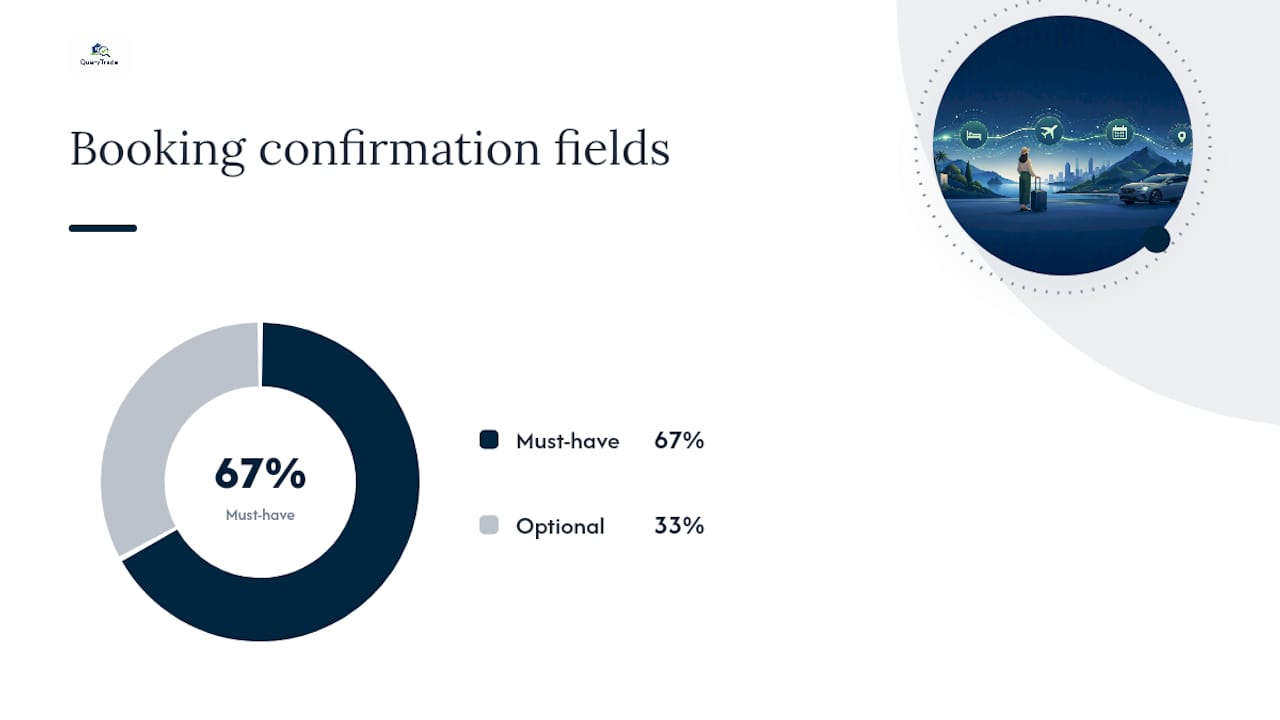
Every confirmation needs a set of must-have fields and a shorter list of optional extras that make the experience smoother. A solid booking confirmation template pulls together the booking reference, the customer's name, the service or room booked, the date and time, the location, a payment summary, and clear next steps. Leave any of those out and the customer has to email you back to ask.
Must-have fields:
- Booking status (confirmed, pending, awaiting payment)
- Booking reference number
- Customer name
- Date and time
- Location, access instructions, or a video call link
- Payment summary (amount paid, amount due, method)
- Contact info and a reschedule or cancel option
Optional but recommended:
- Add-to-calendar button or attached .ics file
- Directions, parking notes, or building access codes
- What to bring or how to prepare
- Link to an FAQ page
- Attached ticket, receipt, or voucher
A few micro-examples of how these fields sound in practice:
- Status: "Your booking is confirmed." Or, if payment hasn't cleared: "Your booking is held pending payment, due by Friday."
- Reference: "Confirmation #BK7734"
- Location: "12 Harbour Road, Unit 4 — ring the buzzer marked 'Studio'"
- Payment: "Deposit received: $40.00. Balance due at appointment: $85.00"
Wording pending or held bookings matters more than most people think. "Thanks for your request" sounds like nothing has happened yet, which makes anxious customers assume they lost the slot. "Your booking is held for 24 hours pending payment" tells them exactly where they stand and what happens next.
| Field | Must-have or optional | Why it matters |
|---|---|---|
| Booking reference | Must-have | Lets both sides find the record instantly in support conversations |
| Date, time, location | Must-have | Prevents the single most common source of no-shows |
| Payment summary | Must-have | Avoids disputes over what was paid and what's owed |
| Reschedule/cancel link | Must-have | Cuts inbound calls and emails asking how to make changes |
| Add-to-calendar (.ics) | Optional | Blocks the time automatically, lowering no-show rates |
| Directions/parking | Optional | Reduces late arrivals for physical locations |
Booking Confirmation Email Templates for Every Type of Booking
Different bookings need different tones. A dental appointment confirmation should sound brisk and clear. A boutique hotel confirmation can afford a little warmth. Here's how the core message shifts depending on what's being booked.
Appointment confirmation email (service business):
Hi James, your appointment with Clearview Optometry is confirmed for Thursday, April 9 at 10:30 AM. Location: 22 Main Street, Suite 3. Reference: APT2291. Need to reschedule? [Click here] or reply to this email.
Table/reservation confirmation:
Your table for 4 at Bellwood Kitchen is confirmed for Saturday, May 2 at 7:00 PM. Reservation #R5502. We hold tables for 15 minutes past booking time. To cancel or change your party size, [manage your reservation].
Hotel/stay confirmation:
Booking confirmed: 3 nights at Harborview Inn, checking in June 14 and out June 17. Confirmation #HV88231. Room type: Queen Deluxe. Total paid: $432.00. [View or change your stay].
Tour/event confirmation:
You're confirmed for the Sunset Bay Kayak Tour on July 8 at 5:30 PM. Ticket #TR4471, 2 guests. Please arrive 15 minutes early. What to bring: swimwear, water shoes, sunscreen..
Rental/pickup confirmation:
Your rental is confirmed: Compact SUV, pickup July 20 at 9:00 AM from Downtown Depot. Booking #RN9012. Total due at pickup: $210.00. Bring your license and the card used to book. [Manage booking].
Subject-line bank, organized by what the message is actually doing:
- Confirmation: "Booking confirmed for [date]"
- Receipt: "Payment received — booking #4821"
- Awaiting payment: "Action needed: complete payment to confirm your booking"
- Change made: "Your booking has been updated"
A full example with a calendar attachment looks almost identical to the templates above, with one addition: a line reading "" linked to a hosted .ics file, or the file attached directly to the email. Most email clients render an .ics attachment as a clickable "add to calendar" prompt automatically, so you don't need custom design work, just a correctly formatted file with the event name, time zone, location, and reference number embedded in it.
Tone and length shift by category. Appointment and rental confirmations should stay under 100 words; the customer wants facts, not friendliness. Hotel and tour confirmations can run longer and warmer, since they're part of a bigger experience the customer is looking forward to.
When Should You Send a Booking Confirmation and Reminders?
Send the confirmation the moment the booking completes, as explained in how AI automation can transform appointment bookings for small businesses. No exceptions, no batching. A delay of even 30 minutes is long enough for a customer to wonder if the payment failed or the system glitched, and that uncertainty is what drives them to call your business instead of trusting the email to show up.
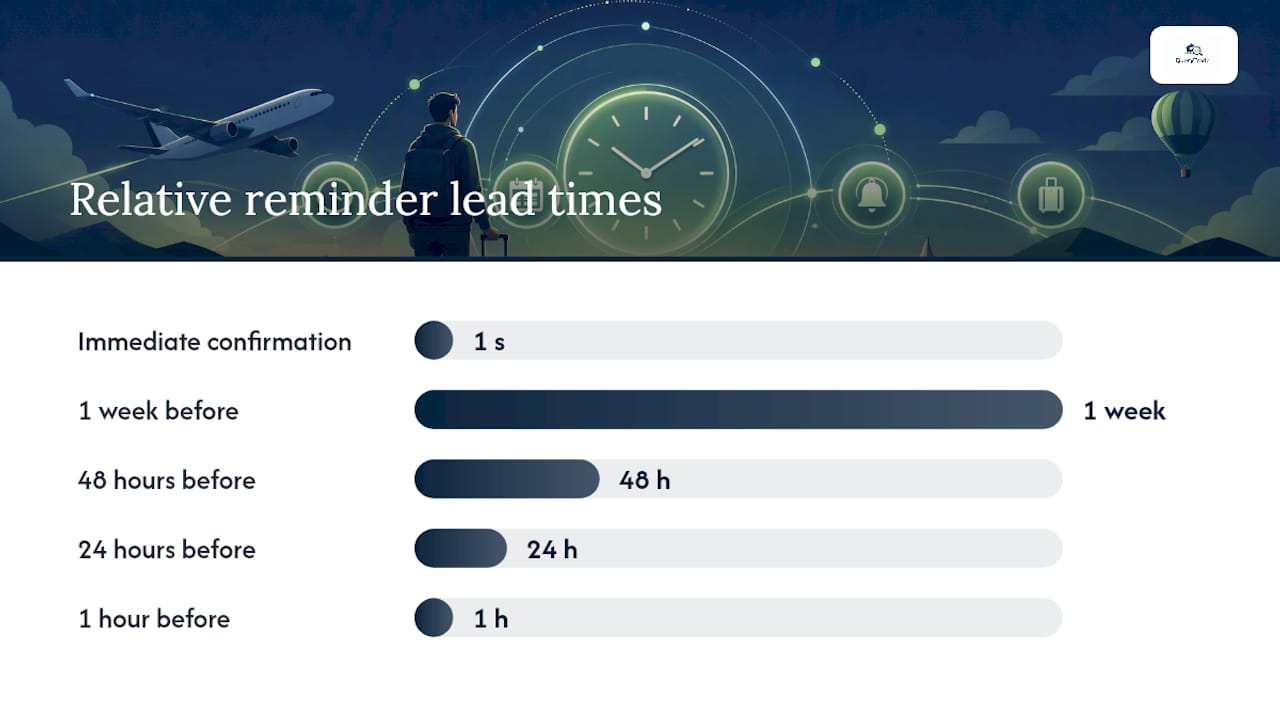
From there, a reminder cadence keeps the booking top of mind without becoming annoying:
- Immediate confirmation — sent the second the booking or payment completes.
- One week before — a light reminder for anything booked far in advance (hotel stays, tours, large events).
- 48 hours before — a practical nudge with prep info (what to bring, directions).
- 24 hours before — the last chance to reschedule without penalty for most service businesses.
- One hour before — a short SMS nudge for same-day appointments or time-sensitive events.
Not every booking type needs all five. A haircut booked two days out doesn't need a one-week reminder. A three-night hotel stay booked months ahead absolutely does.
Channel choice matters as much as timing:
- Email carries the full detail: reference numbers, payment summaries, policy links.
- SMS works best for short, time-sensitive nudges ("Your appointment is in 1 hour at 22 Main St").
- Push notifications suit app-based bookings where the customer already has your app installed.
The automation flow behind all of this is straightforward: a booking trigger fires, the confirmation sends immediately, one or more scheduled reminders follow based on the lead time, and a follow-up message goes out after the appointment or stay. Automated booking systems handle this whole sequence without manual intervention, which matters most when volume climbs and nobody has time to send confirmations by hand.
Build in exception handling from day one. If a payment fails after the confirmation trigger fires, the system needs to catch that and send a correction, not leave a customer thinking they're booked when they're not. The same goes for reschedules: a changed date should regenerate the confirmation and cancel the old reminder sequence, not stack a second one on top.
Pro Tip: Set your 24 hour reminder to double as a soft cancellation deadline. Mentioning "changes made after this point may not be refundable" in that message does more to reduce last minute cancellations than any policy buried in your terms page.
How Do You Format a Confirmation So It Actually Gets Read?
Good confirmation copy puts the details first and the branding second. Confirmation emails should prioritize operational clarity over marketing polish, meaning a customer should be able to find the time, location, and contact details in a five-second scan without hunting past a hero image or a promotional banner.
A few formatting rules that hold up across every booking type:
- Put the date, time, and reference number above the fold, before anything else.
- Skip heavy promotional content entirely. A confirmation is not the place for "check out our new spring menu."
- Design single-column and mobile-first. Most confirmations get opened on a phone within minutes of booking.
- Give one clear call-to-action for managing or canceling the booking, not three competing buttons.
The technical side matters just as much as the writing:
- Keep the sender name and address consistent across every confirmation so customers recognize it and don't mark it as spam.
- Set up SPF, DKIM, and DMARC records for your sending domain so mail providers trust the message and route it to the inbox, not the spam folder.
- Send transactional emails from a dedicated subdomain (like
notifications.yourbusiness.com) separate from your marketing sends, so a bulk promotional email getting flagged doesn't drag your confirmations down with it. - Keep transactional and marketing streams on separate sending infrastructure where your email provider allows it.
Skipping the calendar attachment is one of the most common oversights in booking systems, and it's an easy fix. Including an .ics file or add-to-calendar link automates the one step customers are most likely to forget: actually putting the appointment in their own calendar. A blocked calendar slot is a far stronger no-show deterrent than a reminder email that arrives after they've already made other plans.
Common deliverability mistakes worth catching before they cost you a booking:
- Image-only emails. If the whole confirmation is one image, screen readers and some spam filters choke on it, and text can't be copied for reference.
- Mixed or broken HTML/CSS. Confirmations rendered differently across Gmail, Outlook, and Apple Mail lose critical details in some clients.
- Poorly formed links. A reschedule link that leads to a 404 page turns a five-second fix into a phone call.
What Payment and Cancellation Details Belong in a Confirmation?
A confirmation should state plainly what's been paid, what's owed, and by when, in language a customer can understand without calling anyone. Vague phrasing like "payment processing" leaves too much room for confusion.
A few sample lines that do the job cleanly:
- "Payment received in full: $340.00."
- "Deposit paid: $50.00. Balance of $190.00 due on the day of service."
- "Payment method on file: Visa ending in 4471."
- "Full refund available up to 48 hours before your appointment. Cancellations within 48 hours are non-refundable. [View full policy]."
Keep cancellation terms in plain language in the email itself, then link out to the full policy for anyone who wants the fine print. Nobody wants to read three paragraphs of legal terms in a confirmation email, but everyone wants to know if they'll get their money back.
A confirmation that matches your booking database word for word becomes strong evidence if a dispute ever comes up. Consistency between the email and the system of record is what gives a confirmation its weight as a written record.
That's also the argument for keeping confirmations focused. The moment you load a confirmation with unrelated promotional content, it starts to look less like a transactional record and more like a marketing message, which can affect both how it's classified under email compliance rules and how much weight it carries if a customer disputes a charge.
One firm rule: never put full card numbers, CVV codes, or other sensitive payment data in a confirmation email. Email is not a secure channel for that kind of detail. Reference the last four digits of a card at most, and direct customers to a secure payment portal for anything requiring full account access.
How Do You Write a Booking Confirmation Email From Scratch?
Building your own confirmation doesn't take long once you know the shape it needs to take. Six steps get you there:
- Gather the booking fields. Reference number, customer name, service, date, time, location, and payment status, pulled straight from your booking system.
- Write the subject line first. Lead with the outcome: "Booking confirmed" beats "Thank you for booking" because it answers the customer's first question before they even open the email.
- Write a one-line summary for the first scan. This is the sentence a customer reads in their notification preview, so it needs the date, time, and status in one breath.
- Add every required field, formatted so the eye can jump straight to what it needs. Bold or bullet the reference number, date, and payment status.
- Include a manage or cancel call-to-action. One button, one link, no ambiguity about where to click.
- Test and send. Check every link, confirm the calendar file opens correctly, and read it once as if you were the customer.
A quick prompt you can adapt in your own email editor or CMS: "Write a confirmation for a [booking type] on [date] at [time] at [location], including reference [number], payment status [status], and a link to [manage/cancel URL]." Fill in the brackets and you have a working draft in under a minute.
Before anything goes live, run through this testing checklist:
- Every link (manage, cancel, calendar) opens to the correct page.
- The calendar file opens correctly in Google Calendar, Outlook, and Apple Calendar.
- Time zones display correctly for customers in different regions.
- Currency formatting matches the customer's expected format ($ vs € vs £).
- Test sends land correctly in Gmail, Outlook, and at least one other major provider.
If you're using personalization tokens like {{customer_name}} or {{booking_date}}, always set fallback text. A confirmation that reads "Hi {{customer_name}}, your booking is confirmed" because a token failed to populate looks broken and unprofessional, even if every other detail is correct.
How Does a Trades Business Automate Booking Confirmations?
Tradespeople juggling calls, texts, and half-finished paper quotes rarely have time to write a custom confirmation for every job. That's the exact gap QueryTrade was built to close for plumbers, electricians, carpenters, and painters working across Ireland and the UK.
Once a customer submits a job request through a QueryTrade intake link, the platform tracks it through the pipeline (New, Contacted, Quoted, Scheduled, Completed) and can trigger an automatic confirmation the moment a job is scheduled and a deposit is collected through Stripe. No manual follow-up email required.
A generated confirmation from a scheduled job might read:
Hi Michael, your kitchen extension quote with Doyle Carpentry is confirmed for Monday, September 14. A deposit has been received via Stripe. Balance is due on completion. Questions? Reply to this email or call us directly.
Benefits tradespeople report from automating this step:
- Fewer no-shows, because the deposit itself acts as a commitment device.
- Clearer scheduling, since every confirmed job carries the same reference structure.
- Faster deposit collection, with payment tied directly to the confirmation trigger.
- Fewer support calls asking "is my job still booked?"
Pro Tip: Sector-specific templates matter more than generic ones. A painter's confirmation should mention surface prep and access details; a carpenter's should mention measurements and material delivery windows. QueryTrade's built-in templates already account for those differences, so setup takes minutes rather than hours.
What Do Real Bookings Teach You About Confirmations?
Three lessons come up again and again from people who actually run booking-heavy businesses, and none of them are complicated.
First, speed beats polish. A plain confirmation sent in the first ten seconds after booking does more good than a beautifully designed one sent an hour later. Customers don't remember the template design; they remember whether they got confirmation before they started worrying.
Second, clarity beats cleverness. "Confirmed for Tuesday at 2 PM" outperforms any attempt at a witty subject line, every time. The customer isn't looking for personality in this message. They're looking for proof.
Third, calendar sync is the detail people skip and later regret. Adding an .ics link takes a few minutes to set up once and pays off on every single booking after that, because it removes the one manual step (actually writing the appointment down) that causes the most no-shows.
Pro Tip: Label the subject line "Confirmed" rather than "Thanks for booking." Customers scanning a crowded inbox during a busy week are looking for status words, not gratitude. "Confirmed" is the word their eye catches.
There's room for a small, tasteful mention of something else, like a related service or a loyalty note, without turning the confirmation into a sales pitch. One short line at the very bottom, after all the booking details, keeps the message transactional while still creating a light touchpoint. Anything more than that risks tipping the whole email into marketing territory, which changes how it's classified and how customers read it.
Automate Your Booking Confirmations With QueryTrade
Writing confirmations by hand works fine until job volume climbs, and then it becomes the task that gets skipped on a busy Tuesday, right when a customer needed it most. QueryTrade gives trades businesses in Ireland and the UK a way to send confirmations automatically the moment a job moves to "Scheduled" in the pipeline, without touching a single line of code or hiring anyone to manage it.
The setup takes under five minutes: create your customer intake link, customize a confirmation template for your trade, connect Stripe for deposit collection, and sync your calendar. From there, every confirmed job triggers its own confirmation automatically, complete with the deposit amount, balance due, and a reschedule option, without you lifting a finger after the first setup.
A quick example of what a generated confirmation looks like for a painting job: "Hi Emma, your exterior painting job with Kelly & Sons is confirmed for October 3. A deposit has been received. Balance is due on completion." That's the whole message, built from the job details already sitting in the pipeline.
Explore the full feature set, including the job pipeline and auto-reply templates, or start a free 30-day trial to see how automated confirmations change the number of no-shows on your calendar within the first few weeks.
Sources
- Booking Confirmation Email Tips and Tricks | Mailchimp
- How to write the best appointment confirmation email (with examples) | Twilio
- Booking Confirmation Email Templates: What to Include
- Confirmation Message Samples: Appointments, Orders, and More | LegalClarity
- An overview of booking confirmations | Calendly community