
Ask for the deposit the moment the client says yes, and send the payment link before you hang up or leave the driveway. That single habit, more than any pricing strategy or contract clause, determines whether you get paid on time or spend your evenings chasing invoices.
Here's the fast version: when a quote is approved, confirm who signed off, set the deposit at a percentage tied to job size and materials cost, and text or email a payment link immediately. Waiting even a day gives the client time to compare quotes, get cold feet, or simply forget.
Before you request anything, nail down three things:
- Approval — who actually said yes to the quote (verbal, text, or signed estimate)?
- Amount — what percentage or flat fee matches this job's size and material risk?
- Method — which payment channel gets money moving fastest for this customer?
Pro Tip: Keep a payment link generator open on your phone before every client call. If it takes more than 30 seconds to create and send, you'll lose the moment and the deposit.
Pairing an instant payment link with a job-management tool that marks the booking "paid" and "scheduled" the second the money lands removes almost all the friction tradespeople associate with chasing deposits. Query Trade was built around exactly that handoff, connecting the intake form to Stripe so the deposit and the booking update at the same time.
Key Takeaways
Collecting job deposits reliably comes down to asking immediately after approval, sending a payment link within seconds, and letting your job tracker update itself once the money lands.
| Point | Details |
|---|---|
| Ask right after approval | Request the deposit the moment the client agrees to the quote, not later. |
| Set a sliding-scale percentage | Charge higher percentages on small jobs, lower percentages on large ones. |
| Send a payment link instantly | Use SMS or email links so the client can pay in under a minute. |
| Record it as a two-step invoice | Issue a deposit invoice first, then subtract it on the final invoice. |
| Document everything | Keep receipts, transaction IDs, and signed terms attached to the job. |
| Automate with Query Trade | Query Trade pairs Stripe payment links with job tracking so deposits and scheduling update together. |
Table of Contents
- What Is a Job Deposit and Why Do Tradespeople Collect One?
- How Much Should You Charge for a Job Deposit?
- What's the Best Way to Collect a Job Deposit?
- How Do You Record a Deposit on an Invoice?
- What Should Your Deposit Terms and Cancellation Policy Say?
- What's a Fast Workflow for Collecting a Deposit?
- What Tools Do You Need to Collect Deposits Reliably?
- Why Consistent Deposit Habits Matter More Than the Policy Itself
- How Query Trade Simplifies Deposit Collection From Enquiry to Invoice
- Where to Learn More About Collecting Deposits
- Frequently Asked Questions
- Sources
What Is a Job Deposit and Why Do Tradespeople Collect One?
A job deposit is a partial payment collected before work starts, applied against the total invoice once the job is complete. It's not a fee for showing up. It's a portion of the final price, paid early.
Three practical reasons trades collect deposits:
- Schedule protection. A deposit turns a verbal "maybe" into a booked slot on your calendar, so you stop holding dates for people who ghost you.
- Materials funding. Custom cabinetry, ordered fixtures, and specialty tile often require nonrefundable purchases before you can start. A deposit covers that outlay so you're not floating the client's material costs.
- Commitment signal. Clients who pay something upfront cancel far less often than those who haven't put any money down.
The specifics shift by trade. A plumber ordering a custom vanity or specialty fixture typically collects enough to cover that part order outright. A carpenter building bespoke cabinetry might ask for a third up front simply because the lumber and hardware are non-returnable. A builder starting a multi-week renovation often splits the deposit from progress payments, collecting an initial sum to secure the crew's calendar before demolition day.
Whatever the trade, the deposit conversation works best framed as routine business, not a favor you're asking for. According to Zealous Growth's research on the deposit conversation, positioning the deposit as "how we hold your spot and order materials" and asking right after the client agrees to proceed increases acceptance and avoids awkward back-and-forth. Query Trade's intake form builds that framing into the booking step itself, so the deposit request arrives as a natural next click rather than a separate, uncomfortable ask.
How Much Should You Charge for a Job Deposit?
There's no single right percentage, but the size and material risk of the job should drive the number, not habit or guesswork.
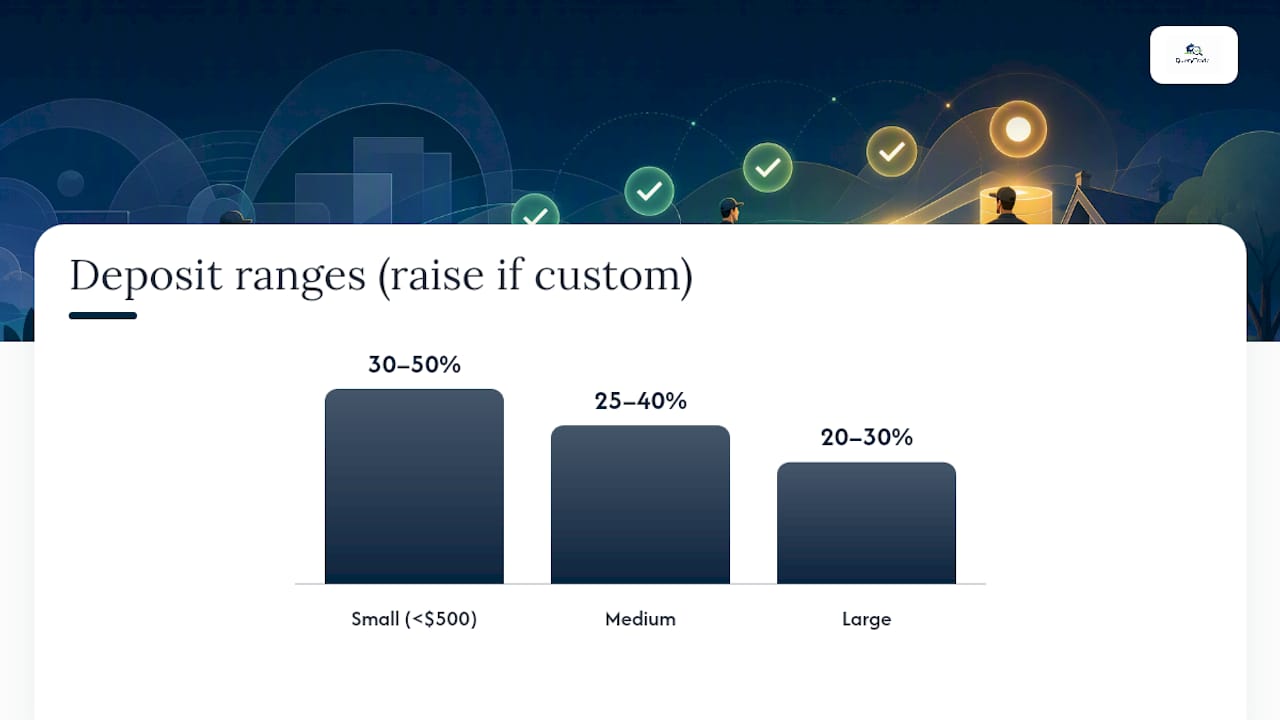
Smaller jobs generally need a higher percentage because the total risk is low but the proportional cost of a no-show is high relative to the job value. Larger jobs tend to use a lower percentage of a bigger number, which still covers real exposure without asking a client to hand over thousands before you've lifted a tool.
Three calculation methods work well in practice:
- Materials-based. Charge enough to cover whatever you have to buy before you can start, especially anything nonrefundable.
- Risk-based. Increase the percentage when the job involves custom orders, specialty finishes, or anything you can't resell if the client backs out.
- Value-based (sliding scale). Use a higher percentage on small jobs and a lower percentage on large ones, since a flat rate punishes big projects and undercollects on small ones.
| Job Size | Typical Deposit Range | Example Calculation |
|---|---|---|
| Small (under $500) | 30–50% | $1,200 kitchen faucet swap → $480 deposit (40%) |
| Medium (amount varies by job size) | 25–40% | $6,000 bathroom remodel → $1,800 deposit (30%) |
| Large (amount varies by job size) | 20–30% | $25,000 kitchen renovation → $6,250 deposit (25%) |
These ranges come from InvoiceFly's guide on collecting deposits for home service jobs, and they hold up well as a starting point, adjusted upward whenever a job includes custom or nonrefundable materials.
Pro Tip: For small, fast jobs under $500, skip percentages entirely and charge a flat booking fee instead, something like $50 to $100. Percentage math on a small ticket looks fussy to a client and isn't worth the friction.
Once you settle on a policy, the harder part is applying it consistently across every quote without recalculating by hand each time. Query Trade lets you store a default deposit rule and auto-apply it to new quotes, so the percentage or flat fee shows up automatically instead of depending on your remembering it mid-call.
What's the Best Way to Collect a Job Deposit?
Payment links win on speed almost every time, but they're not the only option, and the right choice depends on the job and the client in front of you.
According to Shuttle's guide to collecting deposits before starting work, payment links sent by SMS or email remain the fastest and most reliable method, since customers can pay in under a minute if you send the link immediately after confirming the booking. The window where a client might call a competitor closes the second they tap "pay."
Bank transfer and card terminals still have a place. A client uneasy about a text link might prefer reading digits over the phone or tapping a card reader in person. But every method other than payment links introduces delay, and delay is where deposits get lost.
Two message templates worth copying straight into your phone's notes app:
SMS: "Hi [Name], here's the link to secure your [job type] booking for [date]: [link]. Deposit covers materials and holds your slot."
Email subject line: "Your booking is confirmed, one quick step to lock it in"
Shuttle's research also notes that a branded checkout page, one showing your business name and logo rather than a generic third-party page, increases client trust and completion rates. Worth checking whether your payment provider supports that before you pick one.
Query Trade integrates directly with Stripe, so once a client accepts a quote, you can generate and send a payment link from the same screen where you're tracking the job, no separate app, no copy-pasting between systems.

How Do You Record a Deposit on an Invoice?
Get the paperwork wrong and you'll spend more time untangling your books than you saved by collecting the deposit in the first place.
The cleanest method, backed by SumUp's invoicing guidance, works in two stages:
- Issue a deposit invoice first. Label it clearly as "DEPOSIT INVOICE," include the job description, the deposit amount, the date, and your business details, exactly as you would on a standard invoice.
- Apply the deposit as a negative line on the final invoice. List the full job total, then subtract the deposit as a negative line item, so the client sees exactly what they already paid and what remains.
A simple final invoice layout looks like this:
- Kitchen renovation, full scope: $6,000
- Less deposit paid (Invoice #1042, March 3): −$1,800
- Balance due: $4,200
Stripe's own documentation on deposit invoices describes this two-invoice structure as a standard approach for requesting partial upfront payment, and it's one most accounting software and payment processors support natively.
For reconciliation, three steps keep your books clean:
- Save the receipt with its transaction ID the moment the deposit clears.
- Tag the payment against the specific job in your accounting system, not just as generic income.
- Note VAT or sales tax treatment at the time of invoicing, since deposits are usually taxed the same way as the final payment, but jurisdiction rules vary.
Tax treatment of deposits differs by country and sometimes by trade category, so check with an accountant if you're unsure how your jurisdiction treats prepayments.
Query Trade attaches the payment receipt directly to the job record the moment Stripe confirms it, so when tax season or a client dispute rolls around, you're not digging through email for a screenshot.
What Should Your Deposit Terms and Cancellation Policy Say?
Vague deposit terms cause more disputes than the deposit amount itself. Clients don't usually argue about paying a third upfront. They argue about what happens if the job changes or falls through.
Decide upfront whether your deposits are refundable or non-refundable, and be explicit about which applies and why:
- Refundable deposits work well for standard jobs where materials haven't been ordered yet and cancellation costs you little beyond lost time.
- Non-refundable deposits make sense once you've committed to custom materials, special orders, or blocked out multi-day crew time that can't easily be rebooked.
A short snippet you can paste into any quote or estimate:
When a dispute does come up, work through it in order:
- Confirm the payment actually cleared and pull the transaction ID.
- Check the signed estimate and deposit terms the client agreed to.
- Offer a refund or a rebooking option that matches what your terms actually say, not what feels fair in the moment.
- Escalate to a formal demand or small-claims process only if the client refuses a resolution that matches your documented terms.
One fairness note worth taking seriously: keep deposit terms proportionate to actual risk. A 50% non-refundable deposit on a same-day repair with no material cost is hard to defend if a client pushes back, and it's the kind of policy that generates bad reviews faster than it protects revenue.
Pro Tip: Store your deposit terms as a saved snippet in whatever quoting tool you use, so every estimate includes identical wording. Inconsistent terms between jobs are what actually cause disputes, not the deposit itself.
Query Trade keeps the original estimate text, the deposit terms the client agreed to, and the payment receipt all attached to the same job record, so if a disagreement ever surfaces, you can pull proof in seconds instead of searching three different apps.
What's a Fast Workflow for Collecting a Deposit?
Speed is the entire game here. The faster you can turn a verbal yes into a paid deposit, the fewer jobs slip away to a competitor who called back first.
- Confirm the quote verbally or by text. Get a clear yes from the person who has authority to approve spending on the job.
- Generate the payment link immediately. Do this before ending the call or leaving the driveway, ideally in under 30 seconds.
- Send the link by SMS or email. Use whichever channel the client responded on most recently.
- Verify payment clears. Check your payment dashboard or wait for the automated notification.
- Mark the job as scheduled. Update your calendar or job tracker the second the deposit lands, not at the end of the day.
- Order materials or notify the crew. Trigger any material orders or crew scheduling that depended on the deposit clearing.
- Follow up on the balance before the job starts. Send a reminder a day or two before the start date so there are no surprises at completion.
A quick phone script for collecting deposits mid-call: "Great, I'll text you a secure payment link right now for the deposit, it's $[amount] and it locks in your slot for [date]. You should get it in the next few seconds."
Shuttle's operational research is blunt about this: if creating and sending a link takes more than a couple of minutes, staff quietly stop doing it, and deposit collection rates drop across the board. The fix isn't willpower. It's automating link creation so it takes less effort than skipping the step.
Pro Tip: Set up a saved payment link template with your standard deposit amount pre-filled, so all you're editing is the client's name and job reference before hitting send.
This is precisely the workflow Query Trade automates end to end: the moment a client accepts a quote through your intake form, you generate a Stripe payment link from inside the job record, and once it's paid, the job status flips to "Scheduled" automatically, no separate spreadsheet update required.
What Tools Do You Need to Collect Deposits Reliably?
You don't need an elaborate setup. You need three things working together: a way to generate payment links fast, a checkout that doesn't scare off clients on their phones, and a job tracker that reflects payment status without manual updates.
The minimal checklist looks like this:
- A payment provider that issues links instantly. Stripe is the most widely documented option and integrates with most job-management software.
- A mobile-friendly checkout. Most clients will pay from their phone, often within seconds of receiving a text, so a checkout that loads slowly or looks generic costs you conversions.
- A job-management tool that tracks deposit status. Manually updating a spreadsheet every time a deposit clears is exactly the kind of friction that causes missed follow-ups.
The payoff of connecting these three pieces is concrete: instant notification when a deposit lands, a receipt automatically attached to the job, calendar slots that block themselves once a job is paid and scheduled, and a straightforward refund path if a cancellation happens within your stated terms.
Query Trade was built specifically to be that connective layer for trades businesses, combining the intake form, Stripe-based payment links, and a visual job pipeline so a paid deposit and a scheduled job are the same event, not two separate updates you have to remember to make. If you want to see how the job pipeline feature reflects payment status automatically, it's worth a look before you build your own spreadsheet workaround.
Why Consistent Deposit Habits Matter More Than the Policy Itself
The businesses that struggle with deposits almost never have a bad policy. They have an inconsistent one. One job gets a deposit request, the next doesn't, because the tradesperson was rushed, or forgot, or felt awkward asking a particular client. That inconsistency is what actually causes the cash flow problems and last-minute cancellations tradespeople blame on "difficult clients."
The evidence backs this up. Framing the deposit as standard operating procedure, something every client pays, asked right after they say yes, removes the awkwardness entirely, according to Zealous Growth's analysis of deposit conversations. Clients don't push back on a policy. They push back on feeling singled out.
The mistake I see most often isn't undercharging on deposits. It's treating the deposit request as a separate, uncomfortable conversation instead of baking it into the booking process itself. The moment you make it automatic, part of every quote, sent through the same link every time, clients stop questioning it and start expecting it.
An automated setup that sends the link the instant a quote is approved removes the human hesitation that causes missed deposits in the first place. That's less a tooling recommendation than an observation about what actually changes behavior on a busy job site.
How Query Trade Simplifies Deposit Collection From Enquiry to Invoice
Query Trade exists for exactly the gap this article has been describing: the space between a client saying yes and the money actually landing in your account. For trades juggling five job sites and a phone that won't stop buzzing, that gap is where deposits get lost, not because clients refuse to pay, but because sending a link, tracking a payment, and updating a calendar are three separate tasks competing with an actual day of work.

The setup is simple: a shareable intake form captures the job details and lets the client accept a quote, a Stripe-powered payment link goes out the moment they do, and the job pipeline updates to "Scheduled" automatically once the deposit clears. The receipt attaches itself to the job record, so nothing gets buried in an inbox. Photo uploads, calendar sync, and automated notifications round out the rest, but the deposit-to-booking handoff is the piece most tradespeople feel first.
Setup takes under five minutes and requires no technical background. If you're ready to stop chasing deposits manually, start a free trial and see how the pipeline handles it for you.
Where to Learn More About Collecting Deposits
A handful of resources go deeper on specific pieces of this process if you want to dig further:
- Shuttle's guide on collecting deposits before starting work covers payment link speed and branded checkout pages in detail.
- SumUp's invoicing guidance walks through deposit invoice formatting and final invoice line items.
- Stripe's documentation on deposit invoices explains how to structure upfront payment flows on their platform.
- InvoiceFly's guide to collecting deposits for home service jobs breaks down percentage ranges by job size.
- Zealous Growth's piece on the deposit conversation covers the framing and timing that improve client acceptance.
If you'd rather skip the manual setup and see how deposit capture and job tracking work together out of the box, Query Trade's features page is the next place to look.
Frequently Asked Questions
How soon after a quote is accepted should I request the deposit? Immediately. Send the payment link during the same conversation or within minutes of the client agreeing to proceed, since delay gives them room to reconsider or shop competitors.
Can a client refuse to pay a deposit and still expect the job booked? You can decline to schedule the job until the deposit clears. Most clients accept this once you frame it as standard practice rather than something specific to them.
What percentage deposit is standard for trades work? It ranges from roughly 30 to 50 percent for small jobs, 25 to 40 percent for medium jobs, and 20 to 30 percent for large projects, adjusted upward for custom or nonrefundable materials.
Do I need a written contract to collect a deposit legally? A signed estimate or written quote referencing the deposit amount and terms gives you far stronger footing in a dispute than a verbal agreement alone. Confirm any specific legal requirements with a local advisor, since consumer protection rules vary by jurisdiction.
What happens if a client cancels after paying a deposit? Follow whatever refund terms you stated in the quote. Refundable deposits get returned per your stated window; non-refundable deposits, typically tied to material orders, are retained as agreed.
This article is general information, not a substitute for advice from a qualified financial advisor. Consult a qualified financial professional about your own circumstances before acting on anything here.
Sources
- How to Collect Deposits Before Starting Work | Shuttle
- How to Invoice With a Deposit | SumUp
- Deposit invoices 101: What they are and how to use them — Stripe
- The Deposit Conversation: Collecting Upfront Without Losing Jobs — Zealous Growth