
A deposit email template is a short, direct message that states the amount owed, the deadline, and a one-click way to pay. Get those three things right, and clients tend to pay promptly. Get them wrong (buried payment link, vague deadline, apologetic tone), and you'll be chasing that invoice for weeks.
Here are the five templates every small business owner or freelancer needs on hand, plus a one-line rule for when to use each:
- Initial deposit request — send this the moment a quote is accepted, before work starts.
- Overdue deposit reminder — send shortly after the deadline passes, neutral tone, no guilt trip.
- Deposit confirmation email — send within minutes of the payment clearing, confirming amount and next steps.
- Partial deposit or milestone request — send at each project stage when you're collecting payment in installments.
- Final payment request — send once the job is complete and the remaining balance is due.
Two subject lines you can copy right now: "Deposit Due: [Project Name] — $[Amount] by [Date]" and "Action Needed: Confirm Your Booking With a Quick Deposit." Both put the ask in the subject line, so the client knows what's inside before they open it.
Key Takeaways
Deposit collection speeds up when the request states the amount, deadline, and payment link clearly, and slows down whenever any of the three is vague or buried.
| Point | Details |
|---|---|
| Lead with the ask | State amount, deadline, and payment CTA in the first sentence, not the third paragraph. |
| Match the template to the moment | Use initial, reminder, confirmation, milestone, or final templates depending on where the client is in the cycle. |
| Style the payment link as a button | A clear "Pay Deposit" button converts better than a plain hyperlink buried in text. |
| Automate the reminder cadence | Scheduled reminders remove the emotional friction of manually chasing late payments. |
| Confirm quickly and specifically | Send confirmation within minutes of payment clearing, including amount, date, and reference number. |
| QueryTrade automates the full cycle | QueryTrade links job intake, Stripe deposit collection, and pipeline status updates into one workflow for trades businesses. |
Table of Contents
- Tips for Writing a Deposit Request Email That Gets Paid Fast
- Five Copy-and-Paste Deposit Email Templates
- How to Send These Emails and Automate Deposit Collection
- What Belongs in a Deposit Confirmation Email
- How QueryTrade Fits Into Your Deposit Workflow
- The Real Lesson Behind Deposit Emails
- Let QueryTrade Handle the Deposit Chase for You
- Frequently Asked Questions
- Sources
Tips for Writing a Deposit Request Email That Gets Paid Fast
The subject line and opening sentence do most of the work. If your subject line says "Following Up" or "Quick Question," you've already lost momentum. Lead with the ask: amount, deadline, and what to click. Something like "Please confirm your booking with a $200 deposit, due Friday" tells the client everything they need before they've scrolled an inch.
Every deposit request needs five pieces of information, and skipping any one of them creates a support ticket you didn't need to generate. Include the deposit amount or percentage, a one-sentence explanation of what it covers (materials, scheduling, or securing the date), an invoice or reference number, the payment deadline, and a line about what happens after payment. Clients pay faster when they know the deposit "locks in your slot for March 14" rather than just existing as a line item.
The payment link deserves its own visual weight. Don't drop a plain URL mid-paragraph and hope someone clicks it. Style it as a button with wording like "Pay Deposit" or "View Invoice," and place it right after you state the amount, not buried at the bottom under three paragraphs of pleasantries. Placing the payment link near the total due, styled as a clear call-to-action, speeds up payment because the client doesn't have to hunt for what to do next.
Personalization matters, but keep it light. Use the client's name, reference the specific job ("your kitchen fit-out" or "the deck rebuild"), and if there was a prior agreement on payment terms, mention it in one sentence. That's it. You don't need three paragraphs of small talk before the ask.
Three mistakes show up constantly in deposit emails that underperform: vague subject lines that don't mention money or deadlines, payment links buried after too much preamble, and over-apologizing for asking to get paid for work you're actually doing. A fourth quiet killer is an unclear deadline. "At your earliest convenience" means nothing. "By 5 PM Friday, March 13" means something.
Pro Tip: Automate your reminder cadence so it feels like routine business, not a personal chase. Treating follow-ups as a standard workflow rather than an awkward ask keeps the relationship professional and tends to improve how consistently deposits get collected.
Five Copy-and-Paste Deposit Email Templates
Each template below covers a different moment in the payment cycle. Swap in your own project details, amount, and deadline, and you're ready to send.
1. Initial Deposit Request
Subject: Deposit Due: [Project Name] — $[Amount] by [Date]
Hi [Client Name],
Thanks for confirming [Project Name]. To lock in your start date of [Date], we require a deposit of $[Amount] ([X]% of the total project cost), due by [Deadline].
This deposit covers materials ordering and reserves your slot on our schedule. You can pay securely here: [Pay Deposit]
Once payment clears, we'll send confirmation and outline next steps for [start date/kickoff call].
Questions? Just reply to this email.
Best, [Your Name]
Usage note: send this immediately after a quote is accepted, ideally the same day.
2. Overdue Deposit Reminder
Subject: Reminder: Deposit for [Project Name] Was Due [Date]
Hi [Client Name],
This is a quick reminder that the deposit of $[Amount] for [Project Name] was due on [Date] and hasn't been received yet.
To keep your project on schedule, please submit payment as soon as possible: [Pay Deposit]
Reference: Invoice #[Number]
Let me know if you have any questions or if there's an issue with the payment link.
Thanks, [Your Name]
Usage note: send 1 to 3 days after the deadline, tone stays neutral and short, never apologetic.
3. Deposit Confirmation Email
Subject: Deposit Received: [Project Name]
Hi [Client Name],
We've received your deposit of $[Amount] on [Date]. Thank you.
Reference number: [Invoice/Ref #] Payment method: [Card/Bank Transfer]
Your project is now confirmed for [start date/next milestone]. We'll be in touch with [scheduling details/kickoff call] shortly.
Best, [Your Name]
Usage note: send within minutes of payment clearing, ideally through automated notification.
4. Partial Deposit or Milestone Request
Subject: Milestone Payment Due: [Project Name] — Stage [X]
Hi [Client Name],
We've completed [milestone, e.g., "framing and rough electrical"] on [Project Name]. As agreed, the next payment of $[Amount] is due before we move to [next stage].
Please submit payment by [Deadline]: [Pay Milestone]
Once received, we'll begin [next stage] on [date].
Thanks, [Your Name]
Usage note: send at each pre-agreed project stage, referencing the specific milestone completed.
5. Final Payment Request
Subject: Final Invoice: [Project Name] — $[Amount] Due [Date]
Hi [Client Name],
[Project Name] is now complete. The final balance of $[Amount] is due by [Date].
Invoice #[Number] is attached, and you can pay securely here: [Pay Final Balance]
Thank you for the opportunity to work on this project.
Best, [Your Name]
Usage note: send the same day the job wraps, while the finished work is fresh in the client's mind.
Here's how the five compare when you're deciding which one to reach for:
| Template | When to send | Tone | Primary CTA placement |
|---|---|---|---|
| Initial deposit request | Right after quote approval | Clear, welcoming | Directly after amount and deadline |
| Overdue reminder | 1-3 days past due date | Neutral, brief | Repeated near top, no burying |
| Deposit confirmation | Within minutes of payment clearing | Warm, confirming | Link to invoice/receipt, not a payment ask |
| Partial/milestone request | At each agreed project stage | Matter-of-fact | After milestone description |
| Final payment request | Day job is completed | Direct, closing | Attached invoice plus button |
Flodesk's template library covers these same five scenarios with slightly different phrasing if you want more variations to test against your own client base.
How to Send These Emails and Automate Deposit Collection
Before you hit send on any deposit request, run through a short checklist: test the payment link yourself to confirm it works, double check the invoice number matches your records, confirm the due date is realistic given the client's timeline, and include a direct contact method for questions. A broken payment link is the single fastest way to turn a five-minute payment into a three-day delay.
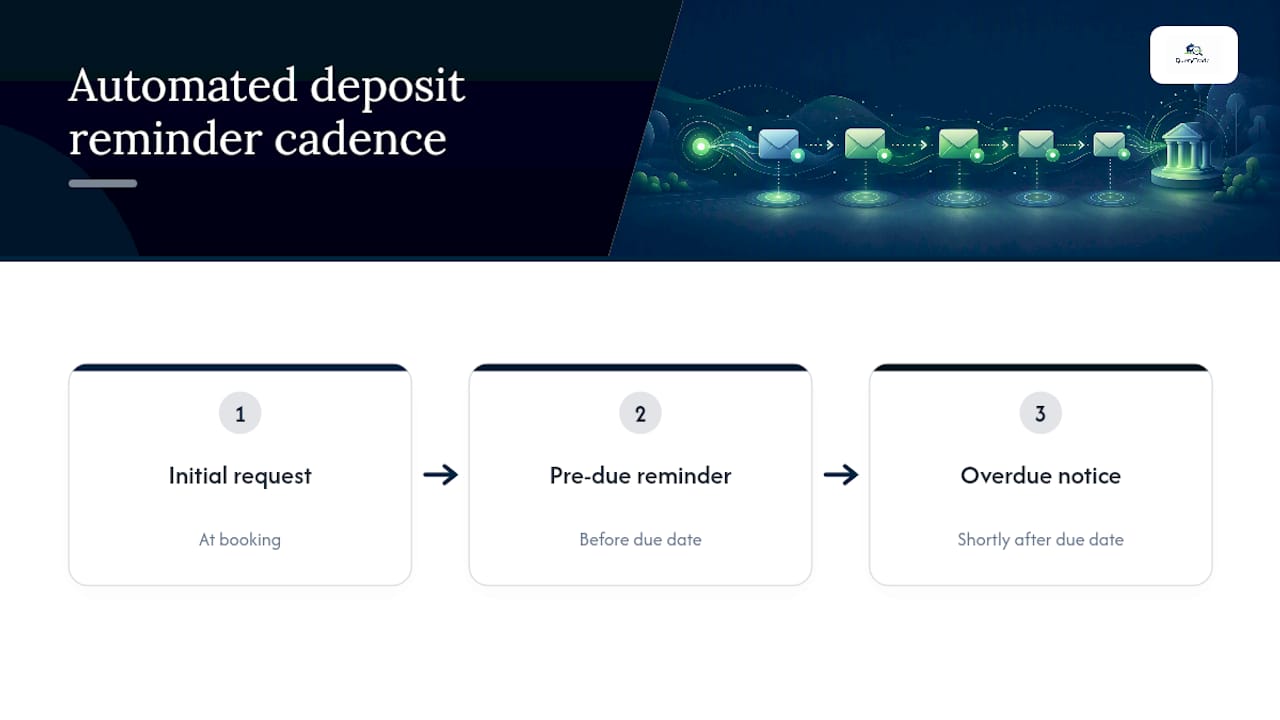
Manual sending works fine for a handful of clients a month. Past that, automating reminder cadences saves real time and removes the awkwardness of manually chasing someone for money. A workable cadence looks like this: initial request at booking, a friendly reminder before the due date, and an overdue notice shortly after. Invoicing platforms and payment gateways can trigger these automatically once a due date is set, so you're not manually tracking who owes what in a spreadsheet.
The payment button itself matters more than most people realize. A plain hyperlink reading "click here to pay" tends to get ignored more often than a styled button reading "Pay Deposit." If you're building templates in a CMS or email platform, documentation on template structure explains where to safely place variables and buttons without breaking the layout across different email clients. One technical note worth knowing: Gmail and Outlook often strip external CSS, so buttons need inline styling to render consistently rather than collapsing into a plain text link.
For teams that send deposit instructions regularly, a structured workflow with fixed variables (deposit amount, due date, booking stage) beats writing from scratch every time. Toggles' editable Outlook workflow template is a solid example of this approach applied to travel deposits, and the same variable-based structure works for trades, consulting, or any deposit-based business.
Pro Tip: Fold the deposit request into your quote approval email instead of sending it separately. Experienced freelancers and tradespeople often ask for the deposit while the client is still reading the estimate, because interest and urgency are both at their highest right at that moment. Wait a day and you're competing with the client's inbox, their to-do list, and their second thoughts.
What Belongs in a Deposit Confirmation Email
Every deposit confirmation needs five things: the exact amount received, the date it cleared, the invoice or reference number, the payment method used, and a clear statement of what happens next (a kickoff call, a scheduled start date, or a delivery window). Skip any of these and you'll get a follow-up email asking "did you get my payment?"
Formatting guidance for deposit confirmations recommends keeping the structure simple: state the transaction, then state the next action. No filler in between.
Timing matters as much as content. Send the confirmation as soon as funds clear, not the next business day. A same-day confirmation reassures the client their payment went through and their spot is secured, which cuts down on anxious follow-up messages.
Here's a one-paragraph confirmation you can copy directly:
"Hi [Client Name], we've received your deposit of $[Amount] on [Date] (Ref #[Number], paid via [method]). Your project is confirmed for [date/next step], and we'll be in touch shortly with [scheduling details]. Thanks for your business."
Before you hit send on any confirmation, run it against this checklist:
- Amount received matches what was invoiced.
- Date received is accurate, not the date you're writing the email.
- Reference or invoice number is included and correct.
- Payment method is stated (card, bank transfer, etc.).
- Next step is named specifically, not left vague.
How QueryTrade Fits Into Your Deposit Workflow
Writing a great deposit email template solves half the problem. The other half is making sure the request actually goes out at the right moment, the payment link actually works on a client's phone, and your job status actually updates once the money lands. That's the gap most solo trades businesses and small teams run into.
A tradesperson capturing a lead through a shareable intake form, sending an automated deposit request the moment a quote is accepted, and watching the job pipeline update itself once payment clears, without opening a spreadsheet or chasing a client by text, is what a deposit workflow looks like when the manual steps are removed.
QueryTrade builds several of these pieces directly into one platform:
- A shareable customer intake link that captures job details upfront, so you're not reconstructing project scope from a string of text messages.
- Deposit collection through Stripe, built into the job workflow rather than a separate invoicing step.
- A job pipeline that tracks each inquiry from New through Contacted, Quoted, Scheduled, and Completed, so deposit status is visible at a glance.
- Automated notifications that alert you the moment a client submits a request or a deposit clears.
- Auto-reply templates for WhatsApp and Instagram, so the same deposit-request instinct applies wherever the client first reaches out.
A typical flow looks like this: a client submits a job request through your intake link, you send the initial deposit request template with an embedded Stripe payment link, the client pays, and QueryTrade updates the job status and can trigger a confirmation automatically. No spreadsheet, no separate invoicing tool, no manually cross-checking who's paid.
If you're a plumber, electrician, carpenter, or builder currently juggling deposits across texts, emails, and a notebook, QueryTrade can help streamline that process.
The Real Lesson Behind Deposit Emails
Most advice on deposit emails focuses on wording, and wording matters, but it's not the biggest lever. The bigger lever is timing. Every source on payment collection points the same direction: ask for the deposit while the client is still engaged with the quote, not three days later when their attention has moved to another contractor's estimate.
Conventional advice treats deposit requests and confirmations as two separate emails you write once you actually need them. That's backward. The businesses that get paid fastest have their five templates written before they ever need to send one, sitting ready in a drafts folder or, better, loaded into an automated workflow that fires the moment a quote is accepted.
Here's what gets underestimated: the confirmation email matters almost as much as the request. A prompt, specific confirmation ("Deposit Received: $200, Ref #1042, kickoff scheduled for March 14") does more to build repeat-client trust than any amount of friendly small talk in the initial ask. Clients remember whether you followed through on the details, not whether you were polite about asking for money.
If you take one thing from this guide, make it this: write your five templates once, automate the reminder cadence so it never feels personal, and put the payment button where a tired client scrolling on their phone can't miss it. Everything else is refinement.
Let QueryTrade Handle the Deposit Chase for You
If you're a tradesperson tired of copying these templates by hand into every new email thread, QueryTrade turns the whole process into something that runs itself. Instead of manually tracking who's been sent a deposit request and who's actually paid, QueryTrade captures the job through a shareable intake link, sends the deposit request, collects payment through an embedded Stripe checkout, and updates your job pipeline the moment funds clear.

That means fewer no-shows, fewer awkward follow-up texts, and a lot less time spent copying and pasting the same email five times a week. It's built specifically for plumbers, electricians, carpenters, painters, and builders across Ireland and the UK who need a low-tech way to look professional without hiring an office manager.
If that sounds like the missing piece in your current setup, check the QueryTrade pricing page and start the free 30-day trial to see how the deposit workflow runs from your very next job inquiry.
Frequently Asked Questions
What should a deposit email include? A deposit email should state the exact amount or percentage due, the deadline, what the deposit covers, an invoice or reference number, and a clear payment link or button. Skipping any of these usually means an extra back-and-forth email to clarify.
How do I write a deposit request email format that doesn't sound awkward? Keep the tone neutral and direct. State the ask in the first sentence, explain briefly what the deposit secures (materials, scheduling, your time), and avoid over-apologizing for asking to be paid for confirmed work.
How soon should I send a deposit confirmation email after payment? Send it the same day funds clear, ideally within minutes if you're using an automated deposit collection process. A prompt confirmation reassures the client their payment went through and their project slot is secured.
What's the difference between a deposit request and a payment link email template? A deposit request focuses on securing a portion of payment upfront, usually tied to booking or starting a job. A payment link email template can apply to any invoice, including final balances, and the core structure (amount, deadline, link) stays the same either way.
Can I automate deposit email workflows without technical skills? Yes. Platforms built for trades businesses, including QueryTrade, let you set up automated deposit requests and confirmations through a simple intake form and Stripe integration, without writing code or managing a separate invoicing tool.
Sources
- 5 great deposit request email templates to copy & paste | Flodesk Tips
- 5 Ways to Professionally Ask for Payment via Email (With 5 Templates)
- Get Paid Faster: Invoice Email Template With Payment Link
- Deposit Payment Instructions Email Template for Outlook | Toggles
- Deposit Confirmation Letter
- Docs