
An estimate request form is a short, sales-focused intake that lets you qualify leads and deliver a reliable ballpark without a site visit. The single best approach: a conversational, conditional form that adapts follow-up questions based on earlier answers, collects photos, and captures a budget range so you can triage every enquiry before you pick up the phone.
Here's what to do right now:
- Share your Querytrade intake link on your services page, WhatsApp, and Instagram bio.
- Add six core fields: name, phone, site address, job type, budget range, and photo upload.
- Promise a response time on the form itself and keep it.
That three-step setup takes under five minutes and immediately separates you from every competitor still relying on a generic contact form or waiting for callbacks.
Table of Contents
- Why a dedicated estimate request form beats a contact form
- What fields does every estimate request form need?
- Which optional fields actually improve your quote accuracy?
- How to collect photos and optimize for mobile
- Form design rules that increase completion rates
- Privacy, deposits, and what to put on the form
- How to process estimate requests from inbox to booked job
- Two ready-to-use templates you can copy right now
- Common mistakes that reduce submissions or delay quotes
- What to tell customers about response times
- How to get more customers to complete the form
- Key Takeaways
- The approach that actually works in the field
- Querytrade puts this entire workflow in one place
Why a dedicated estimate request form beats a contact form
A dedicated quote request form captures high-intent leads and cuts response friction in half. When someone fills out a structured form, they're telling you exactly what they need and roughly what they'll spend. That's a different signal than a "Hi, can you call me?" message.
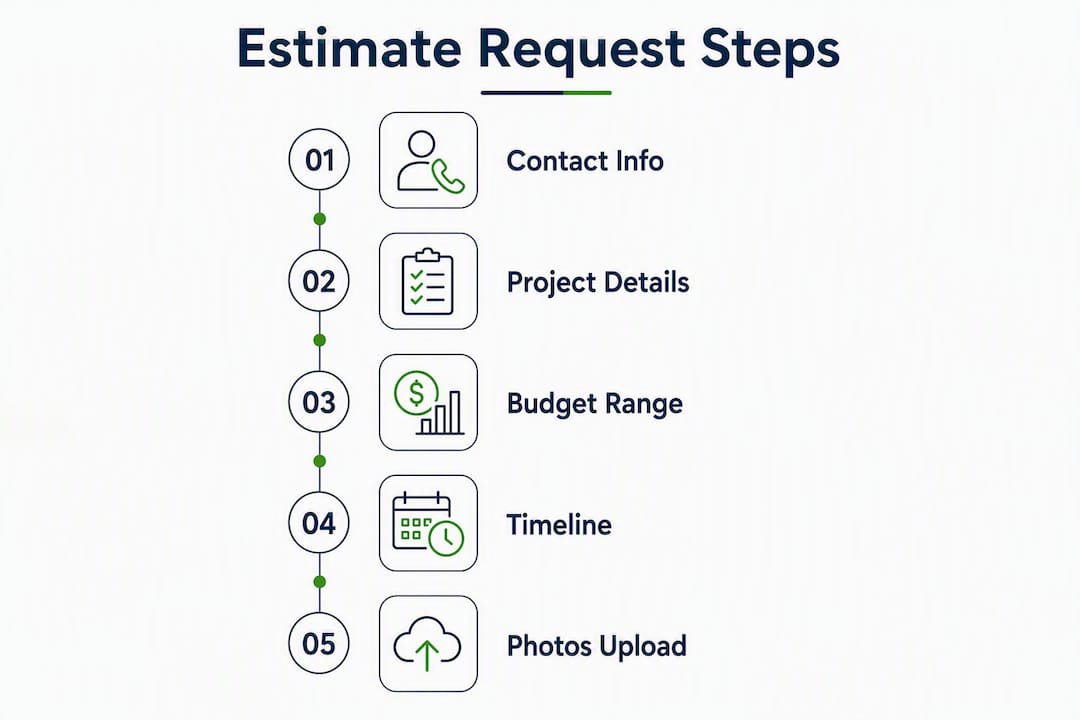
Online quote forms capture contact details, project description, dimensions, desired dates, and budget range to speed quoting and reduce back-and-forth. For tradespeople, that means fewer clarification calls, faster ballpark quotes, and a higher booking rate because the customer feels like they're dealing with a professional operation from the first click.
The quote request stage is one of the highest-intent actions a customer can take. Treat the form as a critical sales asset, not optional paperwork.
Measurable outcomes you can expect:
- Faster quote turnaround (from days to hours when photos and budget are captured upfront)
- Higher qualified-lead rate (budget-range filtering removes tire-kickers before you spend time on them)
- Fewer no-shows (customers who complete a structured form are more committed)
- Reduced discovery calls (the form does the first interview for you)
What fields does every estimate request form need?
Five fields are non-negotiable. A pre-built template with 13 fields covering contact, project address, scope, budget, timeline, and permit needs shows what a complete intake looks like, but you don't need all 13 to start. Here's the core set:
| Field | Purpose | Required? | How it's used |
|---|---|---|---|
| Full name | Identify the lead | Yes | Personalizes every reply |
| Phone / email | Follow-up contact | Yes | Auto-acknowledgment and quote delivery |
| Site address | Confirm service area | Yes | Filters out-of-area jobs immediately |
| Job type / trade | Route to right workflow | Yes | Triggers trade-specific follow-up questions |
| Budget range | Qualify the lead | Recommended | Triage: write proposal, scope smaller, or decline |
| Target start date | Prioritize urgency | Yes | Schedules site visits and quote deadlines |
| Photo upload | Replace site visit for ballpark | Optional | Provides visual context for desk-based estimates |

Pro Tip: Use budget-range dropdowns rather than a free-text field. Brackets like £500–£2,000 / £2,000–£5,000 / £5,000–£15,000 / £15,000+ let you triage leads instantly — the bottom bracket gets a quick template reply; the top bracket gets a call within the hour.
Which optional fields actually improve your quote accuracy?
Add optional fields only when they materially change the price or feasibility of the job. Anything else is friction that costs you submissions.
For carpenters, ask about cabinet style (shaker, slab, bespoke), rough room dimensions, and whether existing units need removal. Those three answers can shift a kitchen fit-out quote by thousands. Querytrade's carpenter intake workflow maps these fields directly to a pipeline card so nothing gets lost.
For painters, surface type (plaster, timber, previously painted) and number of coats are the price-movers. A "Not sure" option on the coats question keeps nervous customers from abandoning the form.
For plumbers, pipe access and the age of the existing system matter most. A 1970s copper system with no isolation valves is a different job than a modern combi install.
Present optional fields with conditional logic: if the customer selects "Painting" as the job type, the surface-type question appears. If they select "Plumbing," it doesn't. That keeps the form short for everyone while collecting the right detail for each trade.
How to collect photos and optimize for mobile
Photos and room dimensions give you enough context for a desk-based ballpark estimate in many cases, which means you can skip the site visit entirely for straightforward jobs. That's a real time-saver when you're pricing five enquiries on a Tuesday morning.
Ask customers to submit:
- One wide-angle shot of the full room or area
- A close-up of the specific problem or focus area
- A photo of any access points (loft hatch, under-sink cabinet, fuse board)
- A shot with a tape measure or ruler in frame if dimensions matter
For mobile UX, accept JPEG and PNG files, set a per-file limit of 10 MB, and tell the customer on the form ("Photos under 10 MB work best — your phone camera is fine"). Querytrade's photo upload feature stores images tied directly to the enquiry card, so you're not hunting through email attachments when it's time to quote.
Pro Tip: A one-question-at-a-time flow on mobile reduces abandonment significantly. Show a progress bar ("Step 3 of 6") so customers know they're nearly done.
Form design rules that increase completion rates
The fastest way to kill your submission rate is to front-load the form with long text boxes and a wall of required fields. Interactive, conditional question flows keep prospects engaged compared with long static multi-field pages.
Design rules that work:
- Single-column layout only (two columns break on mobile)
- Mark required fields clearly; keep optional fields visibly optional
- Use inline help text ("e.g., 'Replace kitchen taps and fix a slow drain'") under open-text fields
- Add "Not sure" as an answer option for budget, materials, and timeline
- Show a response-time promise above the submit button
What to avoid:
- Asking for company name or VAT number on a residential job form
- Forcing a long project description before the customer knows what you need
- No confirmation message after submission (customers assume it failed)
- No response-time commitment (silence kills trust)
Setting and meeting response SLAs reduces abandonment anxiety and improves perceived reliability. A simple "We'll be in touch within 24 hours" above the submit button does more for conversion than any design tweak.
A/B test worth running: make the budget field required for two weeks, then optional for two weeks, and compare completion rates. Some templates set budget as required; others keep it optional — the right answer depends on your audience and average job size.
Privacy, deposits, and what to put on the form
Keep legal language short. A one-line privacy note and a checkbox are all you need on the form itself.
Place that sentence directly above the submit button. Link to your full privacy policy in the site footer and on the form confirmation page. Templates recommend a one-line privacy note rather than long legal blocks — customers read the short version; they skip the long one.
On deposits: ask for one when the job is confirmed, not at the enquiry stage. A typical deposit for trades in Ireland and the UK is usually a portion of the quoted price, collected securely via Stripe. Note it clearly on your quote confirmation: "A 20% deposit is required to secure your booking. Payment is processed securely via Stripe." Querytrade handles deposit collection through Stripe, so you can send a payment request directly from the job card without leaving the platform.
Store personal data only as long as you need it for the job, and send customers a confirmation notification the moment they submit. That's both good practice and a basic compliance expectation under UK and Irish data protection rules.
How to process estimate requests from inbox to booked job
Follow a tight workflow with clear SLAs. Here's the playbook:
- Auto-acknowledgment (immediate): The form sends a confirmation email the second the customer submits. Include the response-time promise and a reference number.
- Triage (within 2 hours): Review budget range and photos. Assign a pipeline status: New → Contacted.
- Qualify (within 4 hours): Decide: enough info for a ballpark, needs a site visit, or out of range.
- Quote or schedule (within 24–48 hours): Send a ballpark quote or book a site visit. Move the card to Quoted or Scheduled.
- Deposit request: Once the customer accepts, send a Stripe payment link. Card moves to Scheduled.
- Follow-up: If no response after 48 hours, send one quote reminder email from the pipeline card.
Use pipeline states consistently: New, Contacted, Quoted, Scheduled, Completed, and Lost. Moving a card takes seconds in Querytrade's dashboard, and every team member sees the same status.
Three template replies to keep ready:
Scenario 1 — Enough info for a ballpark: "Hi [Name], thanks for your enquiry. Based on the photos and details you've shared, we'd estimate this job at roughly [range]. Happy to confirm a fixed price after a quick site visit — does [date] work for you?"
Scenario 2 — Needs a site visit: "Hi [Name], great to hear from you. This one's a bit more involved than we can price from photos alone. Can we pop over on [date] for a 20-minute look? No charge for the visit."
Scenario 3 — Out of range: "Hi [Name], thanks for reaching out. Your budget of [X] is below our minimum for this type of work. We'd hate to start something we can't finish properly, so we're not the right fit here — but good luck with the project."
Two ready-to-use templates you can copy right now
Short quick-request form (6 fields, mobile-first)
| Field | Type | Required? | Maps to |
|---|---|---|---|
| Full name | Text | Yes | Contact name in pipeline |
| Phone number | Tel | Yes | Primary contact field |
| Site address | Text | Yes | Job location |
| Job type | Dropdown | Yes | Trade routing / workflow trigger |
| Budget range | Dropdown | Recommended | Lead qualification tier |
| Photos | File upload (max 3) | Optional | Attached to enquiry card |
Detailed estimate request template (full field set)
Add these fields on top of the short template for high-value or complex jobs:
- Preferred start date (date picker, required)
- Detailed job description (open text, optional — with inline example)
- Materials preference: supply-and-fit vs. labor only (radio buttons)
- Access notes: parking, key safe, restricted hours (text, optional)
- Permit required? (checkbox: "I'm not sure / Yes / No")
- Additional photos (file upload, up to 6 images)
- How did you hear about us? (dropdown, optional — useful for tracking referral sources)
Pro Tip: Wire both templates into Querytrade using the shareable intake link. Every submission creates a pipeline card automatically, so you never manually copy a name and number again.
Common mistakes that reduce submissions or delay quotes
Too many required fields, no response-time promise, no mobile photo support, and unclear budget expectations are the four most common conversion killers.
- Too many required fields: Make only name, phone, address, and job type mandatory to start. Add more required fields only after testing shows they don't hurt completion.
- No response-time promise: Add "We reply within 24 hours" above the submit button. Customers who don't know when to expect a reply often call a competitor instead.
- No photo upload option: Without photos, you're back to scheduling site visits for every enquiry. Add a file upload field and accept mobile camera shots.
- Unclear budget expectations: A free-text budget field produces answers like "as cheap as possible." Use dropdown brackets instead.
- No confirmation message: Set up an instant auto-reply. A blank screen after submission looks like an error.
To diagnose drop-off, check where customers stop in your form. If most people quit after the budget question, test making it optional. If they quit after the photo upload, check your file-size limit.
What to tell customers about response times
Set the expectation on the form, repeat it in the auto-acknowledgment, and then beat it. Prompt response is the standard that converts well; delays risk losing the job to faster responders.
The auto-acknowledgment email should include: a thank-you line, the reference number, the exact response window ("You'll hear from us by [time] tomorrow"), and a phone number in case it's urgent. That one email eliminates most "Did you get my form?" follow-up calls.
How to get more customers to complete the form
The simplest incentive is a clear value exchange: "Fill this in and we'll give you a free ballpark estimate within 24 hours." That's more compelling than a discount for most trade customers, because what they actually want is speed and certainty.
Other approaches that work:
- Response guarantee: "If we don't reply within 24 hours, your first hour of labor is free." Bold, but it forces internal discipline and signals confidence.
- Free site visit for larger jobs: Offer a no-obligation visit for jobs above a certain budget bracket. Mention it on the form next to the budget field.
- Progress bar: Showing "Step 2 of 5" reduces abandonment because customers can see the end is close.
- Social proof near the submit button: A short line like "Joined by 200+ homeowners who got a quote this month" builds trust at the moment of hesitation.
Avoid discount-first incentives for trade work. They attract price-sensitive customers who are harder to retain and more likely to cancel.
Key Takeaways
A well-built estimate request form with budget-range filtering and photo uploads is the single fastest way to increase qualified leads and cut quote turnaround time.
| Point | Details |
|---|---|
| Use budget-range dropdowns | Tiered brackets let you triage every lead in seconds without a phone call. |
| Enable photo uploads | Photos and dimensions often replace the site visit for ballpark estimates. |
| Promise a 24-hour response | State it on the form and in the auto-acknowledgment; meeting it materially improves booking rates. |
| Keep required fields to a minimum | Name, phone, address, and job type are enough to start; add more only after testing. |
| Querytrade handles the full workflow | Shareable intake link, pipeline states, photo storage, and Stripe deposits in one place, set up in under five minutes. |
The approach that actually works in the field
The conventional wisdom says "just add a contact form." That advice costs tradespeople real money. A generic contact form tells the customer nothing about your process, and it tells you nothing about their budget. You end up playing phone tag to gather information you could have collected in 90 seconds.
The conversational, photo-enabled, budget-qualified approach works because it mirrors how a good first phone call actually goes. You'd ask what the job is, where it is, roughly what they want to spend, and whether you can see a photo. The form does exactly that, at any hour, without you lifting the phone.
What most guides miss is the follow-up discipline. The form is only half the system. The other half is a tight SLA: auto-ack in seconds, triage in two hours, quote or site-visit decision in 24 hours. Querytrade's pipeline dashboard makes that discipline visible to everyone on the team, which is why the setup-in-five-minutes claim holds up in practice.
Querytrade puts this entire workflow in one place
Querytrade is built specifically for tradespeople in Ireland and the UK who want to stop losing jobs to slow responses and missed messages. The shareable intake link gives you a professional estimate request form with photo uploads, budget-range fields, and instant notifications, all without touching a line of code.
Every submission lands in a pipeline dashboard with states from New through to Completed. Deposit collection runs through Stripe, so you can secure a booking the same day you send a quote. WhatsApp and Instagram auto-reply templates handle the first response while you're on-site.
The free 30-day trial gives you the full feature set from day one. Check the features and pricing and start your trial at querytrade.com.