
For most tradespeople, the fastest win is this: turn on Meta Business Suite Instant Reply today, drop your Querytrade intake link in the message, and you'll capture leads even when you're on a roof or under a sink. That handles a majority of the problem. If you need different replies for different questions — pricing vs. booking vs. photo requests — you'll need a third-party tool connected to the Instagram Messaging API.
Start here:
- Enable Instant Reply in Meta Business Suite (free, five minutes, same message to everyone).
- Add your Querytrade intake link so every new DM becomes a tracked job automatically.
- Once volume grows or you need keyword-triggered replies, layer in an API tool like ManyChat or Zapier.
Table of Contents
- How does Instagram auto reply actually work?
- Which option fits your workload?
- How to set up a keyword-triggered auto-reply without coding
- Ready-to-use message templates for tradespeople
- How to hand enquiries off to your job pipeline
- Privacy, consent, and keeping customers engaged
- How to test and monitor your automation
- Key Takeaways
- Why the hybrid approach is the only one worth defending
- Further reading and tools
How does Instagram auto reply actually work?
Three distinct mechanisms exist, and confusing them is the most common setup mistake.
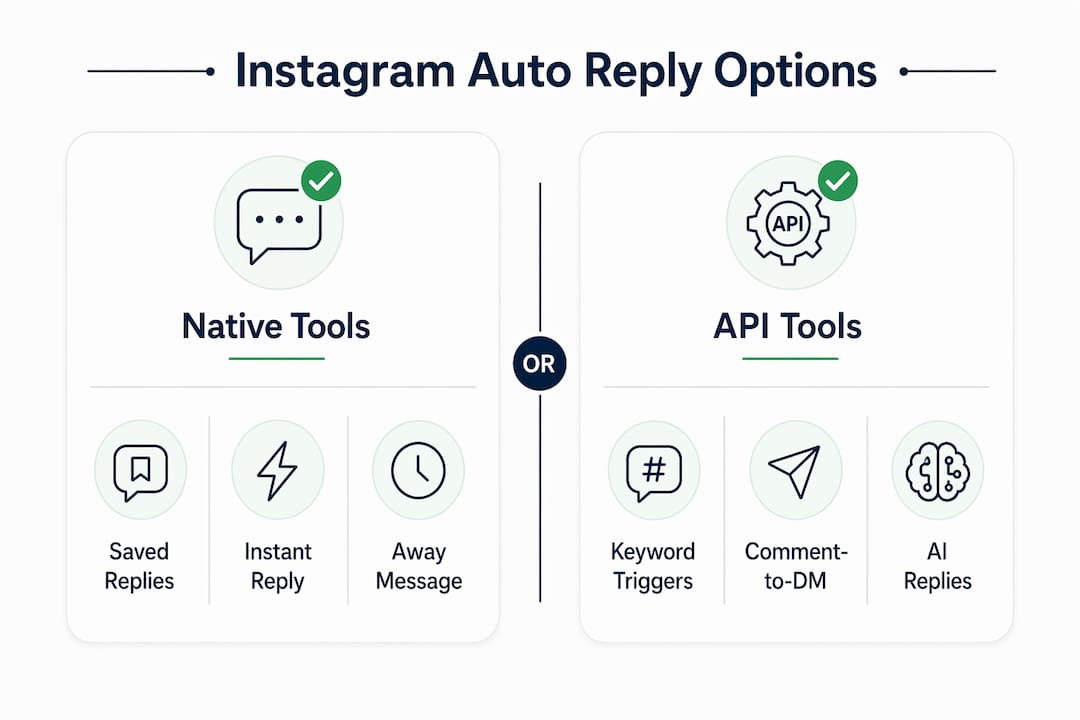
Saved Replies (Quick Replies) are manual shortcuts. You open a DM, type "/", and select a pre-written template. They speed up typing but send nothing automatically — if you're offline, no reply goes out.
Meta Business Suite native automation gives you two real auto-reply options: an Instant Reply (fires on a user's first DM) and a schedulable Away Message for out-of-hours. Both are free and require no third-party tool. The catch: both send the same text to every sender regardless of what they wrote. You can't branch by keyword or intent.
API-based automation is where keyword triggers, comment-to-DM funnels, and AI-driven replies live. Tools like ManyChat, MobileMonkey, and Zapier connect to the Instagram Messaging API via OAuth, listen for triggers, and fire the right reply. This is the only route to logic-based responses.
| Feature | Saved Replies | Meta Business Suite | API Tool (ManyChat etc.) |
|---|---|---|---|
| Sends automatically | No | Yes | Yes |
| Keyword-triggered replies | No | Limited | Yes |
| Comment-to-DM funnels | No | No | Yes |
| Different replies by intent | No | No | Yes |
| Cost | Free | Free | Paid |
| Account safety | High | High | High (OAuth only) |
The simple flow for API automation: a user comments or DMs → Instagram notifies the tool via webhook → the tool evaluates the keyword → it sends the right DM → optionally, it pushes the contact and message to Querytrade as a new job.
Which option fits your workload?
The right choice depends on how many DMs you get and what you need those replies to do.
Option A: Saved Replies only. Works if you're personally handling under 15–20 DMs per day and Instagram is purely a support channel, not a lead source. Quick replies are a productivity tool, not automation — they won't scale during a busy campaign or when you're on-site all day.

Option B: Meta Business Suite Instant Reply + Away Message. Free, fast to set up, and genuinely useful for acknowledgements. Meta Business Suite supports custom keyword automations in its Automations tab, though advanced flows still require a Messenger API Technology Provider. Best for solo tradespeople who want a professional first response without paying for a bot.
Option C: API-based tool (ManyChat, MobileMonkey, Zapier). Necessary when you need different replies by intent, lead capture forms, or comment-to-DM funnels. Starting with native Instant Reply, then adding an API tool when volume or complexity grows is the approach most professionals recommend.
Decision matrix:
- Solo tradesperson, low DM volume: Option B, with a Querytrade intake link in the Instant Reply.
- Small team, moderate volume: Option B for acknowledgement + Option C for keyword flows.
- High-volume or running ad campaigns: Option C from the start, with Zapier routing leads to Querytrade.
How to set up a keyword-triggered auto-reply without coding
Prerequisites: Instagram Business or Creator account, admin access to Meta Business Suite, your Querytrade intake link ready to paste.
- Switch to a Business account. Go to Settings → Account → Switch to Professional Account. Choose Business.
- Connect Instagram to Meta Business Suite. At business.facebook.com, link your Instagram account under Accounts → Instagram Accounts.
- Enable Instant Reply. In Meta Business Suite Inbox, click Automations → Instant Reply → toggle on → select Instagram → write your message → Save Changes.
- Set an Away Message. In Automations → Away Message, add your out-of-hours schedule, write the message, and save.
- Create a keyword automation. In Automations, look for "Custom Keyword" or "Keyword Reply." Add trigger words like quote, price, or photo. Write the reply that fires when those words appear. Paste your Querytrade intake link as the CTA.
- Test from a secondary account. Send the trigger keyword from a separate Instagram account and confirm the right reply arrives with the correct link.
- Verify toggles are active. Check that Instant Reply and Away Message are both switched on after testing — they can reset.
Testing checklist:
- Keyword triggers fire correctly for each word you set.
- The DM includes the correct Querytrade intake link.
- Away Message sends during scheduled out-of-hours.
- All message toggles remain active after saving.
Pro Tip: Start with a single keyword — "quote" or "price" — and one intake link. Monitor for a week before adding more triggers. Complexity added too early creates misfires that are hard to diagnose.
Ready-to-use message templates for tradespeople
Copy, paste, and adjust these to your trade.
Instant acknowledgement: Quote request (asks for address and photos): Photo request guide: Booking/intake with deposit: After-hours away message: Automation captures the most leads when it moves customers off Instagram quickly and into a structured intake form. These templates do exactly that.
A hybrid approach works best: automated first-line acknowledgements plus human follow-up for higher-value or sensitive enquiries keeps the tone professional without sounding cold.
How to hand enquiries off to your job pipeline
Three practical patterns, depending on your setup:
- Link-first intake: The auto-reply sends users to your Querytrade intake link. They complete the form, which creates a new job in your pipeline automatically — contact details, postcode, photos, and all.
- Webhook push via Zapier: Your API tool (ManyChat or similar) captures the DM content and attachments, then a Zap posts that data to Querytrade via webhook or email, creating a New job in the pipeline.
- CSV batch import: For high-volume periods, export leads from your automation tool and import them into Querytrade in one go.
A practical Zap looks like this: user comments "quote" on a post → ManyChat fires a DM → user replies with phone and postcode → Zapier posts the details to Querytrade → a New job appears in your pipeline dashboard. High-performing automation always attaches photos to the job record so you can quote without an extra back-and-forth.
Include photo instructions in the auto-reply itself. Ask for a wide shot and a close-up. It cuts the number of follow-up messages before a quote in half.
If the intake link fails for any reason, the automation should instruct the sender to call or text directly and flag the contact for manual follow-up. Never leave a dead end.
Privacy, consent, and keeping customers engaged
Keep the first message simple. Ask for one piece of information at a time — not name, address, phone, and photos all at once. That wall of requests kills response rates.
Set a clear response SLA in every auto-reply: "We reply within 24 hours on weekdays" manages expectations and reduces follow-up messages. Store captured details in Querytrade rather than leaving them sitting in your Instagram inbox. Delete photos once the job is quoted or completed, per your own retention policy.
Only connect tools that use OAuth and the official Instagram API. Never hand your Instagram password to a third-party service. Tools that "puppet" your browser — logging in as you and clicking buttons — commonly violate Instagram's terms and cause account bans. ManyChat, MobileMonkey, and Zapier all use the official API. Stick to Meta-approved providers.
Pro Tip: Check that any third-party tool you consider is listed as a Meta Business Partner or uses the official Messenger API. If the setup screen asks for your Instagram password rather than an OAuth login, walk away.
How to test and monitor your automation
Run this checklist before going live and again weekly for the first month.
- Send each trigger keyword from a secondary Instagram account and confirm the correct reply fires.
- Check that the Querytrade intake link in the DM is clickable and loads correctly.
- Verify that username variables (like @username) populate correctly in the message.
- Test the Away Message by temporarily setting your away hours to the current time.
- Confirm that all automation toggles are still active after saving changes.
- Open Querytrade and verify that a test submission from the intake link creates a new job in the pipeline.
Metrics to track weekly: number of automated leads, conversion rate from DM to completed intake form, average time from auto-reply to human follow-up, and bounce rate on the intake link.
Review automation logs daily during the first week after launch, then weekly. Any misfire — wrong reply, broken link, missing variable — escalate to manual handling immediately and fix the trigger before re-enabling.
Key Takeaways
Instagram auto reply works best as a two-layer system: free native tools for instant acknowledgement, and an API-connected tool for keyword-driven lead capture that routes directly into your Querytrade job pipeline.
| Point | Details |
|---|---|
| Native tools are free and fast | Meta Business Suite Instant Reply and Away Message require no third-party tool and take under five minutes to enable. |
| Saved Replies are not automation | Quick Replies only work when you manually trigger them inside an open DM — they send nothing automatically. |
| API tools unlock keyword replies | ManyChat, MobileMonkey, and Zapier connect via OAuth to enable keyword triggers, comment-to-DM funnels, and intake routing. |
| Intake link is the key conversion step | Embedding a Querytrade intake link in every auto-reply moves leads off Instagram and into a tracked job pipeline. |
| OAuth only — no password sharing | Tools that require your Instagram password risk account bans; always use Meta-approved, OAuth-connected providers. |
Why the hybrid approach is the only one worth defending
Most guides push you toward full automation or tell you to handle everything manually. Both are wrong for a trades business.
Full automation without a human escalation path loses the jobs that actually pay well. A plumber dealing with a burst pipe at 11 PM doesn't need a bot asking for photos. They need a number to call. Automation should handle the predictable, repeatable stuff: acknowledgements, intake links, photo requests, after-hours messages. The moment a message signals urgency, a complaint, or a negotiation, it needs a human.
The hybrid model — instant acknowledgement, keyword capture for routine asks, human follow-up for quotes and complaints — is what tradespeople get the biggest ROI from. It's not glamorous. It's a short auto-reply with a Querytrade link and a daily inbox check. That combination stops leads from disappearing into the DM void while keeping your reputation intact.
Start with the Instant Reply. Add one keyword trigger. Check your inbox every morning. That's the whole system for most trades businesses.
Further reading and tools
- Official Meta setup: Meta Business Suite Automations — the canonical source for Instant Reply and Away Message configuration.
- Saved Replies vs. DM automation explained: Inrō's comparison guide covers exactly when Quick Replies stop being enough and what API automation adds.
- ManyChat setup guide: ManyChat's Instagram autoresponder walkthrough includes copy-paste templates and keyword flow examples.
- Querytrade auto-reply templates: Built-in templates for Instagram, WhatsApp, and Facebook that connect directly to the intake workflow.
- Querytrade job pipeline: See how every enquiry becomes a tracked job from New through to Completed, with photo uploads and deposit collection built in.
- Trade-specific solutions: Querytrade solutions by trade — plumbers, electricians, carpenters, builders, and more.