
One shared intake link, a visible job pipeline, and a five-minute response rule will stop most of your lost leads and win you more jobs. That is the whole system, stripped to its essentials.
The first move: capture every incoming request in one place, no matter which channel it arrives on. A contractor lead management guide puts it bluntly: the fastest company to respond usually gets the job. If a customer's WhatsApp message, missed call, and website form all end up in different places, you are already losing work to someone faster.
- Create one shareable intake link for every job request.
- Set a 5-minute response rule for business hours.
- Track everything in a simple CRM/pipeline, not scattered inboxes.
Pro Tip: Set your intake link up in QueryTrade today. It takes under five minutes and immediately gives every enquiry a home.
Key Takeaways
A single intake link, a visible job pipeline, and a five-minute response rule together prevent most lost job leads for trades businesses.
| Point | Details |
|---|---|
| Centralize intake | Route every channel, web, WhatsApp, phone, into one shared record instead of scattered inboxes. |
| Score and prioritize | Use a simple 5-point urgency scale to decide who gets called first. |
| Follow up repeatedly | Run at least three to five touches over 30 days rather than one quote and silence. |
| Track the right numbers | Watch speed to lead and cost per booked job, not just lead volume. |
| Use QueryTrade to run it | QueryTrade's intake link, pipeline, and auto-replies cover setup in under five minutes with a free trial. |
Where to Learn More About Managing Job Inquiries
- Salesforce's lead management guide explains the identify, qualify, nurture, convert framework in more depth.
- CustomerFlows' contractor guide covers capture and routing specifics for trades.
- Pipelineon's four-step system breaks down SLAs by trade type.
- ProTradeHQ's follow-up guide has ready-to-use estimate follow-up scripts.
- PinkCallers' best practices dig into the five-minute response data.
- QueryTrade's job pipeline page shows the tracking system described throughout this guide.
- QueryTrade's solutions page covers setups by trade, from builders to painters.
Test a few of these alongside your own current process before deciding what to change first.
Table of Contents
- How to Manage Job Inquiries in Your First 30 Minutes
- How Do You Capture Every Incoming Job Enquiry?
- How Do You Qualify and Prioritize Job Leads?
- What Follow-Up Cadence Actually Books More Jobs?
- Which Metrics Show Whether Your Pipeline Is Working?
- What's the Fastest Way to Set This Up Today?
- How Do You Connect Job Enquiries to Your Other Business Tools?
- What About Data Privacy When Handling Customer Enquiries?
- How Do You Handle Peak Enquiry Times Without Losing Control?
- How QueryTrade Helps You Manage Job Inquiries Day to Day
- Frequently Asked Questions
- Sources
How to Manage Job Inquiries in Your First 30 Minutes
Stop the bleeding before you build anything fancy. Here's what to do right now:
- Create your intake link and share it everywhere (bio, signature, van signage).
- Turn on auto-replies for WhatsApp and Instagram DMs.
- Set up one shared inbox or pipeline view, not five separate apps.
- Assign a 5-minute response SLA to whoever answers first.
- Draft one reusable quote template.
- Block 15 minutes weekly for a "no quote left behind" review.
Pro Tip: Give one person clear ownership of first response, even if it rotates weekly. Enquiries with no named owner get answered last, every time.
Do this in QueryTrade and the auto-reply templates plus the intake link cover half this list automatically.
How Do You Capture Every Incoming Job Enquiry?
Every job request should land in one system, whether it arrives through a web form, a WhatsApp message, an Instagram DM, a phone call, or a referral text from a mate. That single-source-of-truth habit is what separates trades businesses that scale from ones that stay stuck firefighting.
Your intake should ask for the basics only: service type, location, photos if relevant, urgency, and preferred contact method. Longer forms get abandoned. A practical contractor workflow recommends capturing source, service context, and urgency at the point of contact, because that data drives everything downstream.
For messaging channels, auto-replies matter more than most tradespeople realize. A quick "Thanks, we've got your request, we'll call within the hour" on WhatsApp or Instagram keeps a customer from calling the next plumber on the list while they wait. Missed-call text-back does the same job for phone enquiries you cannot answer mid-job.
Speed is not a nice-to-have here. Contractors who respond within five minutes convert dramatically more leads than those who wait even an hour, because homeowners with a leak or an electrical fault are usually calling three or four trades at once.
QueryTrade's shareable intake link handles the form, urgency flag, and photo upload in one step, and its auto-reply templates for WhatsApp and Instagram close the acknowledgement gap the moment a message lands.
How Do You Qualify and Prioritize Job Leads?
Not every enquiry deserves the same speed of response. A homeowner with a burst pipe outranks someone asking for a quote on a kitchen refit next spring, and your system should reflect that instantly.
A simple 5-point scoring model works for most trades:
- Urgency (0-2 points): emergency = 2, routine = 0.
- Homeowner status (0-1 point): owner-occupier = 1, tenant = 0.
- Budget signal (0-1 point): mentioned a figure or approved quote = 1.
- Estimated job value (0-1 point): above your average ticket = 1.
- Scheduling window (0-1 point): wants work within two weeks = 1.
A score of 4 or higher means call within five minutes. Anything under 2 can wait for your daily batch of callbacks.
Build these as custom fields in whatever CRM/pipeline you use, so every lead carries a visible score instead of a gut feeling. Salesforce's lead management framework describes this as the qualify stage, and it works whether you're running a five-person plumbing outfit or a solo carpenter.
QueryTrade's urgency ranking does this scoring automatically and triggers instant notifications the moment a high-priority job lands, so nothing sits unread in a busy inbox.
What Follow-Up Cadence Actually Books More Jobs?
Most quotes die from silence, not price. A homeowner gets three estimates, hears back from one contractor, and books that one. Top-performing contractors run three to twelve follow-up touches per quote, far more than the single "just checking in" text most trades send.
A cadence that works for nearly every trade:
- Immediate: automated acknowledgement within minutes.
- Day 1: personal call or text confirming the quote is coming.
- Day 3: reminder with a photo of similar completed work.
- Day 7: a deadline or small incentive to book.
- Day 30: a soft nurture touch if they've gone quiet.
Sample intent for a day-3 text: acknowledge the quote sent, attach a job photo, ask if they have questions. Keep it short, because trades customers read on their phones between jobs.
- SLA target: very fast response during business hours, and within an hour otherwise.
- Escalate to a phone call if there's no reply after two text touches.
- Use automation for the first two touches, human judgment after that.
QueryTrade's customizable templates and Stripe-based deposit collection handle the automated steps and lock in bookings before customers change their minds or shop around further.
Which Metrics Show Whether Your Pipeline Is Working?
Keep the pipeline itself simple: New, Contacted, Quoted, Scheduled, Completed, and a final Won or Lost tag. Pipelineon's four-step contractor system argues for exactly this kind of compact structure, because anything more granular just adds clicks nobody makes on a job site.
| Metric | Why it matters |
|---|---|
| Speed to lead | Fastest response usually wins the job over competing quotes. |
| Lead-to-appointment rate | Shows whether your qualifying and follow-up are actually working. |
| Quote-to-book rate | Reveals if your pricing or follow-up cadence is losing jobs late. |
| Cost per booked job | The real measure of marketing spend, not just cost per lead. |
Tracking cost per booked job rather than cost per lead matters because a cheap lead that never books is worse than an expensive one that does.
Run a five-minute "no quote left behind" check every week and a source-attribution review monthly. That's enough to catch leaks without turning reporting into a second job.
QueryTrade's job pipeline, instant notifications, photo uploads, and calendar sync mean these numbers update themselves instead of living in a spreadsheet nobody opens.
What's the Fastest Way to Set This Up Today?
Here's a setup you can finish on a lunch break:
- Create your account.
- Import existing contacts from a CSV export.
- Build your intake link or form with the fields discussed above.
- Turn on auto-reply templates for WhatsApp and Instagram.
- Set your pipeline stages (New, Contacted, Quoted, Scheduled, Completed).
- Add one follow-up sequence covering days 1, 3, and 7.
- Connect calendar sync and, if available, deposit collection.
CSV imports usually stall on mismatched column headers, so check that names, phone numbers, and job types map to the right fields before you hit import. Test your auto-reply by messaging your own business number, and decide up front who owns first response so a new lead never sits unclaimed for hours.
Pro Tip: Run this setup during a slow hour, not a busy one. Fifteen focused minutes beats a rushed five.
QueryTrade is built for exactly this kind of same-day setup, and the free trial lets you test the whole flow before paying anything.
What Should You Budget in Time and Money?
Expect setup in under five minutes for the intake link and pipeline basics, a first week of tweaking templates as real enquiries come in, and steady-state operation that needs maybe 15 minutes a week once it's running.
- Setup: under 5 minutes for the core system.
- Week one: adjust templates based on actual customer language.
- Ongoing: a weekly pipeline check, monthly source review.
Pricing follows a standard subscription model with a free trial period, covering the pipeline, notifications, and deposit tools together. Check QueryTrade's features page for current plan specifics.
Run a 30-day test: fewer missed calls and faster bookings usually show up within the first two weeks. Start the trial now and measure it against your current no-show and no-reply numbers.
Which Mistakes Quietly Cost You Jobs?
The biggest lead-killer isn't a bad quote, it's silence. Watch for these patterns:
- Job requests spread across four different inboxes and apps.
- No one person owns first response.
- Quotes go out with no scheduled follow-up.
- No record of which channel each enquiry came from.
- Intake forms so long that customers abandon them halfway.
If your response time regularly creeps past an hour, or your pipeline hasn't been updated in a week, treat that as an urgent fix, not a background task. Those two red flags alone predict most of the jobs you'll never hear back about.
QueryTrade centralizes intake into one link and automates the follow-up sequence, so these gaps close by default rather than by discipline you have to maintain manually.
How Do You Connect Job Enquiries to Your Other Business Tools?
A job management system that sits in isolation from your accounting software or calendar just creates a second admin job. The goal is one enquiry, one record, updated automatically everywhere it needs to be.
Calendar sync matters most immediately. When a job moves to "Scheduled" in your pipeline, that appointment should appear on your phone's calendar without retyping it. This prevents the classic double-booking that happens when a job gets confirmed by text but never makes it onto the actual schedule.
Accounting integration matters once a job is won. A contractor lead flow that moves an opportunity from enquiry to won job should hand off cleanly into invoicing, so you are not manually re-entering customer details a third time. Fewer manual re-entries means fewer transposition errors on invoices, which matters more than it sounds when you're doing books at 9pm.
If you're currently running everything through a spreadsheet, know that spreadsheets work fine at low volume but break down as job numbers grow, mainly because two people editing the same file at once creates conflicts and lost updates. Moving to a dedicated platform typically means exporting your spreadsheet to CSV and mapping the columns once, which is a one-time friction cost rather than an ongoing one.
QueryTrade's calendar sync and pipeline dashboard aim at exactly this handoff problem, keeping scheduling, job status, and customer records in the same place instead of three.
What About Data Privacy When Handling Customer Enquiries?
Every job enquiry you collect includes personal information: names, addresses, phone numbers, sometimes photos of a customer's home. Treat that data with the same care you'd want a stranger to take with your own address and daily schedule.
If you operate in Ireland or the UK, customer data handling falls under GDPR regardless of how small your business is. That means being able to tell a customer what data you hold on them, deleting it on request, and not sharing it with third parties without a legitimate reason. It also means storing enquiry data somewhere reasonably secure, not in a group chat screenshot folder or an unlocked shared laptop.
Practical habits that keep you compliant without hiring a lawyer:
- Only collect the fields you actually need (service type, location, contact details, urgency).
- Avoid storing sensitive details longer than necessary once a job is complete or declined.
- Use a platform that encrypts stored data rather than plain spreadsheets emailed between team members.
- Be clear with customers about how their information will be used, even in a one-line note on your intake form.
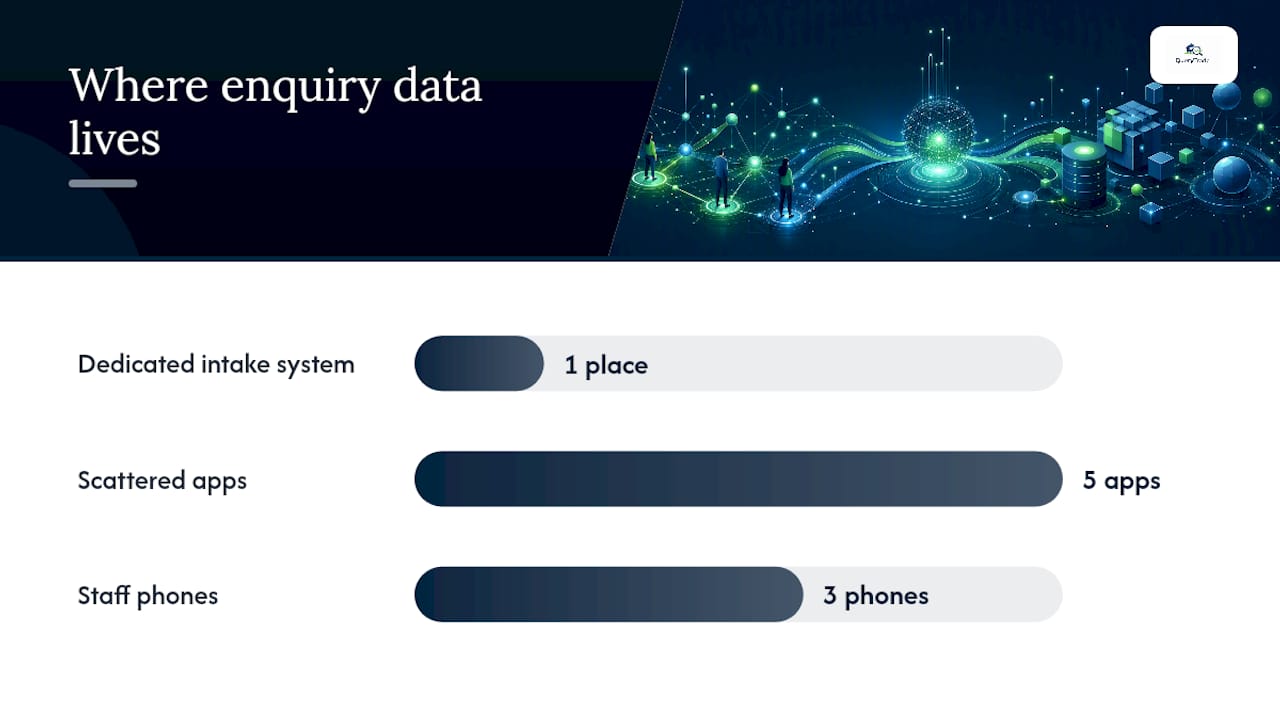
A dedicated intake system tends to handle this more responsibly than scattered screenshots and sticky notes, simply because the data lives in one controlled place instead of across five apps and three phones. QueryTrade's intake link stores customer details securely from the first submission, which removes the guesswork around where sensitive job information actually lives.
How Do You Handle Peak Enquiry Times Without Losing Control?
Every trade has a season. Plumbers get slammed when the first frost hits, roofers spike after a storm, and painters see a rush every spring. The system that works fine at ten enquiries a week can fall apart at forty.
The fix isn't more staff, usually, it's tighter automation absorbing the first response while humans handle the judgment calls. Automated first-intake layers work best when they keep leads warm and organized for a human to follow up, rather than trying to replace that follow-up entirely. During a surge, your auto-reply and urgency scoring do the triage so you are not manually reading forty messages before deciding who to call first.
A few adjustments that help specifically during busy stretches:
- Tighten your scoring thresholds temporarily, since you can't chase every lead at once.
- Extend your response SLA slightly during peak weeks, but communicate that upfront in your auto-reply.
- Batch lower-priority quotes into a single daily block instead of answering them piecemeal.
- Review your pipeline twice daily during peak season instead of once.
The goal during a surge isn't perfection, it's making sure nothing falls through entirely while you're stretched thin. A visible pipeline lets you see at a glance which of forty leads are getting cold, something no shared inbox can show you clearly.
QueryTrade's instant notifications and pipeline view scale with volume without you needing to hire an office admin just to keep up during your busiest month.
Why a Single Intake and Pipeline Beats Everything Else
Most tradespeople overcomplicate this. You don't need marketing automation software built for enterprise sales teams, you need one link, one pipeline, and a habit of responding fast. The businesses that struggle aren't lacking tools, they're lacking a single place where every enquiry lands.
Try the simplest version first before adding complexity you don't need yet.
How QueryTrade Helps You Manage Job Inquiries Day to Day
Query Trade built this platform around the exact gaps this guide covers. The job pipeline gives you the New through Completed view without spreadsheet chaos. Photo uploads let customers show you the leaking pipe or cracked render before you quote. Instant notifications mean a high-urgency enquiry never sits unread for hours, and the auto-reply templates for WhatsApp and Instagram handle acknowledgement the second a message arrives.

Deposit collection through Stripe locks in bookings upfront, cutting into the no-shows that cost trades real money every month. Setup takes under five minutes, no technical background required, and a free 30-day trial lets you run this exact system against your current one before committing to anything.
Start your free trial on the QueryTrade homepage, or check the full features list to see the job pipeline and auto-replies in action first.
Frequently Asked Questions
What's the simplest way to manage job inquiries as a solo tradesperson? One shared intake link plus a basic pipeline (New, Contacted, Quoted, Scheduled, Completed) covers most needs without extra software complexity.
How fast should I respond to a new job inquiry? Aim for five minutes during business hours. Contractors hitting that mark convert dramatically more leads than those who wait an hour or more.
Do I need a CRM to organize job requests, or is a spreadsheet enough? Spreadsheets work at low volume but break down once multiple people edit the same file or lead volume climbs, which is when a dedicated pipeline pays for itself.
How do I stop losing leads sent through WhatsApp or Instagram? Turn on auto-reply templates so every message gets an instant acknowledgement, then route it into your main pipeline instead of leaving it in the app's inbox.
What should a follow-up sequence for job quotes look like? A five-touch cadence over 30 days, immediate acknowledgement, a day-1 call, a day-3 reminder, a day-7 deadline offer, and a day-30 nurture touch, catches most quotes that would otherwise go quiet.
Sources
- Lead management for small businesses | Salesforce blog
- Contractor Guide to Never Missing a Lead | CustomerFlows
- The 4-Step Lead System Every Contractor Needs | Pipelineon
- Contractor lead follow up: how to stop losing estimates | ProTradeHQ
- Lead management best practices for home service contractors | PinkCallers