
A pipeline dashboard for trades is a job-tracking board that captures every enquiry, shows where each job sits between New, Contacted, Quoted, Scheduled, and Completed, and gives you one place to see what needs a follow-up call today. The fastest way to get one running is not to build a spreadsheet from scratch. It's to use a no-tech template or a ready-made system like QueryTrade's Job Pipeline, which sets up in under five minutes with no technical skills required.
Three things change the moment you have this in place:
- You stop losing jobs to a missed text buried under twenty others.
- You follow up faster, because the dashboard tells you exactly who's waiting and for how long.
- You cut the admin hours that usually go into chasing quotes and re-typing job details into invoices.
Pro Tip: Don't wait until you have "time to set it up properly." Create one intake link today, send it to your next three enquiries, and build the rest of the pipeline around what you actually see coming in.
Key Takeaways
A working pipeline dashboard needs only five stages, six intake fields, and one weekly review to convert more enquiries into booked jobs while cutting invoicing admin time.
| Point | Details |
|---|---|
| Keep stages minimal | Use New, Contacted, Quoted, Scheduled, Completed instead of building out ten stages nobody checks. |
| Capture the right fields | Collect name, contact method, address, service, urgency, and photos at first enquiry. |
| Qualify before quoting | Run the six-question checklist to avoid wasting hours on jobs unlikely to book. |
| Review weekly, not daily | A short Monday review catches stalled quotes better than constant checking. |
| Start with QueryTrade's ready template | QueryTrade's Job Pipeline sets up in under five minutes with intake forms, photo uploads, and deposit collection built in. |
Table of Contents
- What Does "Pipeline Dashboard" Mean for a Trades Business?
- What Stages Should a Trade Pipeline Dashboard Actually Have?
- What Should You Capture the Moment an Enquiry Comes In?
- How Do You Decide Which Enquiries Are Worth Your Time?
- How Fast Can You Actually Set One Up?
- What Daily Habits Actually Convert Enquiries Into Booked Jobs?
- Which Metrics Actually Matter on a Job Pipeline?
- How Much Time Does This Actually Save?
- "I Don't Have Time for This" and Other Objections
- Why the Simplest Pipeline Usually Wins
- How QueryTrade Gets You From Enquiry to Booked Job
- Frequently Asked Questions
- Sources
What Does "Pipeline Dashboard" Mean for a Trades Business?
For a plumber, electrician, or landscaper, a pipeline dashboard means something specific: a visual system that captures a customer enquiry, routes it to the right stage, and reminds you what to do next. It has nothing to do with the sales pipelines built for software companies or the server-monitoring dashboards IT teams use. This guide is about job pipelines, not sales funnels.
Here's what falls inside that scope, and what doesn't:
- In scope: capturing enquiries through a form or link, moving jobs through stages, uploading site photos, collecting deposits, syncing estimate appointments to a calendar, and basic forecasting of what's likely to book.
- Out of scope: enterprise CRM dashboards for multi-stage B2B sales teams, and technical operations dashboards used to monitor servers or software uptime.
The core use case is simple: an enquiry comes in, you decide whether it's worth quoting, you send a quote, you schedule the job if it's accepted, and you get paid. A good dashboard makes every one of those steps visible without you having to dig through texts, emails, and voicemails to remember where things stand.
What Stages Should a Trade Pipeline Dashboard Actually Have?
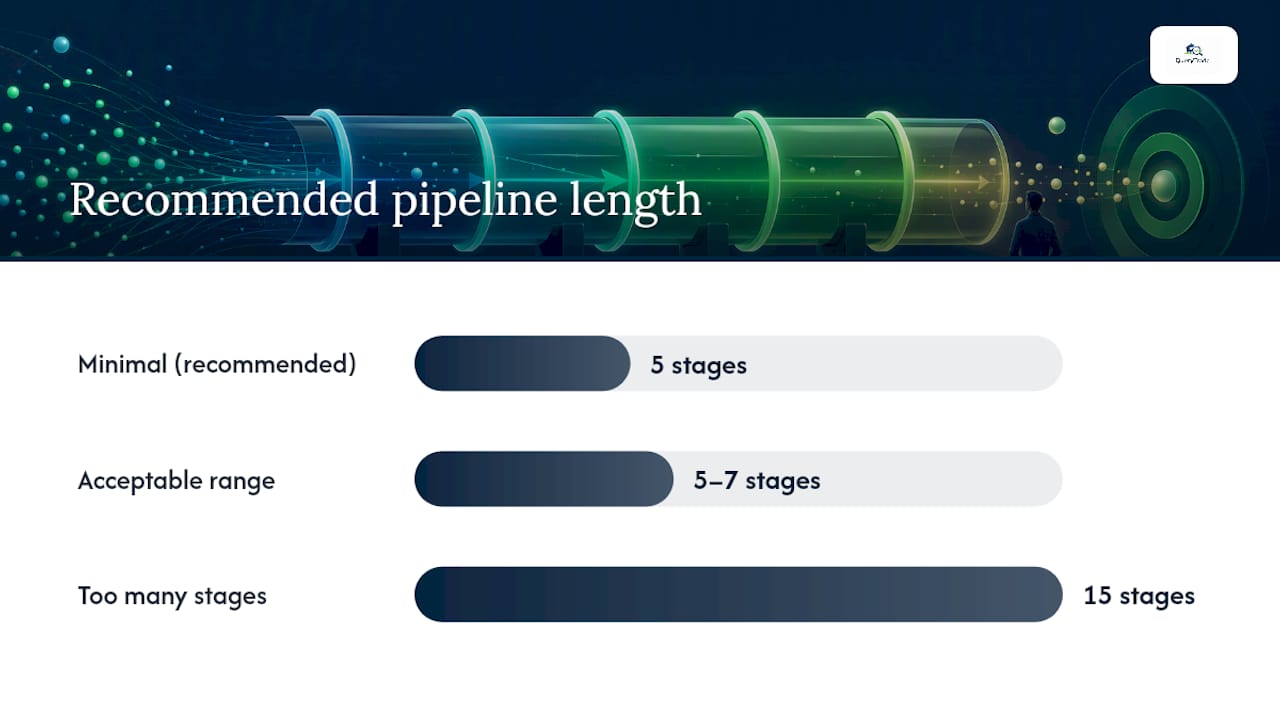
Most trades businesses do better with five stages than fifteen. Contractor pipeline research recommends keeping a pipeline to 5 to 7 stages with a clear owner and next action at each one. More stages tend to blur decision-making rather than sharpen it.
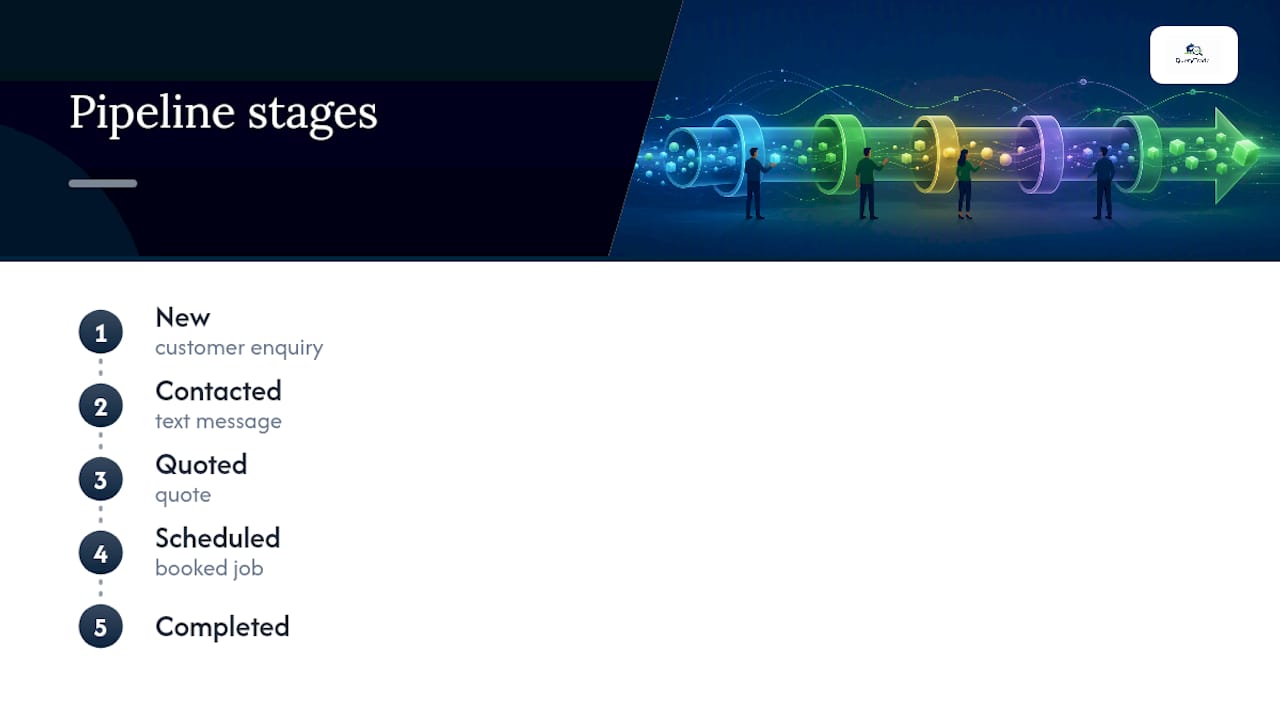
The minimal set that covers almost every trade:
- New — the enquiry just landed. Nobody has responded yet.
- Contacted — you've replied, asked clarifying questions, or arranged a site visit.
- Quoted — a price has gone out and the customer is deciding.
- Scheduled — the customer accepted and a date is booked.
- Completed — the job is done and ready to invoice.
Some businesses expand this into a longer version, adding stages like Estimate Scheduled, Negotiation, In Progress, Invoiced, and Paid. That works for larger teams juggling multiple crews, but for a one or two-person operation, five stages usually cover it without extra clicks.
Each stage needs an owner and a deadline, not just a label:
- New: whoever checks the inbox first responds within the target window.
- Contacted: the tradesperson or office manager confirms scope and sets a quote deadline.
- Quoted: a follow-up date gets set automatically, not left to memory.
- Scheduled: the calendar entry syncs so nobody double-books a Tuesday.
- Completed: the invoice goes out the same day, not "sometime this week."
Pro Tip: Most leaks happen between Quoted and Scheduled. That's where a customer goes quiet and nobody follows up because there's no assigned next action. Give every quoted job a follow-up date the moment it's sent.
What Should You Capture the Moment an Enquiry Comes In?
Getting the intake right at the start saves you from chasing missing details later, when the customer has already moved on to calling someone else. Practical pipeline advice for contractors points to tracking lead source, job type, location, and next follow-up date as the baseline fields worth capturing.
For a trades business, the fields that matter most are:
- Customer name and contact method (phone usually beats email for speed).
- Address or postcode — this tells you travel time before you even quote.
- Service requested and a short description of the job.
- Urgency or timeline — is this an emergency or a "sometime this month" job?
- Budget range, if the customer is willing to share one.
- Preferred appointment windows for a site visit or estimate.
- Photos and file attachments — a leaking pipe photo or a floor plan PDF often tells you more than three paragraphs of description.
Each field earns its place. An address lets you estimate travel time before committing to a quote. A photo of a damaged roof section can save an entire site visit for a straightforward repair. A mobile-friendly form with a photo upload prompt built in tends to get more complete submissions than a bare text box, because customers respond better to a prompt than a blank field.
The setup itself is simple: a unique intake link you share by text, email, or social media, with instant notification the moment someone submits it. No customer login, no app download on their end.
How Do You Decide Which Enquiries Are Worth Your Time?
Not every enquiry deserves a full estimate. A quick six-question checklist, run the moment a new lead lands, saves hours of estimating time on jobs that were never going to book anyway.
Ask these six questions before you commit to a quote:
- Is the job within your normal service area?
- Does it match your trade specialty, or is it outside your usual work?
- Is the project size worth the time to quote (too small to be profitable, or realistically sized)?
- Does the customer's timeline match your availability?
- Is this a direct homeowner enquiry, or does it run through a general contractor or agent?
- Does the likely margin justify the quoting effort?
A simple rule works well here: three or more "yes" answers means quote it. Two or fewer means either pass or ask a quick clarifying question by phone before deciding. Red flags — vague budgets, a customer who won't confirm an address, or unrealistic timelines paired with a tiny budget — usually mean the job isn't worth chasing, or at minimum deserves a phone call before you spend an hour on a written quote.
Pro Tip: Score leads out of six the moment they land, right in the pipeline notes field. Six months from now, you'll be able to see exactly which lead sources bring you real jobs versus time-wasters.
How Fast Can You Actually Set One Up?
Here's the honest answer: under five minutes if you use a ready template, longer if you build one from scratch in a spreadsheet.
The fastest path:
- Create your intake link using a ready Job Pipeline feature.
- Set five required fields: name, contact method, address, service needed, and urgency.
- Turn on auto-notify so you get a text or email the instant an enquiry lands.
- Drag a test lead through all five stages to confirm the flow makes sense.
- Test the photo upload from your phone camera.
- Schedule your first real estimate appointment straight from the dashboard.
If you're not ready for dedicated software yet, a shared spreadsheet paired with a simple form works as a stopgap. Track the same fields, use color-coded tabs for each stage, and manually move rows as jobs progress. It's clunky, and it falls apart once you're juggling more than a handful of active leads, but it beats a notebook or a pile of text threads.
The switch point to a dedicated tool usually comes when you're fielding more than five or six live enquiries a week and spending real time re-typing details between your phone, a quote document, and an invoice. That's exactly the gap QueryTrade's Job Pipeline was built to close, with a no-tech setup that's ready inside five minutes, intake forms, photo uploads, calendar sync, and deposit collection built in from day one.
What Daily Habits Actually Convert Enquiries Into Booked Jobs?
The dashboard itself doesn't book jobs. The habits around it do.
- Respond to new enquiries within two to four hours during business hours. Slower than that, and customers start calling competitors.
- Every job in the pipeline needs a next action and a date attached. No exceptions.
- Assign a clear owner to each active enquiry, even in a two-person business.
- Confirm every scheduled appointment with a text or email 24 hours in advance to cut no-shows.
- Use a photo checklist on-site so job records stay consistent from estimate to completion.
Automated reminders reduce the back-and-forth. A simple text template like "Your estimate is confirmed for Thursday at 10am, reply to reschedule" cuts down missed appointments without you lifting a finger each time. CRM automation research points to contact management and automated follow-ups as the features that most reduce manual errors in contractor pipelines.
Run a fifteen-minute pipeline review once a week, ideally the same time every Monday.
Consistency in a contractor pipeline comes from short, regular reviews that surface stuck estimates and leads with no next action, not from adding more pipeline stages or complexity.
Look for jobs stuck in Quoted for more than a week, and leads sitting in New with nobody assigned. Those two patterns account for most lost jobs.
Which Metrics Actually Matter on a Job Pipeline?
Most trades businesses only need six to eight numbers to know if the pipeline is working. Anything beyond that turns into noise nobody checks.
| Metric | Why it matters | Action to take |
|---|---|---|
| Enquiries per week | Shows demand trends and marketing effectiveness | Increase outreach if volume drops for two weeks straight |
| Median response time | Slow response loses jobs to competitors | Set a two to four hour response target and track against it |
| Quote conversion rate | Reveals if pricing or proposals need work | If under 30%, revisit pricing or how quotes are presented |
| Average time-in-stage | Flags where jobs stall | Follow up manually on anything stuck over 5 days |
| Booked value per month | Tracks real revenue, not just activity | Compare against quoting volume to spot pricing gaps |
| Estimate-to-win ratio | Shows how many quotes actually convert | Low ratio means too many low-quality leads getting quoted |
| Unpaid invoice days | Cash flow health check | Chase anything unpaid immediately |
Pipeline stage counts deserve a daily glance too. If "Quoted" keeps growing while "Scheduled" stays flat, something in your follow-up process is broken, not your pricing.
Some trades businesses using integrated job management tools report cutting invoicing admin time by up to 70%, largely by reusing quote and job data instead of re-entering it at invoice stage.
How Much Time Does This Actually Save?
That 70% figure deserves a concrete example, not just a headline number.
Picture a two-person plumbing business handling 15 enquiries a week. Before any system, a rough estimate puts admin time (chasing quotes, manually writing invoices, re-typing job details) at around six hours a week between both people. With intake forms, photo capture, and job data flowing straight into an invoice, that drops meaningfully, based on the pattern some trades report with integrated systems.
Even a conservative two to three hours saved per week adds up to roughly ten hours a month. That's enough time to fit in one or two extra small jobs, or simply reclaim an evening. Job management software that connects enquiry to invoice removes the repeated data entry that eats those hours, since job details captured at intake carry straight through to the quote and the final invoice.
The hours saved translate directly into either more billable jobs or fewer unpaid hours spent on paperwork nobody's paying for.
"I Don't Have Time for This" and Other Objections
"I don't have time to set this up." Fair, but the setup takes under five minutes with a ready template. You're not building software, just filling in five fields and sharing a link.
"It costs too much." Most tools in this space run on monthly plans with a free trial period, so you can test it against your next batch of real enquiries before paying anything.
"My team won't use it." Start with one person and one process: the intake link. Once the first job books through it, that visible win usually gets the rest of the team on board faster than any explanation would.
"Customers won't fill out forms." Mobile-friendly forms with a photo upload option tend to get completed more often than a phone tag that drags on for three days. Customers generally prefer sending a photo once over describing a leak over the phone twice.
Pro Tip: Track the first job that books entirely through your new intake process and mention it out loud to your team. A real, specific example beats any pitch about "efficiency."
Why the Simplest Pipeline Usually Wins
Most trades businesses that struggle with pipelines aren't missing sophistication. They're missing consistency. Every complicated CRM we've seen recommended to small trades teams ends up half-used within a month, because it demands more setup time and more data entry than a plumber juggling four jobs a day can spare.
What actually works is closer to what ConstructConnect describes as treating leads like systemized signals: discovery, qualification, relationship tracking. Three steps, not fifteen. The businesses that stick with a pipeline long enough to see results are the ones that picked the simplest version that captured the enquiry, showed the stage, and reminded them of the next action.
The temptation is always to add more fields, more stages, more automation before the basics are even running. Resist that. A five-stage pipeline used every single day beats a twelve-stage pipeline abandoned after two weeks.
How QueryTrade Gets You From Enquiry to Booked Job
Query Trade built the Job Pipeline specifically for trades businesses that don't have a spare afternoon to configure software. The setup takes under five minutes and asks for no technical skills at all, just a few clicks to activate your shareable intake link.
Once it's live, every enquiry that comes through your link lands directly in the pipeline at the New stage, with instant notification sent to your phone or inbox. Customers can attach photos straight from their camera roll, which speeds up your quoting without a site visit in many cases. Appointments sync to your calendar automatically, so double-booking stops being a weekly headache. When a job is ready to lock in, you can collect a deposit through Stripe right from the same dashboard, cutting down on cancellations and no-shows before they happen.
Query Trade replaces the spreadsheet-and-text-thread chaos most trades businesses run on with one clear view: who's waiting, what stage they're at, and what needs to happen next. If you're ready to see it running with your own enquiries, visit the Job Pipeline feature page and start your free 30-day trial today.
Frequently Asked Questions
What is a pipeline dashboard for a trades business? It's a visual job-tracking system that shows every customer enquiry and which stage it's at, from New through Contacted, Quoted, Scheduled, and Completed, so nothing gets lost between a text message and a booked job.
How is this different from a sales pipeline dashboard? A sales pipeline dashboard is built for B2B sales teams tracking deals through a longer negotiation cycle. A trades pipeline dashboard is built around the much shorter cycle of enquiry, quote, schedule, and complete, with fields like address and photos instead of deal size and stakeholder count.
How long does it take to set up a pipeline dashboard? With a ready template or a tool like QueryTrade's Job Pipeline, setup takes under five minutes with no technical skills needed. Building one from scratch in a spreadsheet takes longer and needs ongoing manual upkeep.
What stages should a trades pipeline dashboard use? Most small trades teams do best with five stages: New, Contacted, Quoted, Scheduled, and Completed. Larger operations sometimes add stages like Invoiced or Paid, but more stages usually add friction rather than clarity for a one or two-person team.
What metrics should I actually track? Focus on response time, quote conversion rate, average time-in-stage, and booked value per month. These four alone tell you whether enquiries are turning into paid work fast enough to matter.
Can a pipeline dashboard really cut admin time? Some trades businesses report up to a 70% reduction in invoicing time after adopting integrated job management systems that carry quote data straight through to the invoice.
Sources
- Construction job leads: How to build a consistent pipeline in 2026
- Contractor Sales Pipeline: How to Track Inquiries, Estimates, and Booked Jobs Without Losing Follow-Up
- How Job Management Software Saves Time on Admin