
When everything feels urgent, stop and follow this three-step triage routine: capture, triage, assign. That's the whole method. You write down every job the moment it lands, force yourself to rank it against a single question, and then assign or block the top item before you touch anything else.
Here's the 0 to 15 minute version. From minute zero to five, capture every incoming job with no filtering. Don't judge yet, just log it. From minute five to fifteen, apply one forced rule: pick your single Most Important Task (MIT) or run the 1-3-5 method, then sort the rest through a quick Eisenhower pass. The immediate next step is to assign the top items or block time for them, and send a one-line status update to whoever is waiting.
- Write down every job as it arrives, unfiltered.
- Pick one MIT or run the 1-3-5 split.
- Sort remaining items by urgency and importance.
- Assign, block time, and notify stakeholders.
Pro Tip: Teams that prioritize well consistently outperform peers who react to whatever lands last — the gap isn't effort, it's the fifteen minutes spent sorting before diving in. A tool like Query Trade helps by capturing every job through one link the moment it comes in, so nothing gets lost before triage even starts.
Key Takeaways
| Point | Details |
|---|---|
| Capture before judging | Write down every job unfiltered in the first five minutes, no exceptions. |
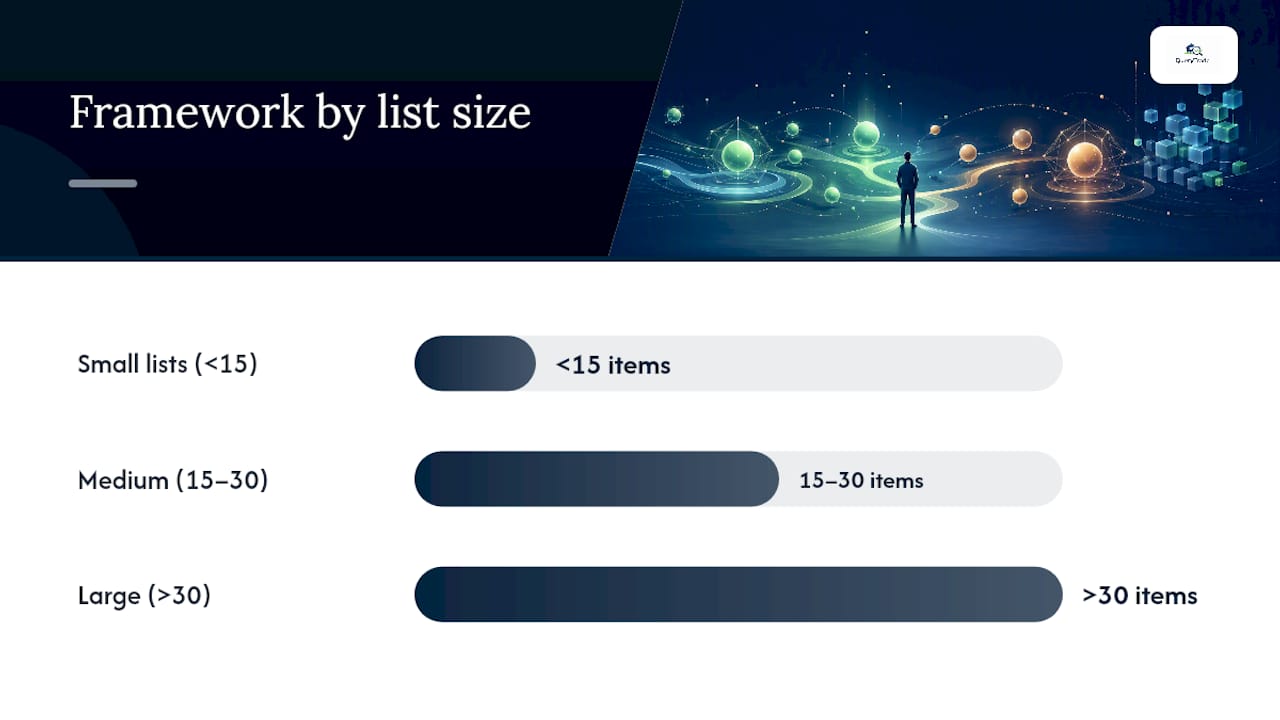
| Match framework to volume | Use daily methods under 15 items, Eisenhower for 15 to 30, scoring past 30. |
| Ask the consequence question | Label something urgent only if a real thing breaks when it waits. |
| Cap active work | Hold concurrent tasks to three to avoid the accuracy cost of multitasking. |
| Centralize intake with Query Trade | The shared pipeline and intake form turn scattered inquiries into one sortable list. |
Table of Contents
- Which Prioritization Framework Fits Your Job List?
- What Do You Do in the First 15 Minutes of a Chaotic Day?
- Should You Use EDD, Critical Ratio, or a Scoring Rule?
- Why "Urgent" Often Isn't (and How to Fix It)
- How QueryTrade Maps to This Triage Routine
- How Do You Stay Productive Without Burning Out?
- What Tools Actually Help You Prioritize Urgent Work?
- How Do You Handle Conflicting Urgent Requests From Different People?
- The One Habit That Fixes Most Prioritization Problems
- Get Your Job Triage Out of Group Chats and Voicemail
- Sources
Which Prioritization Framework Fits Your Job List?
Not every job list needs the same system. The right framework depends almost entirely on how many items you're juggling and how often that list changes.
- Eisenhower Matrix: Best for planning a day or week and protecting work that matters but never screams for attention. It sorts tasks into four quadrants: urgent and important, important but not urgent, urgent but not important, neither. The Harvard Business School breakdown of the Eisenhower Matrix is worth reading if you've never used it seriously, because most people misuse quadrant three, treating noisy-but-trivial requests as real emergencies.
- Ivy Lee method, MIT, or the 1-3-5 rule: Best for individuals with fewer than roughly 15 open items a day. The 1-3-5 rule structures your day into one big task, three medium tasks, and five small ones. It works because it's simple enough to run from memory, no app required.
- WSJF, RICE, or another scoring framework: Best once you're managing many items with measurable inputs like job size, revenue, or deadline pressure. These frameworks trade simplicity for precision, and that trade only pays off at scale.
The decision rule is basically a headcount problem. Under 15 daily items, stick with a daily method. Between roughly 15 and 30, the Eisenhower Matrix earns its keep. Past 30 items, especially with jobs that carry real financial stakes, a scoring framework stops being overkill and starts being the only thing that keeps you sane.
Most tradespeople never need WSJF. A solo electrician juggling eight callouts a week is better off with a five-minute MIT check than a spreadsheet of weighted scores. Save scoring systems for the point where your job list genuinely outgrows memory and gut feel. Centralizing every inquiry in one pipeline, the way Query Trade's job pipeline does, makes it obvious which tier you're actually in before you overbuild your system.
What Do You Do in the First 15 Minutes of a Chaotic Day?
Everything feels urgent at 8 a.m. when the phone won't stop and three customers think they're first in line. Here's the routine that actually cuts through it, broken into three timed stages.
- Minutes 0 to 5: capture and sort by consequence. Write down every job the second it lands, then ask one question of each: "What breaks if this waits?" Anything with a real consequence (a burst pipe, a client losing their own deadline) gets marked "must not miss." Everything else gets marked "if waits."
- Minutes 5 to 15: force a cull. Pick your MIT, or run the 1-3-5 split if you've got a longer list. Assign or delegate the rest immediately rather than letting them sit in your head. Set expectations now: a two-line text telling a customer "on site by 2pm" prevents four follow-up calls later.
- Hours 1 to 2: protect the real work. Block focused time for the MIT and schedule any Quadrant II items (the important, not-urgent stuff) before the day fills back in. Send a short status update to stakeholders so nobody's guessing.
Pro Tip: Cap yourself at three active jobs at once. Multitasking doesn't just slow you down, it measurably increases error rates, which on a job site means redone work, not just lost time. Build a short daily buffer, even 20 minutes, purely for Quadrant II work. Skip it for a week and you'll notice the backlog of "important but not urgent" jobs quietly turning into next week's emergencies.
Should You Use EDD, Critical Ratio, or a Scoring Rule?
Two simple scheduling rules solve most day-to-day sequencing problems without any software. Earliest Due Date (EDD) just means working jobs in the order they're due, first deadline first. Critical Ratio divides time remaining by work remaining, so a job that's due soon but nearly finished ranks lower than one due soon and barely started.
- Use EDD when your jobs have clear deadlines and roughly similar effort. It's dead simple and needs no data collection.
- Use Critical Ratio when job sizes vary a lot. It stops a huge job from silently blocking three small ones that could've shipped days earlier.
- Move to WSJF or a scoring rule only once you're tracking 30 or more items, or once you can actually measure value (revenue, margin, or customer priority) alongside effort.
- Build in one fairness override, like "emergency callouts always jump the queue," so the rule doesn't fight common sense.
The trade-off is data. EDD and Critical Ratio run on information you already have, deadlines and rough effort estimates. Scoring frameworks need consistent inputs across every job, which means someone has to actually enter that data every time. Start with EDD plus a single override rule for genuine emergencies, then layer in scoring only once job size and value are things you can actually put numbers on. Automated systems that blend deadline, revenue, and customer priority can produce that ranking for you once your volume justifies it, which is usually well before most tradespeople expect.
Why "Urgent" Often Isn't (and How to Fix It)
Most prioritization failures aren't about frameworks. They're about mislabeling. Researchers call one version of this the mere urgency effect: people default to whatever feels time-sensitive, even when it matters less than the quiet task sitting untouched. The fix is a single filter question: "What tangible thing happens if this waits a day?" No answer, no urgent label.
- Priority inflation: everything becomes "top priority" until the label means nothing. Cap yourself at one or two genuine "A" slots per day and demote repeat interruptions on sight.
- Multitasking creep: hold active tasks to three at a time and work in short, undistracted blocks. Constant switching between tasks is a documented drag on both speed and accuracy, not just a feeling.
- Vague status updates: a two-line message ("Running behind, on site by 3pm instead of 1pm") heads off the follow-up call that costs you five more minutes.
- Silent delegation: when you hand off a job, say what "done" looks like in one sentence, not five.
Poor prioritization habits don't just cost minutes. They're a big reason strategic work gets postponed indefinitely while noisy, low-value requests eat the whole day. Query Trade's shared job pipeline gives everyone the same live view of what's actually pending, which cuts down on the "did you see my message" pings that fuel priority inflation in the first place.
How QueryTrade Maps to This Triage Routine
Every step above works better with one shared source of truth instead of scattered texts, calls, and sticky notes.
- Capture: Query Trade's intake form collects job details through a single shareable link, so the "write everything down" step happens automatically and jobs arrive already sized.
- Execution: photo uploads clarify scope before you arrive, deposit collection cuts down on no-shows, and instant notifications mean nothing sits unread for six hours while you're up a ladder.
| What you need | How it's covered |
|---|---|
| Fast, unfiltered capture | Shareable intake form and unique links |
| Shared triage view | Job pipeline with status stages and urgency ranking |
| Fewer no-shows | Stripe deposit collection at booking |
| Less back-and-forth on scope | Photo uploads attached to each inquiry |
If you're still triaging jobs from three different group chats, that's the exact chaos this kind of pipeline was built to replace.
How Do You Stay Productive Without Burning Out?
Urgent-job management has a burnout problem baked into it. Treat every day like a five-alarm fire and you'll run yourself into the ground within a month, deadlines or not.
The fix starts with separating "urgent" from "important" on purpose, every single day, using the Eisenhower sort covered earlier. If Quadrant II work (important, not urgent) never gets protected time, it eventually becomes Quadrant I work under worse conditions and tighter deadlines. Block that time before your day fills up, not after.
Build in real stopping points. A tradesperson answering calls at 9 p.m. because "it might be urgent" is training customers to expect that response, which guarantees more calls at 9 p.m. Set a cutoff, communicate it once, and let a shared system like a job pipeline hold new inquiries until morning instead of your phone.
Watch for the physical signs, not just the schedule ones. Rushing between jobs without a buffer, skipping meals, or answering messages mid-task are all symptoms of a triage system that's failing, not proof you're working hard enough. The three-active-task cap mentioned earlier isn't just about accuracy. It's a genuine guardrail against the kind of week where everything blurs into one long emergency.
Finally, review what actually was urgent at the end of each week. Most people find that fewer than half the jobs they treated as fires actually needed same-day attention. That gap is where burnout quietly lives.
What Tools Actually Help You Prioritize Urgent Work?
A surprising number of prioritization failures come down to using the wrong tool for the wrong job count, not a lack of discipline.
For solo operators with a short daily list, a plain notebook or a phone notes app running the 1-3-5 method works fine. Don't overbuild here. For small teams juggling ten to thirty open jobs at once, a shared pipeline view beats individual to-do lists every time, because the whole point of triage at that scale is visibility everyone can see, not just what's in your own head.
Real-time job prioritization tools that track threat levels continuously, rather than relying on a static due-date queue, tend to catch problems earlier because they update as conditions change instead of waiting for a morning review. That's the same logic behind automated systems that combine deadline, revenue, and customer priority into one daily order.
For centralizing the noisy front door, an AI receptionist tool like RingPort can cut down on interrupting phone calls before they ever hit your triage list. And if focus is the actual bottleneck rather than the sorting itself, the case for doing one thing at a time is worth five minutes, because no framework fixes a day that's constantly interrupted mid-task. The best setup usually pairs one capture tool, one shared pipeline, and one hard rule about how many jobs you'll actively work at once.
How Do You Handle Conflicting Urgent Requests From Different People?
Two customers, one crew, both certain they're the emergency. This is where prioritization frameworks meet actual human friction, and it's the part most guides skip.

Start by applying the same filter question to both requests: what breaks if each one waits? A burst pipe outranks a cosmetic tile crack even if the second customer called first and sounds more upset. Resist the pull to prioritize based on who's loudest, that's the mere urgency effect showing up in its most personal form.
When two requests genuinely tie on consequence, use a transparent rule instead of a gut call, like Earliest Due Date or "whoever's job was already scheduled first stays scheduled." Say that rule out loud to both customers. A quick, honest explanation ("I've got an emergency callout ahead of you, but I'll update you by 2pm") almost always lands better than silence, even when it's not the answer someone wants.
Document the decision somewhere both you and your team can see it, not just in your head. That's the real value of a shared pipeline: when a customer calls back asking why they're not first, you can point to an actual status and timeline instead of relitigating the whole judgment call from memory. It also protects you when a stakeholder pushes back later, because the sequencing decision is visible, timestamped, and consistent, not something you have to defend from recall alone.
The One Habit That Fixes Most Prioritization Problems
Prioritizing urgent jobs works when you separate capture from judgment, apply one consistent filter question, and cap how many things you'll actively work on at once.
Most advice on this topic focuses on picking the "right" framework, and that's the wrong obsession. The Eisenhower Matrix, 1-3-5, and WSJF all work. What actually breaks most people's day is skipping the fifteen-minute pause between "job arrives" and "job gets worked on." Frameworks are just structure for that pause. Without it, even the fanciest scoring system just becomes another place to dump panic.
If there's one thing to fix first, it's the mere urgency effect. Ask "what breaks if this waits?" before labeling anything urgent, every single time, even when it feels like wasted seconds during a busy morning. That one habit prevents more bad days than any matrix or scoring model. The tools matter less than most guides suggest. Discipline in that pause matters more than any of them.
— Query Trade
Get Your Job Triage Out of Group Chats and Voicemail
Query Trade replaces the scattered texts, missed calls, and sticky notes that make urgent jobs feel harder to sort than they should be. Instead of triaging from three different inboxes, every inquiry lands through one shareable link with the job details already attached, so you're applying the EDD or MIT rules covered above to a clean list instead of a guessing game.
The job pipeline gives you the shared, live view a real triage routine needs: New, Contacted, Quoted, Scheduled, Completed, visible to your whole crew without a single status-update call. Deposit collection through Stripe cuts down on no-shows before you've even blocked time for the job, and instant notifications mean nothing sits buried in a missed call for six hours. It's built specifically for plumbers, electricians, carpenters, and builders running exactly the kind of chaotic morning this article just walked through. Start a free 30-day trial and see whether your next urgent-job morning takes fifteen minutes to sort instead of two hours.
Sources
- How to Prioritize Tasks Effectively Using the Eisenhower Matrix — Harvard Business School (online)
- Prioritization Frameworks — Atlassian
- How to prioritize tasks — Zoom blog
- AI prioritization — PlotonIQ