
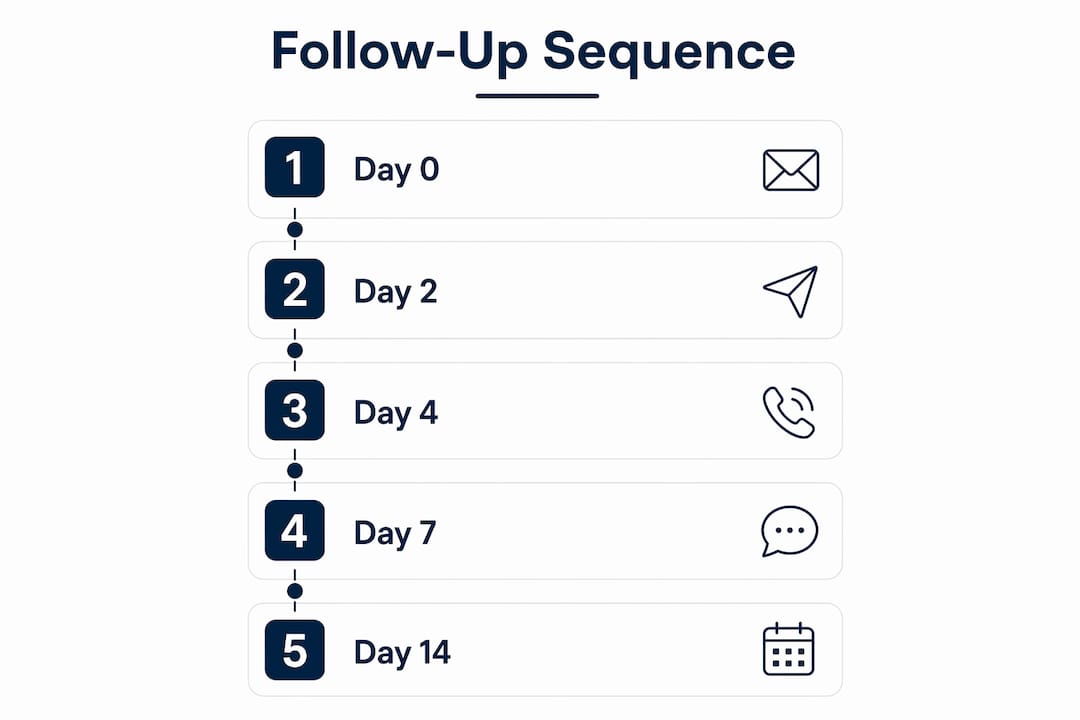
Use a 5-touch, multi-channel sequence to convert more quotes into booked jobs: send the quote on Day 0, check delivery on Day 2 by email, add a value-nudge SMS on Day 4, make a call plus email on Day 7, then send a graceful exit on Day 14. Done consistently, this sequence turns silent quotes into bookings within two weeks and keeps your pipeline honest.
Here is what each touch does:
- Day 0: Send the quote with a clear expiry date and re-attach the PDF every time after this
- Day 2: Short email confirming they received it; ask one open question
- Day 4: Value-add SMS or WhatsApp (a tip, a scheduling window, or a small-scope option)
- Day 7: Phone call first, then a follow-up email if no answer; this is where objections surface
- Day 10: Deadline nudge tied to your real availability or material costs
- Day 14: Graceful exit email that removes pressure and clears your pipeline
Studies show many sales require multiple follow-ups, yet a significant portion of tradespeople stop after just one attempt.
Table of Contents
- What does a ready-to-use quote follow-up sequence look like?
- How do you make each follow-up feel helpful, not pushy?
- When should you stop following up on a quote?
- How do you track follow-ups and measure what's working?
- Subject lines, openers, and closing lines you can copy
- How do you handle objections without losing the job?
- Key Takeaways
- What actually works in the field
- Sources and further reading
- Querytrade makes this sequence easy to run
What does a ready-to-use quote follow-up sequence look like?
| Step | Day | Channel | Objective | Script length | QueryTrade status |
|---|---|---|---|---|---|
| 1. Quote sent | 0 | Deliver quote | Full quote PDF | Set to "Quoted" | |
| 2. Delivery check | 2 | Confirm receipt | — | No change | |
| 3. Value nudge | 4 | SMS / WhatsApp | Add new info | 1–2 sentences | No change |
| 4. Direct check-in | 7 | Call + Email | Surface objections | — | Update "Contacted" |
| 5. Graceful exit | 14 | Close or archive | — | Move to "Scheduled" or archive |
Day 2 email (receipt check):
Subject: Your quote for [Job Type] — quick check
Hi [Name], just checking this landed okay. I've re-attached the quote below. Any questions at all, give me a shout. Happy to walk you through it on a quick call if that helps.
[Your name] | [Phone]
Day 4 SMS / WhatsApp:
Hi [Name], [Your name] here re the [job type] quote. I have a slot opening [day/week] that would suit your job well. Worth a quick chat? Reply YES and I'll call you.
Day 7 voicemail script:
Day 7 email (send immediately after the call attempt):
Subject: Following up — [Job Type] quote
Hi [Name], just left you a voicemail. Re-attaching the quote here so you don't have to hunt for it. If the price or scope isn't quite right, I'm happy to talk through options. What's the best way to connect this week?
Always re-attach the original quote in every email. Customers rarely search their inbox.
Day 14 graceful exit:
Subject: Closing off your quote — no worries either way
Hi [Name], I'll take this as a pass for now and won't keep following up. If the timing changes or you want to revisit, just reply here and I'll pick it up straight away. All the best.
The breakup email is often the highest-converting touch in the whole sequence. Removing pressure gives the customer permission to reply honestly — and many do.
Set your job-management platform to stop the sequence the instant a customer replies or books. Tie the trigger to the quote status field so no one gets chased after they've already said yes.
How do you make each follow-up feel helpful, not pushy?
The rule is simple: every follow-up must give a new, specific reason to reply. "Just checking in" is not a reason. Here are angles that work for trades jobs:
- Timeline nudge: "I have a gap in my schedule [week] that would suit your job."
- Small-scope option: "If the full job feels like too much right now, I can start with just [phase 1]."
- Materials update: "Prices on [material] are moving up next month — worth locking in now."
- Similar job reference: "Just finished a similar [job type] in [area] — happy to share photos if it helps."
- Site-specific tip: "Looking at your photos again, I noticed [detail] — worth flagging before we start."
When one channel stops working, switch. If two emails get no reply, move to SMS or WhatsApp. SMS and WhatsApp open rates are substantially higher than email, so a short text often gets a response when an email sits unread.
Pro Tip: If a painter sends a Day 4 WhatsApp with a photo of a recently finished room in the same style the customer asked about, the reply rate jumps. The photo is the new information. Without it, the message is just noise.

Skip the touch entirely if you genuinely have nothing new to add. An empty message trains customers to ignore you.
When should you stop following up on a quote?
Cap active follow-ups at several touches over about two weeks for most trade jobs. Here is the rationale behind each gap:
- Day 2: Fast enough to catch a delivery problem, not so fast it feels aggressive
- Day 4: Gives the customer time to read the quote before you add new info
- Day 7: One week is a natural decision window for most home jobs
- Day 10: A real deadline (your availability, material price change) creates honest urgency
- Day 14: Enough time for even a slow decision-maker; the exit email clears the pipeline
Sample expiry language to include on the quote itself:
That is honest. Do not invent a fake deadline. Customers notice, and it damages trust.
After the final touch, move the lead to a "30-day nurture" tag in QueryTrade rather than deleting it. A short check-in a month later costs 30 seconds and occasionally recovers a job that was simply delayed.
For lower-value jobs or when you are stretched thin, a 3-touch conservative sequence works well: Day 2 email, Day 5 SMS, Day 10 soft close.
How do you track follow-ups and measure what's working?
Minimal tracking checklist for every quote:
- Date quote was sent
- Number of follow-up attempts made
- Channel used for each attempt
- Last contact result (no reply, replied, objection raised, booked)
- Current pipeline state in QueryTrade
KPI table to review weekly:
| KPI | What it tells you | Target to aim for |
|---|---|---|
| Response rate | % of quotes that get any reply | Improve week on week |
| Quote-to-job conversion | % of quotes that become booked jobs | Track trend, not a fixed number |
| Average time to acceptance | Days from quote sent to booking | Shorter = better follow-up |
| Follow-up-to-reply lag | Which touch number gets the most replies | Tells you where to focus effort |
Wire your follow-up triggers to quote status: sequence starts when the quote moves to "Quoted," stops the moment the status changes to "Contacted" with a reply or "Scheduled." That way, no customer gets chased after booking.
Run a simple A/B test this week: write two subject lines for your Day 2 email and alternate them across your next ten quotes. Check which gets more replies. That single test will tell you more than any generic advice.
If your conversion rate stays low despite solid follow-up, the problem is upstream of the sequence: pricing, scope clarity, or the quality of the initial inquiry. Follow-up cannot fix a bad quote.
Subject lines, openers, and closing lines you can copy
Subject lines by intent (keep to ~41 characters for mobile):
- Receipt: "Your [job type] quote — quick check" | "Did my quote reach you okay?"
- Value-add: "Slot opening [week] — your job fits" | "Update on your [job type] project"
- Deadline: "Quote expires [date] — worth a look" | "Locking in your [job type] slot"
- Breakup: "Closing off your quote — no pressure" | "All good if timing's not right"
Email openers:
- "Hi [Name], re-attaching the quote below so you don't have to search for it."
- "Hi [Name], just a quick one — wanted to flag [new info] before I fill my next slot."
- "Hi [Name], I know these decisions take time. Happy to talk through any part of the quote."
WhatsApp / SMS openers:
- "Hi [Name], [Your name] here re the [job] quote. Got a minute this week?"
- "Quick one — I have a [day] slot that suits your job. Worth a chat?"
Closing CTAs by channel:
- Email: "Reply with any questions, or just say YES and I'll hold your slot."
- SMS: "Reply YES to hold your spot, or call me on [number]."
- Call: "Can I hold your slot for 48 hours while you think it over?"
How do you handle objections without losing the job?
| Objection | Short reply | Next step |
|---|---|---|
| "It's too expensive." | "Happy to look at a smaller scope to fit your budget — what's the priority?" | Offer phase 1 only |
| "I'm still getting other quotes." | "No problem. I'm happy to answer any questions that help you compare." | Send a one-page summary |
| "The timing isn't right." | "Understood. Want me to check back in [month]?" | Tag for 30-day nurture |
| "I'm not sure what's included." | "Let me walk you through it on a quick call — 10 minutes max." | Book a call |
On price: offer a scope-down before you offer a discount. Cutting scope protects your margin and keeps the job profitable. Only discount when you genuinely want the work at that rate and the customer has given you a real budget number.
Key Takeaways
A consistent 5-touch sequence sent over 14 days, with every email re-attaching the quote and every touch adding new information, is the most reliable way to convert silent quotes into booked jobs.
| Point | Details |
|---|---|
| Use a 5-touch sequence | Day 0, 2, 4, 7, and 14 across email, SMS, call, and WhatsApp. |
| Re-attach the quote every time | Customers rarely search their inbox; remove the friction for them. |
| Cap active follow-ups at 5 touches | Stop at Day 14 and move silent leads to a 30-day nurture tag. |
| Track four KPIs weekly | Response rate, quote-to-job conversion, time to acceptance, follow-up-to-reply lag. |
| Querytrade automates the workflow | Set pipeline triggers so sequences start on "Quoted" and stop on reply or booking. |
What actually works in the field
Most tradespeople chase quotes too hard or not at all. The ones who convert consistently do one thing differently: they treat the follow-up as a service, not a sales call. They send the quote, check it arrived, add one useful piece of information, make one phone call, and then let the customer decide. That is it.
The sanity check worth keeping: if a quote is under a certain value and you have spent more time chasing it than it would take to do the job, walk away. Not every lead deserves five touches. Prioritize the jobs where the customer was engaged from the first inquiry, and archive the rest after the graceful exit.
Sources and further reading
- How to Follow Up on a Quote (Without Being Pushy) — QuoteTier Blog
- How to Follow Up on a Quote: Templates and Automation Guide — NetPartners
- How to Follow Up on a Quote (2026 Playbook) — Prospeo
- Quote Follow-Up Email Templates That Close — Prospeo
- Follow-up email after a quote: the exact template and timing sequence — Busic Digital
- Querytrade job pipeline — track every enquiry from lead to won
- Querytrade auto-reply templates for WhatsApp, Instagram & Facebook
- Querytrade photo uploads — quote jobs without driving to site
Querytrade makes this sequence easy to run
Every step in this guide maps directly to a feature Querytrade already has. Your pipeline moves quotes through New, Contacted, Quoted, Scheduled, and Completed. Triggers fire when a status changes. Auto-reply templates handle WhatsApp and Instagram DMs without you typing each message. Photo uploads mean you can quote faster and start following up sooner, without a site visit.
Querytrade is built for tradespeople in Ireland and the UK who want a clean system, not a spreadsheet. Set it up in under five minutes, run your first 30 days free, and see how many quotes you were leaving on the table. Start your free trial at Querytrade.com and get your first follow-up sequence running today.