
You can collect deposits with Stripe three ways: Payment Links for the fastest setup, Invoices with partial payments for staged billing, or card authorizations through a PaymentIntent when you need a refundable security hold. Pick the method that matches how you get paid, not the other way around.
Businesses that offer partial payment options settle invoices 20% faster than those demanding payment in full up front. That single number explains why so many tradespeople now ask for a deposit before they touch a job.
Here's the fast version before we get into setup details:
- Payment Link — send a one time link, no invoice needed, money moves immediately
- Invoice with partial payment — bill a percentage now and the balance later, all inside one document
- PaymentIntent authorization — hold funds on a card without charging them, ideal for damage or no show deposits
Pick your method, then read on for the Dashboard steps. Or skip the manual setup entirely: Query Trade can trigger a Stripe deposit request the moment a customer accepts your quote.
Key Takeaways
Collecting deposits with Stripe works best when you match the method, Payment Link, Invoice, or PaymentIntent, to the job type, and treat payout timing as a planning input rather than an afterthought.
| Point | Details |
|---|---|
| Choose the right method | Use Payment Links for speed, invoices for staged billing, and PaymentIntents for refundable security holds. |
| Payout timing lags payment | Available balance in Stripe is not the same as money in your bank account, so plan against your payout schedule. |
| Deposits speed up settlement | Businesses offering partial payments settle invoices 20% faster than those requiring full payment up front. |
| Track authorization expiry | Uncaptured holds expire in roughly a week to ten days, so release or capture before that window closes. |
| Automate the paperwork | Query Trade turns an accepted quote into a Stripe deposit request and tracks its status inside the job pipeline automatically. |
Table of Contents
- How Stripe Payouts and Settlement Timing Actually Work
- Practical Ways to Collect a Deposit With Stripe
- Security Deposit Lifecycle: Hold, Capture, Release
- Using Stripe Invoices and Partial Payments for Deposits
- Reconciling Deposits and Payouts in the Stripe Dashboard
- Deposit Policy and Compliance Basics That Prevent Disputes
- A Real Workflow: Quoting to Deposit Inside a Job Pipeline
- Where Tradespeople Lose Money on Deposits
- How Query Trade Automates Stripe Deposit Collection
- Official Stripe Resources for Deposit Collection
- Frequently Asked Questions
- Sources
How Stripe Payouts and Settlement Timing Actually Work
Money that shows as "cleared" in your Stripe Dashboard is not the same as money sitting in your bank account. Stripe pays out funds on a schedule you set (or one assigned by default for your country and industry), and that schedule, not the payment date, determines when cash actually lands.
Most new Stripe accounts start on a rolling payout schedule, commonly a few business days after a payment clears, though this varies by region and risk profile. You can choose daily, weekly, or manual payouts instead. Card payments, ACH transfers, and SEPA transfers each settle at different speeds:
- Cards — funds typically become available within your standard payout window
- ACH transfers — often available in around three days
- Wire transfers — can be available the same day
- SEPA transfers — timing varies by transfer type and bank
Pro Tip: Never plan a subcontractor payment or a supplier order around your Stripe "available balance." Check your actual bank payout schedule first. A weekend or bank holiday can push a payout back several days without warning.
One practitioner guide from Stripe puts this plainly: confusing dashboard clearing with bank payout timing is one of the most common cash flow mistakes small businesses make. If you hold security deposits, keep a small buffer in your Stripe balance so a refund or dispute doesn't leave you short before the next payout lands.
Query Trade shows deposit status right next to each job stage, so you can see what's collected and what's still pending without digging through the Stripe Dashboard mid job.
Practical Ways to Collect a Deposit With Stripe
Three tools cover almost every deposit scenario: a Payment Link, an Invoice, and a PaymentIntent. The rule of thumb is simple. Use a Payment Link when you want money fast with zero setup. Use an Invoice when you're billing a percentage now and a balance later. Use a PaymentIntent when you need to hold funds without charging them yet.
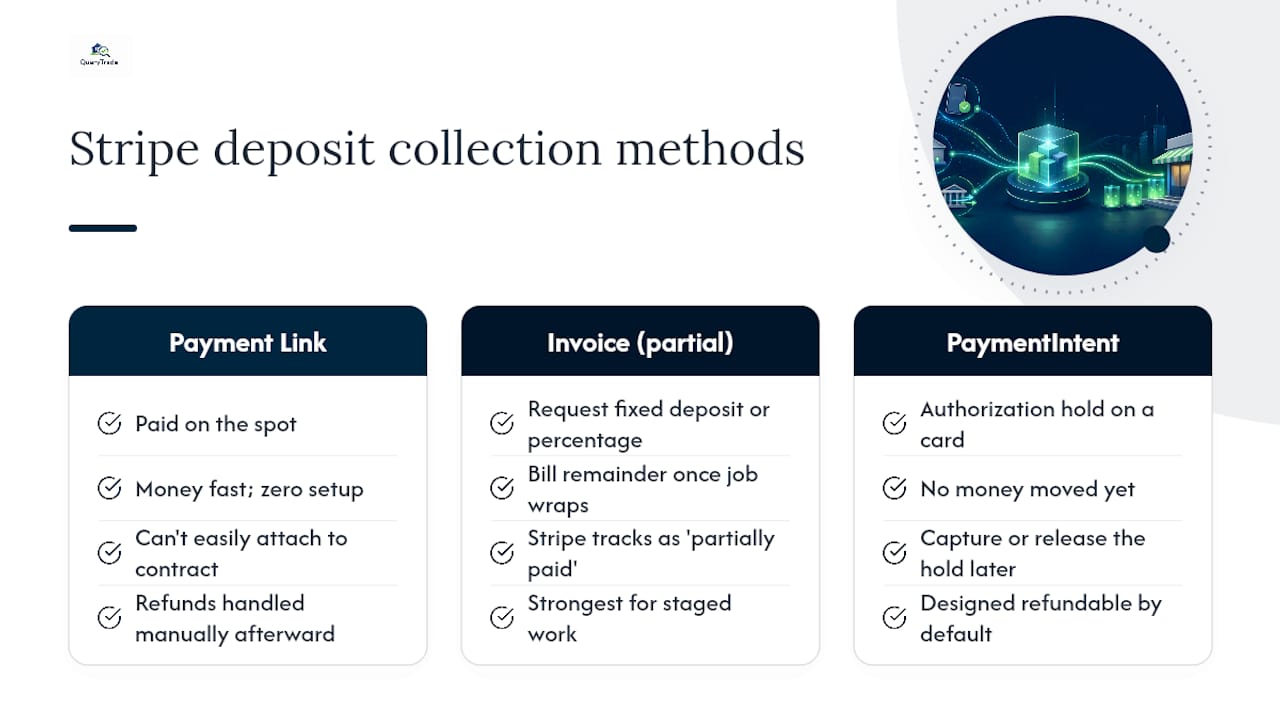
Payment Link. This is a shareable checkout page you generate in seconds, no code required. Send it by text or email and the customer pays on the spot. It's the fastest option, but it's a blunt tool: you can't easily attach it to a formal contract, and refunds have to be handled manually afterward.
Invoice with partial payment enabled. An invoice lets you request a fixed deposit amount or percentage, then bill the remainder once the job wraps. Stripe tracks the invoice as "partially paid" and shows an amount_remaining field so you always know what's outstanding. This is the strongest option for anyone doing staged work, kitchen fit-outs, extensions, upholstery jobs with materials ordered up front.
PaymentIntent with manual capture. This creates an authorization hold on a card without moving the money yet. It's built for security deposits: you hold the funds, then either capture them (if there's damage or a no show) or release the hold (if everything's fine). This is the only method of the three designed to be refundable by default rather than by exception.
Stripe also lets you attach a separate PaymentIntent directly to an existing invoice through its attach_payment capability, which is how multiple partial payments get recorded against one job without creating duplicate paperwork.
Query Trade can generate the right one automatically from the quote itself, so you're not manually building invoices for every job.
Security Deposit Lifecycle: Hold, Capture, Release
A security deposit on Stripe moves through four stages: authorize, hold, then either capture or release. Understanding the timing here matters more than almost anything else in this guide, because getting it wrong means losing money you thought was protected.
- Create the authorization. You generate a PaymentIntent with
capture_methodset to manual, or use partial authorization if the card doesn't have the full amount available. - The hold sits on the card. The customer's bank reserves the funds, but nothing has actually charged yet.
- You decide: capture or release. If the job goes fine, you release the hold and nothing is charged. If there's damage, a no show, or unreturned equipment, you capture some or all of the authorized amount.
- Refund if needed. If you captured funds and later need to reverse that, Stripe's standard refund flow applies from there.
Authorization holds don't last forever. Depending on the card network, an uncaptured authorization typically expires within about a week to ten days. Miss that window and the hold disappears, meaning you'd need to run a brand new charge with the customer's consent.
Tell customers exactly what to expect in writing. Something like: "A $200 security hold will be placed on your card at booking. If the property is left in good condition, this hold is released automatically within [X] business days and no charge appears on your statement."
Query Trade can log the hold status against the job card and send that release confirmation automatically, so you're not manually chasing which holds are still open a week later.

Using Stripe Invoices and Partial Payments for Deposits
Invoices with partial payments work well for deposits because they keep the whole payment history, deposit and balance, attached to one document instead of scattered across separate charges. Stripe lets you attach a distinct PaymentIntent to an invoice through the attach_payment API, and each payment shows up in that invoice's payments list with the running amount_remaining updated automatically.
In the Dashboard, open any invoice and you'll see its status change to "partially paid" once the first payment lands, with the remaining balance displayed clearly. You can send a reminder for the balance, edit the amount due, or mark it paid manually if the customer settles by another method.
Two limitations worth knowing before you build a workflow around this:
- Partial payments aren't supported on invoices tied to auto-charged subscriptions.
- Hosted invoice pages have specific rules about how many partial payments a customer can make, so check current Stripe documentation before assuming unlimited installments.
Pro Tip: Attaching a payment doesn't change the invoice's original due date or terms. If you're staging payments across milestones, write the schedule into the contract itself, not just into Stripe.
Before sending any deposit invoice, confirm it states: deposit percentage, due date, refund conditions, and a reference to your signed contract. Query Trade turns an accepted quote into that invoice automatically, with the deposit terms already filled in.
Reconciling Deposits and Payouts in the Stripe Dashboard
Start in three places: the Invoices page for amount_remaining and payment status, the Payments tab for individual transaction detail, and Balance → Payouts to match a bank deposit back to the transactions that funded it.
Reconciliation checklist:
- Match each invoice or Payment Link ID against the payment that closed it.
- Check
amount_remainingon any invoice marked "partially paid" before assuming it's closed. - Confirm the payout ID in your Stripe Dashboard against the actual line item in your business bank account.
- Subtract processing fees and any refunds before comparing payout totals to expected revenue.
Pro Tip: Add a unique job reference to each invoice's metadata field. When that number matches the job ID inside Query Trade, reconciling a bank statement against actual jobs takes minutes instead of an afternoon.
Payout timing varies by region and payment method, so the gap between "payment received" and "money reconciled in your books" is rarely zero. Building that lag into your bookkeeping routine now saves a scramble at tax time.
Deposit Policy and Compliance Basics That Prevent Disputes
The single best practice here is boring but effective: write your deposit terms into both the contract and the invoice, in matching language, every single time. Verbal agreements about deposits are the number one source of chargeback disputes.
A workable policy template for invoice payment terms covers:
- Amount — flat fee or percentage of the total job
- Refundable or non refundable, and under what conditions
- Release timing — how many days after job completion
- Dispute contact — who the customer reaches out to first
To reduce disputes before they start: send a receipt the moment a deposit clears, use a clear statement descriptor so customers recognize the charge, and follow up with a reminder before any hold is due to release. If a dispute does land, you'll want a signed contract, the original invoice, and a written communication trail ready to submit. Deposit rules can also touch local consumer protection law depending on your trade and jurisdiction, so check requirements that apply where you operate before finalizing wording.
Query Trade's auto-reply templates can send that contract confirmation and deposit receipt automatically the moment a customer accepts a quote, cutting the paperwork gap where most disputes start.
A Real Workflow: Quoting to Deposit Inside a Job Pipeline
Here's the actual sequence once a deposit method is set up: a customer submits a job request, you send a quote, the customer accepts, and that acceptance triggers either a Stripe Payment Link or a deposit invoice automatically. The deposit gets recorded against that specific job, and the remaining balance gets scheduled for later.
Inside Query Trade's Job Pipeline, that job then moves through stages, New, Contacted, Quoted, Scheduled, Completed, with the deposit status visible the entire time. Photo uploads attached to the job card give you evidence if a security hold ever needs to be captured for damage.
The short version:
- Quote sent → customer accepts → deposit request triggers automatically
- Deposit recorded against the job, visible in the pipeline
- Automated notification confirms the deposit to the customer
- Balance due gets scheduled once the job is marked complete
That's the whole point of pairing Stripe's payment infrastructure with a pipeline built specifically for trades work.
Where Tradespeople Lose Money on Deposits
Three mistakes show up constantly: treating Stripe's available balance as spendable cash before payout day, leaving deposit terms as a verbal agreement instead of written policy, and losing track of which authorization holds are still open until they expire unused.
The fixes are just as short. Keep a payout buffer instead of spending against the dashboard number. Put deposit terms in writing on every invoice. Track hold expiry dates the same way you'd track a job deadline. Query Trade's templates and job pipeline handle the second and third automatically, which removes two of the three most common errors before they happen.
How Query Trade Automates Stripe Deposit Collection
Query Trade is the alternative to chasing deposits by text message and spreadsheet. It's built for trades businesses that want the quote-to-deposit workflow handled automatically instead of stitched together across five different apps.

Once a customer accepts a quote inside Query Trade, the platform can trigger a Stripe Checkout or Payment Link, generate the deposit invoice, and update the job's status without you touching Stripe's Dashboard directly. That means:
- Fewer no shows, because the deposit is requested the moment the quote is accepted
- Faster cash flow, since deposit requests go out automatically instead of whenever you get a free minute
- Simpler reconciliation, with deposit status sitting right next to the job record
- Built-in messaging templates for receipts, reminders, and hold release notices
You can see exactly how this fits into daily job management on the features page, and a 30 day free trial is available if you want to test it against your own quote-to-job workflow before committing to a plan.
Official Stripe Resources for Deposit Collection
- Payouts documentation — payout schedules and settlement timing
- Partial payments for invoices — API and Dashboard reference
- Micro-deposit verification — bank account verification steps
- Query Trade — job pipeline and deposit automation for trades businesses
Frequently Asked Questions
Can I collect a deposit with Stripe without writing any code? Yes. A Payment Link or a hosted invoice both require no code, just a Stripe account and a Dashboard.
How long does a security deposit hold last on Stripe? Most uncaptured card authorizations expire within roughly a week to ten days, depending on the card network, after which you'd need a new charge.
Does Stripe support partial payments on subscription invoices? No. Partial payments aren't supported on invoices tied to auto-charged subscriptions, only on standard invoices.
How long do microdeposits take to verify a bank account? Typically one to three business days once Stripe sends the two test amounts to your account.
What's the difference between a Stripe payment clearing and a payout hitting my bank? Clearing means the transaction succeeded inside Stripe. A payout is the actual bank transfer, which follows your payout schedule, not the payment date.
This article is general information, not a substitute for advice from a qualified financial advisor. Consult a qualified financial professional about your own circumstances before acting on anything here.
Sources
- Partial payments for invoices | Stripe Docs
- Receive payouts | Stripe Docs
- What is micro-deposit verification? | Stripe