
Here's the fix in one sentence: capture every enquiry the moment it lands, auto-acknowledge it in seconds, ask one qualifying question, log it in a pipeline, and follow up on a schedule instead of from memory. That five-stage loop, capture, auto-acknowledge, qualify, pipeline entry, follow-up, is the entire system. You don't need a marketing team or a CRM overhaul to run it.
Three things make this work: WhatsApp Business as your intake channel, a Google Sheet or Excel tracker as your memory, and something like QueryTrade if you want the whole loop running without touching a spreadsheet. WhatsApp is already where your customers are texting you photos of leaking pipes and cracked sockets. The problem isn't the channel. It's that nothing happens automatically after the message lands, so leads sit unread between jobs and go cold.
Speed matters more than most tradespeople assume. A structured first reply that confirms receipt and asks one qualifying question is the difference between a booked job and a customer who's already messaged your competitor. This guide gives you both routes: run it yourself with WhatsApp Business and a tracker, or let QueryTrade run the whole thing for you in under five minutes.
- Capture the enquiry the second it arrives
- Auto-acknowledge so the customer knows you've seen it
- Qualify with one or two short questions
- Log it in a pipeline with an owner and a next action
- Follow up on a schedule, not from memory
Key Takeaways
A five-stage WhatsApp system, capture, auto-acknowledge, qualify, pipeline entry, follow-up, is what stops job enquiries from drifting into missed opportunities.
| Point | Details |
|---|---|
| Use a dedicated number | Set up WhatsApp Business separately from your personal phone to look professional and stay organized. |
| Acknowledge instantly | Send an auto-reply the moment a message lands so customers stop shopping around while they wait. |
| Ask only what you need | Qualify with service type, urgency, location, and a photo, nothing more, to decide fast. |
| Log every lead with an owner | Assign a next action and follow-up date the second a lead clears qualification. |
| Automate reminders, not judgment calls | Automate acknowledgements and follow-ups, but leave pricing and troubleshooting to a person, or let QueryTrade handle the whole loop for you. |
Table of Contents
- The 5-Minute Checklist to Stop Losing WhatsApp Leads Today
- How Do You Set Up WhatsApp Business the Right Way?
- What Job Details Do You Actually Need From a WhatsApp Enquiry?
- What Should You Ask to Qualify a WhatsApp Lead Fast?
- Build a Simple Lead Tracker and Pipeline You Can Use Today
- What Should You Automate on WhatsApp, and What Should You Leave to a Human?
- Why QueryTrade Runs the Whole Five-Stage Workflow for You
- A Tradesperson's View on Why This Actually Sticks
- Try QueryTrade Free for 30 Days, No Tech Setup Required
- Sources
The 5-Minute Checklist to Stop Losing WhatsApp Leads Today
You don't need an afternoon for this. Here's what to do right now, in order.
- Separate work from personal. Set up WhatsApp Business on a dedicated number, or convert your existing business line if you're already using it for jobs.
- Write one greeting message. Something that confirms you got the message and gives a rough reply window.
- Build one quick reply for your most common intake question ("What's the address and what's the issue?").
- Open a tracker. A Google Sheet with six columns is enough. Add every unread WhatsApp enquiry sitting in your inbox right now.
- Label every open chat New, Quoted, or Booked, and give each one a next action and a name attached to it.
Pro Tip: Go back through your last 48 hours of WhatsApp messages before you do anything else. Most tradespeople find at least one enquiry they never replied to. That's the leak you're patching first.
If typing all this out during a job feels like more admin than it's worth, QueryTrade does the same five steps automatically once your intake link is live, and setup takes less time than reading this checklist.
How Do You Set Up WhatsApp Business the Right Way?
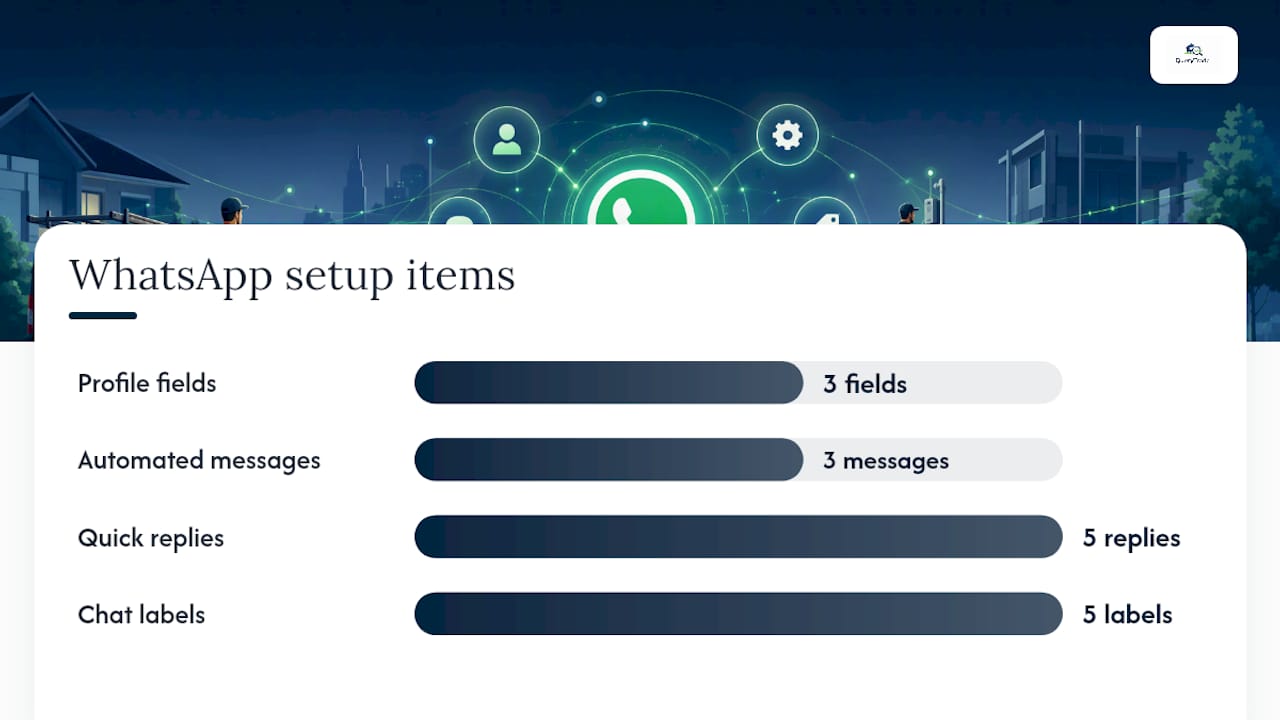
Use WhatsApp Business, not your personal WhatsApp, and fill out a complete business profile before you send a single quick reply. That's the short answer. WhatsApp Business is free and built specifically to separate business messages from personal ones, with profile fields, quick replies, and automated greetings your regular app doesn't have.
Here's the setup sequence:
- Get a dedicated business number, or convert your current number if it's already public-facing.
- Download the WhatsApp Business app and complete your profile: trade category, service area, and any credentials (Gas Safe, RECI, whatever applies).
- Set your business hours so customers know when to expect a reply.
- Build three automated messages: a greeting, an away message for outside hours, and an auto-acknowledge that sets a reply-time expectation.
- Create quick replies for your five most common questions.
Copy these directly into your quick replies list:
/photo— "Can you send a photo of the issue?"/quote— "I'll get a quote to you within 24 hours."/hours— "We're open Monday to Friday, 8am to 6pm."/booked— "You're booked in. I'll confirm the day before."/invoice— "Invoice attached. Payment link is in this message."
Once messages start coming in, label them consistently: New enquiry, Quoted, Booked, Follow up, Completed. WhatsApp Business setup typically takes about 20 minutes, and tradespeople who bother with quick replies see faster response times almost immediately. Those five labels map directly onto QueryTrade's job pipeline, so if you outgrow the manual version later, nothing about your process changes, just where it lives.
What Job Details Do You Actually Need From a WhatsApp Enquiry?
Send one auto-acknowledge, ask one qualifying question, and if you need more (photos, address, access notes), send a single intake link instead of a wall of text. That's the whole capture stage.
Paste something like this as your opening reply:
"Thanks for reaching out! We've got your message. Can you send a quick photo of the issue and confirm your suburb so we can give you an accurate quote?"
If the job needs more detail than a WhatsApp thread can comfortably hold, a shareable intake link beats a long Google Form on mobile. A link that accepts photos and location directly converts better than a lengthy form because customers are usually typing one-handed from wherever the problem is. QueryTrade's version is pre-filled with context, accepts photo uploads, and drops the enquiry straight into your pipeline with no data entry on your end.
Keep the fields you actually capture down to what matters for the next decision:
- Lead date
- Customer name and contact
- Service requested
- Lead source
- Status
- Next action or follow-up date
Anything beyond that is admin you don't need yet. If you'd rather the link do the asking for you, QueryTrade's intake form handles photos and address capture without you typing a single follow-up question.
What Should You Ask to Qualify a WhatsApp Lead Fast?
Ask only what decides whether you send a tech today, quote later, or turn the job down. Nothing else.
Five questions cover almost every trade:
- What's the service type? (leak, install, rewire, snag list)
- How urgent is it? Emergency, this week, or just planning?
- Where's the job located?
- Can they send a photo?
- Any access restrictions or preferred timeslots?
Paste-ready replies for each:
"Is this urgent (today/tomorrow) or are you planning ahead?" "Any parking restrictions or gate codes we should know about?" "Roughly what postcode or suburb is the job in?"
The moment a lead clears qualification, assign it an owner and a next-action date. Fields like next action and follow-up date matter more than any other column in a tracker, because a lead with no owner is a lead nobody actually owns.

Pro Tip: If a job doesn't pass qualification, say so quickly. A fast "not quite our specialty, but here's who to try" builds more goodwill than silence, and it protects your time for jobs you can actually win.
QueryTrade stores these qualifying fields automatically the second a customer fills out your intake link, so nothing gets lost between the WhatsApp thread and your job list.
Build a Simple Lead Tracker and Pipeline You Can Use Today
A single Google Sheet with six fields is genuinely enough to run this for a solo operator or a two-person crew. You don't need software for this part, just discipline about updating it daily.
| Field | Purpose |
|---|---|
| Lead date | When the enquiry came in |
| Customer name / contact | Who to call or message back |
| Service requested | What the job actually is |
| Lead source | WhatsApp, referral, Instagram, etc. |
| Status | New, Contacted, Quoted, Booked, In progress, Completed |
| Owner / next action | Who's handling it and what happens next |
Match your WhatsApp labels to these statuses exactly, so a chat labeled "Quoted" and a tracker row marked "Quoted" always agree. Set two rules and stick to them: review the tracker every morning, and flag anything untouched for 48 hours as stale, then escalate it to whoever owns follow-up that week. A tracker updated daily, even a basic one, is what actually stops leads drifting, not the sophistication of the tool.
Once you're spending more time updating rows than doing jobs, that's the signal to switch. QueryTrade replaces the sheet entirely, photo uploads, instant notifications, and reminders built in, so the tracker updates itself when a customer submits a job.
What Should You Automate on WhatsApp, and What Should You Leave to a Human?
Automate the predictable stuff: acknowledgements, confirmations, reminders, quote follow-ups, and review requests. Leave anything that needs judgment, price negotiation, technical troubleshooting, to a real person.
Here's a workable timing structure:
- Immediate: Auto-acknowledge the second a message lands.
- Day before the job: Appointment reminder.
- 3 days after a quote: Follow-up nudge if there's been no reply.
- 48 hours after job completion: Review request.
Removing delay from the predictable messages while keeping human judgment for anything nuanced is the balance that actually works, rather than automating everything and sounding like a call center. A similar quote follow-up sequence works well in adjacent service trades like air-con servicing, where the same 3-day nudge recovers quotes that would otherwise go quiet.
One consent note worth flagging: transactional updates (booking confirmations, reminders) are generally fine to automate, but anything that reads as marketing should follow proper opt-in practice. Log consent in your tracker so you're not guessing later.
Pro Tip: Never let an automated message answer a pricing question. "Starting from" replies sent by a bot almost always cost you the job when the real number comes in higher.
QueryTrade's auto-reply templates and scheduled reminders cover exactly this list, acknowledgements, confirmations, follow-ups, review asks, without you writing a single automation rule yourself.
Why QueryTrade Runs the Whole Five-Stage Workflow for You
QueryTrade is a no-tech solution built specifically to run this loop: a shareable link captures the enquiry, photos and job details land automatically, the lead drops into a pipeline, and reminders fire without you touching anything.
Here's how the features map to what you just read:
- Capture: The shareable intake link replaces the multi-message back-and-forth.
- Auto-acknowledge: Built-in WhatsApp and Instagram reply templates confirm receipt instantly.
- Qualification: The intake form asks for photos, address, and job type automatically.
- Pipeline entry: Every submission lands in the job pipeline as New, Contacted, Quoted, Scheduled, or Completed.
- Follow-up: Reminders and deposit collection via Stripe reduce no-shows without manual chasing.
Setup takes under five minutes: create your intake link, connect it to your WhatsApp replies, and start receiving enquiries that are already organized. There's no spreadsheet to maintain and no automation to configure by hand.
If you're running multiple trades or a small crew, the solutions pages for plumbers, electricians, and builders show exactly how the pipeline adapts to each trade's job types.
A Tradesperson's View on Why This Actually Sticks
I reply fast now, and my diary fills faster because of it. That's the whole shift, not some grand system overhaul, just not leaving people waiting while I'm up a ladder.
What actually changed wasn't the tech. It was refusing to let a WhatsApp thread sit unread for six hours because I was mid-job. Once every enquiry gets an instant acknowledgement, even an automated one, customers stop shopping around while they wait. Fewer quotes go cold. Less scrolling back through old chats trying to remember who I promised a callback to.
The habit that made the biggest difference was the smallest one: writing down a next action the moment a lead clears qualification. Not at the end of the day. Immediately. A lead with no owner and no date attached is a lead that quietly dies in your inbox, and you won't even notice until the customer's booked someone else.
If you're still running this from memory, try a QueryTrade intake link for a week. No training required, and you'll notice the difference in how much less you're thinking about admin between jobs.
Try QueryTrade Free for 30 Days, No Tech Setup Required
QueryTrade is the no-tech alternative to juggling WhatsApp threads and a half-updated spreadsheet, built specifically so a plumber, electrician, or builder can set it up between jobs, not during a rare free evening. Where a spreadsheet needs someone disciplined enough to update it daily, and WhatsApp alone needs constant manual replies, QueryTrade's job pipeline does both automatically once your intake link is live.
The free 30-day trial covers the full workflow: shareable intake link, photo uploads, instant notifications, auto-reply templates for WhatsApp and Instagram, and deposit collection through Stripe to cut down no-shows. Setup takes under five minutes because there's no technical configuration, just a link you share the way you'd share your number.
Check the pricing page for plan details, or start the free trial directly on the QueryTrade homepage and connect your first WhatsApp enquiry today.
Sources
- How to Build a Simple Lead Tracker for a Trade Business | Your IT & Tech Mates
- WhatsApp Business for Tradespeople: The Complete Guide for Plumbers, Electricians & Builders — Line | Line
- WhatsApp Business is a quick win for tradespeople — Digital Tradies
- WhatsApp Lead Response Playbook for Contractors | CustomerFlows