
Lead response time is the elapsed time between a lead's submission and the first substantive reply. Aim for a reply within about an hour for most inquiries, and strive to respond quickly to high-intent requests, like pricing or demo asks, during business hours. What counts more than pure speed is whether that first reply carries real, qualified context, not just a fast "thanks, we got this."
TL;DR:
- Most teams incorrectly measure response time by including auto-replies, which inflates the actual time it takes to deliver a substantive reply from a human or AI.
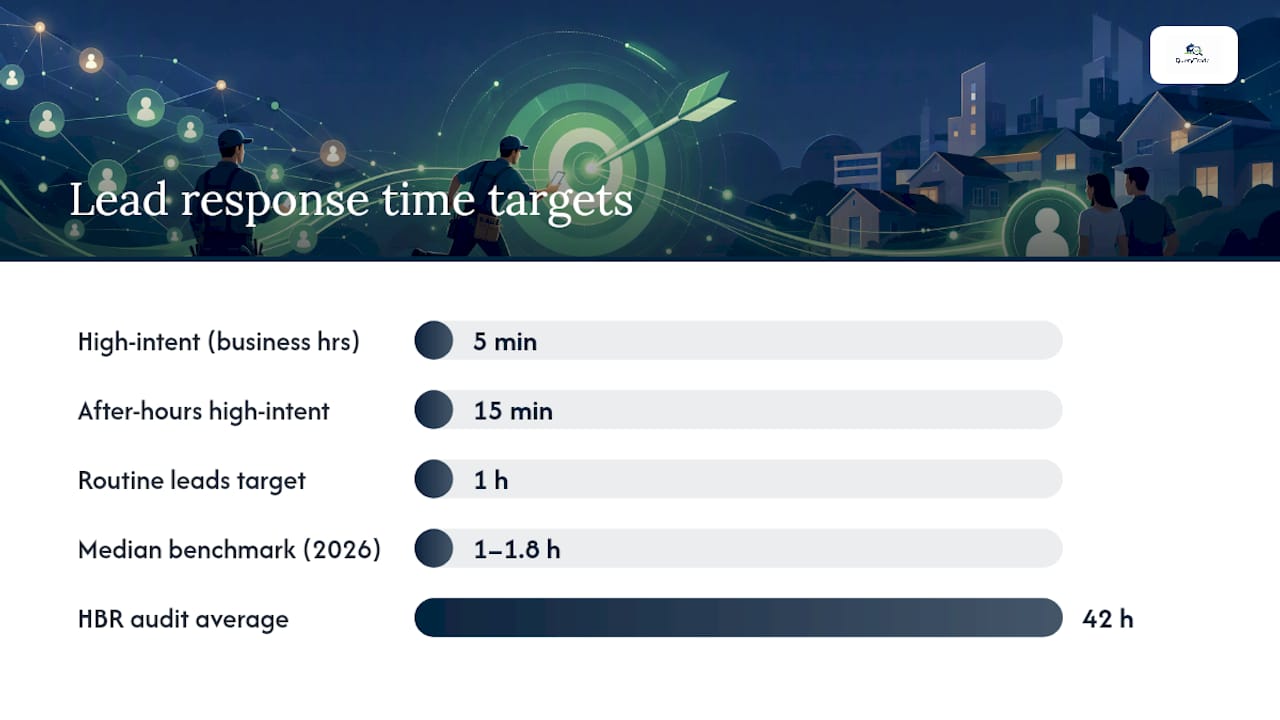
- The average response time across industries remains around 42 hours, with many companies failing to respond within one hour, especially outside business hours.
- Improving response times from days to under 24 hours offers the most substantial gains in lead qualification, especially by targeting high-intent inquiries within five minutes.
- Response efficiency is often hindered by system delays such as routing, data quality issues, and manual triage, not just rep speed, making system fixes the key to faster replies.
- Tracking median and P90 response times, along with the never-responded rate, provides a clear view of actual performance and helps identify specific systemic leaks to fix promptly.
Table of Contents
- What Lead Response Time Actually Means and How to Calculate It
- Why Response Time Matters: What the Research Actually Shows
- Realistic Benchmarks: What to Target and When
- Where the Minutes Actually Disappear
- The Six Fixes That Move the Needle Fastest
- The KPIs Worth Watching Every Week
- Trades Teams: Intake Forms, Triage, and Ready-to-Use Templates
- Where Trades Teams Go Wrong, and a Week One Plan
- How Query Trade Puts This Playbook Into Practice
- Sources
What Lead Response Time Actually Means and How to Calculate It
Most teams track lead response time wrong. They log the timestamp of any outbound touch, including automated acknowledgements, which flatters the number and hides the real problem. The correct definition is narrower: the time from lead submission to the first substantive reply, meaning a message from a human or a qualified AI agent that answers something specific or moves the conversation forward. Auto-replies ("We got your message!") should be logged separately as acknowledgements, not counted as the response.
Calculating this well takes three steps:
- Timestamp both events precisely. Record submission time at the source (form, call, chat) and the first substantive reply time, not the time a rep marked the lead "contacted" in a CRM.
- Calculate the median, not just the average. If ten leads get replies in 4, 5, 6, 8, 9, 11, 12, 15, 40, and 300 minutes, the average is roughly 41 minutes, dragged upward by two outliers. The median, 10 minutes, reflects what a typical lead actually experiences.
- Calculate the 90th percentile (P90). This tells you how bad your worst 10% of leads have it. A team with a great median but a terrible P90 is quietly losing leads nobody notices until they've gone cold.
Segment everything by lead source and intent. A lead who filled out a "request a quote" form with photos attached is a different animal than someone who downloaded a guide. Separate the clock for processing and routing from the clock for rep response, too. That distinction matters when you're trying to figure out whether the delay is a system problem or a people problem.
Why Response Time Matters: What the Research Actually Shows
The evidence on speed and conversions is stronger than most sales blogs give it credit for, but it's also more specific than the internet's favorite shorthand suggests.
The 5-minute rule everyone quotes traces back to the Lead Response Management Study, a research effort covering more than 15,000 leads and over 100,000 call attempts across six companies. It found that contacting a lead at five minutes instead of thirty minutes correlated with roughly 100 times higher odds of making contact and 21 times higher odds of qualifying that lead. Note what it measured: contact and qualification odds, not closed revenue.
The number that gets misquoted: the 5-minute rule was never about guaranteed sales. It measured how much faster contact and qualification happen, not how many deals close. Treating it as a promise of revenue is where most teams go wrong.
Harvard Business Review ran its own audit in 2011, sending test leads to 2,241 companies. The findings were blunt: the average response time was 42 hours, and 23% of companies never responded at all. Firms that responded within one hour were nearly seven times more likely to qualify the lead than those that waited just one hour longer. That single data point does more to justify an urgency policy than any five-minute anecdote.
Recent audits suggest little has changed. A 2026 audit from Workato found more than 99% of tested B2B companies failed to respond within five minutes, and pointed to processing and routing delays, not rep laziness, as the real cause. That's worth sitting with: the bottleneck usually isn't your team. It's the plumbing before your team ever sees the lead.
A few things worth separating clearly:
- Contact odds measure whether you reach the person at all.
- Qualification odds measure whether that contact turns into a real conversation about their need.
- Conversion outcomes measure whether that conversation becomes revenue, and speed alone won't guarantee it.
Realistic Benchmarks: What to Target and When
Chasing five minutes on every lead is a waste of energy if a quarter of your leads never get a reply at all. Fix the biggest leak first.
A sensible sequence looks like this:
- Step 1: Eliminate never-responded leads. If any lead sits untouched for days, that's the highest-value fix available, full stop.
- Step 2: Get everything under 24 hours. This alone puts you ahead of a meaningful share of competitors, based on the HBR audit's 42-hour average.
- Step 3: Push routine leads under 1 hour. This is where the qualification-odds gains from the HBR data start compounding.
- Step 4: Push high-intent leads (demo requests, pricing asks, urgent job quotes) under 5 minutes during business hours. This is where the original Lead Response Management Study's contact-odds multiplier applies most directly.
Benchmark check: 2026 benchmark analyses put median first-touch times around 1 to 1.8 hours across sectors, with only a small share of teams hitting the five-minute mark. If your median sits in that range, you're typical, not exceptional, and there's real room to pull ahead.
Set after-hours rules separately from business-hours SLAs. A lead submitted at 9 PM on a Tuesday shouldn't be judged against a 5-minute clock, but it also shouldn't wait until the next business day. A 15-minute after-hours SLA on high-intent leads, backed by an honest auto-acknowledgement, closes most of that gap.
Track median and P90 together. Average alone hides your worst cases. A tool like Query Trade can help you see both figures on one dashboard instead of digging through a CRM export every week.
Where the Minutes Actually Disappear
Nobody sits on a lead on purpose. Time leaks out of the process in predictable, fixable places.
- Processing delays. The lead sits in an inbox, a form-submission queue, or a shared mailbox before anyone even sees it. This is often the single largest chunk of "response time" and has nothing to do with rep speed.
- Routing and assignment gaps. Leads get assigned round-robin, by territory, or manually, and each extra step adds minutes or hours, especially if the router depends on someone checking a dashboard.
- SDR to AE handoff delays. A lead gets qualified by one person, then reassigned to another, and the clock often gets miscounted here. Many teams stop the "response time" clock at the SDR's first touch, even though the buyer is still waiting on a real conversation with the closer.
- After-hours blind spots. Leads submitted overnight or on weekends often just wait, with no acknowledgement and no triage until Monday.
- Data quality problems. A phone number with a typo or an email that bounces turns a "5-minute response" into a lead nobody can actually reach, which is a different failure than slow response, but gets lumped into the same statistic.
Every one of these is a systems problem, not a motivation problem. That's good news, because systems are easier to fix than attitudes. It's also exactly the gap intake forms are built to close, since they remove the manual triage step entirely by capturing structured details the moment a lead comes in.
The Six Fixes That Move the Needle Fastest
Speed improvements rarely come from telling reps to "be faster." They come from removing the steps that make speed hard in the first place.
- Capture qualified context at intake. A work request form with required fields and photo uploads means your first reply can reference the actual job, not ask "what do you need?" three days later.
- Automate routing by intent. Route pricing and demo requests differently than newsletter signups, and build in automatic reassignment if the first person doesn't act within the SLA window.
- Use honest auto-acknowledgements, then follow with a real human reply fast. Tell the lead you got their message, and mean it as a bridge, not a substitute for the follow-up.
- Add chat and quick-call scheduling during business hours. A WhatsApp-based triage flow handles simple questions immediately and flags anything that needs a real conversation.
- Fix contact data quality. A fast reply to a dead phone number or a typo'd email isn't fast. It's invisible.
- Set tiered SLAs and measure time to qualified context (TTQC), not just raw minutes. A five-minute reply that doesn't move the conversation forward is weaker than a fifteen-minute reply packed with the right details.
Pro Tip: Log acknowledgements and substantive replies as two separate events in whatever system you use. Blending them is the single most common reason teams think their response time is better than it actually is.
Each of these fixes targets a specific leak identified above, which is exactly why generic "respond faster" coaching rarely moves the numbers on its own.
The KPIs Worth Watching Every Week
A speed program without dashboards is just a hope. Track a small number of numbers consistently, and check them often enough to catch regressions before they cost you a quarter's worth of leads.
- Median response time — your typical lead's real experience.
- P90 response time — how bad your worst cases get.
- Never-responded rate — the single most damaging number to leave unmeasured.
- Time to qualified context (TTQC) — how long until the lead has had a reply that actually addresses their need, a metric that tracks conversion better than raw first-touch seconds.
- Connect-to-qualified-conversation rate — of the leads you reach, how many turn into a real conversation.
- SLA hit rate — the share of leads answered inside your tiered targets.
| Metric | What it reveals | Review cadence |
|---|---|---|
| Median response time | Typical lead experience | Weekly |
| P90 response time | Worst-case exposure | Weekly |
| Never-responded rate | Leads falling through entirely | Daily alert |
| TTQC | Speed to a genuinely useful reply | Weekly |
| SLA hit rate | Whether tiers are working | Monthly review |
Slice each of these by lead source, intent tier, and hour of day. A team that looks fine on average might be quietly terrible on weekend leads or leads from a specific form, and averages will never show you that.
Trades Teams: Intake Forms, Triage, and Ready-to-Use Templates
Trades businesses lose leads differently than software sales teams do. A missed call while up a ladder, a WhatsApp message buried under twenty others, a job inquiry with no photo and no clear scope, each one adds friction to a reply that should take thirty seconds.
A shareable job intake form that collects scope and photos upfront turns a vague "can you give me a quote?" into something a tradesperson can act on immediately, cutting TTQC dramatically because there's no back-and-forth needed just to understand the job.
A simple 30-minute triage system works well here: check new inquiries on a fixed schedule, sort by urgency, and send a real reply before moving to the next one. Three templates worth having ready:
- An acknowledgement message confirming receipt and giving a realistic timeline.
- A booking link message that lets the customer pick a time without a phone tag loop.
- A photo request message for jobs where scope is unclear, which often resolves the quote faster than a site visit would.
Where Trades Teams Go Wrong, and a Week One Plan
The mistake we see most often isn't laziness. It's a plumber or electrician trying to run intake through a phone number that's also ringing while they're mid-job, with no system catching what falls through. Nobody built these businesses to run a CRM, and it shows in how leads get lost, not through carelessness, but through a total lack of structure around a moment that decides whether a job gets booked at all.
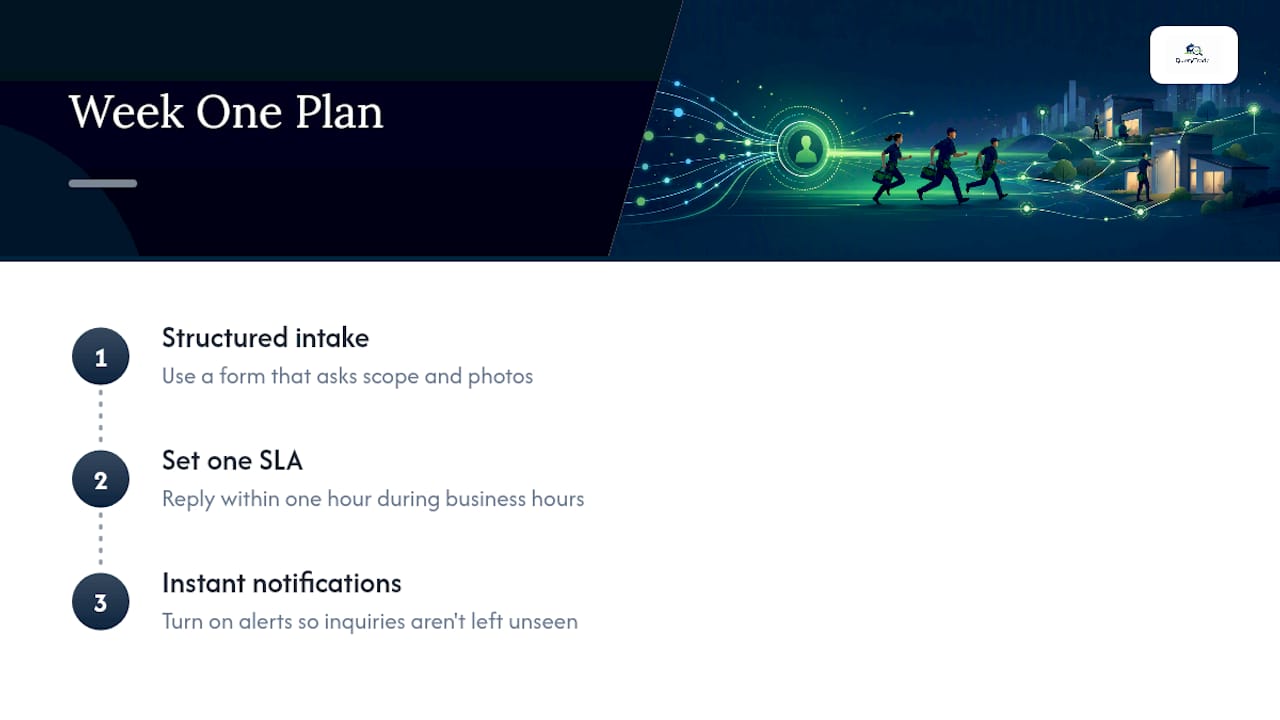
Three fixes cover most of the gap in a single week: replace ad hoc intake with a structured form that asks for scope and photos, set one SLA (even a simple "reply within one hour during business hours" rule), and turn on instant notifications so a new inquiry doesn't sit unseen for six hours. None of this requires new hires or new habits, just a different starting point for how inquiries arrive.
Query Trade was built around exactly this gap, and testing the starter checklist above against your current process for a week is usually enough to see where the time is actually going.
— Query Trade
How Query Trade Puts This Playbook Into Practice
Query Trade is the practical shortcut to everything above, without asking a tradesperson to become a systems administrator. Every fix in this playbook maps directly to a feature: the shareable intake form captures scope and photos at the moment of inquiry, instant notifications close the processing-delay gap, the job pipeline tracks each lead from New through Contacted, Quoted, Scheduled, and Completed, and built-in deposit collection through Stripe locks in bookings instead of letting them go cold.
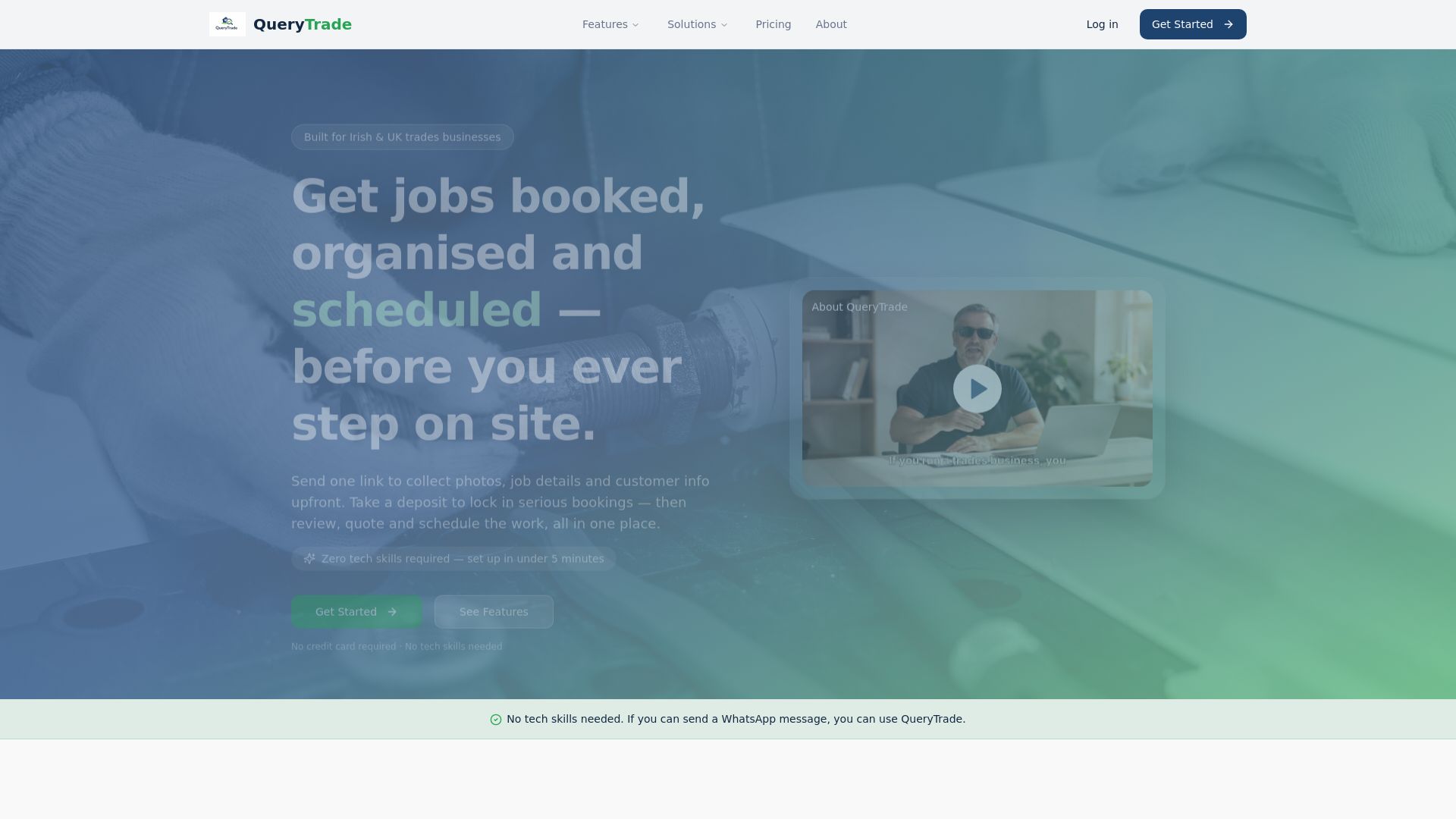
For a plumber or electrician juggling five job sites, the value isn't abstract. It's a faster path from "someone sent an inquiry" to "that inquiry is a booked, deposited job," with a lower never-responded rate and a shorter TTQC because the first reply already has the details it needs. Set up takes under five minutes and requires no technical skills.
Query Trade offers a free 30-day trial. Visit the features page to see the job pipeline and intake tools in action, or head straight to QueryTrade to start your trial and put a real SLA in place this week.
Sources
- The short life of online sales leads — Harvard Business Review
- Leadresponsemanagement
- Lead response time study — Workato (The Connector)
- Lead response time in 2026: Benchmarks, the five-minute rule, and what actually converts — Perspective AI